EasyManua.ls Logo

SainSmart ENDER3 - VII. TROUBLESHOOTING; Printer Troubleshooting Guide

SainSmart ENDER3
38 pages
Print Icon
To Next Page IconTo Next Page
To Previous Page IconTo Previous Page
Loading...
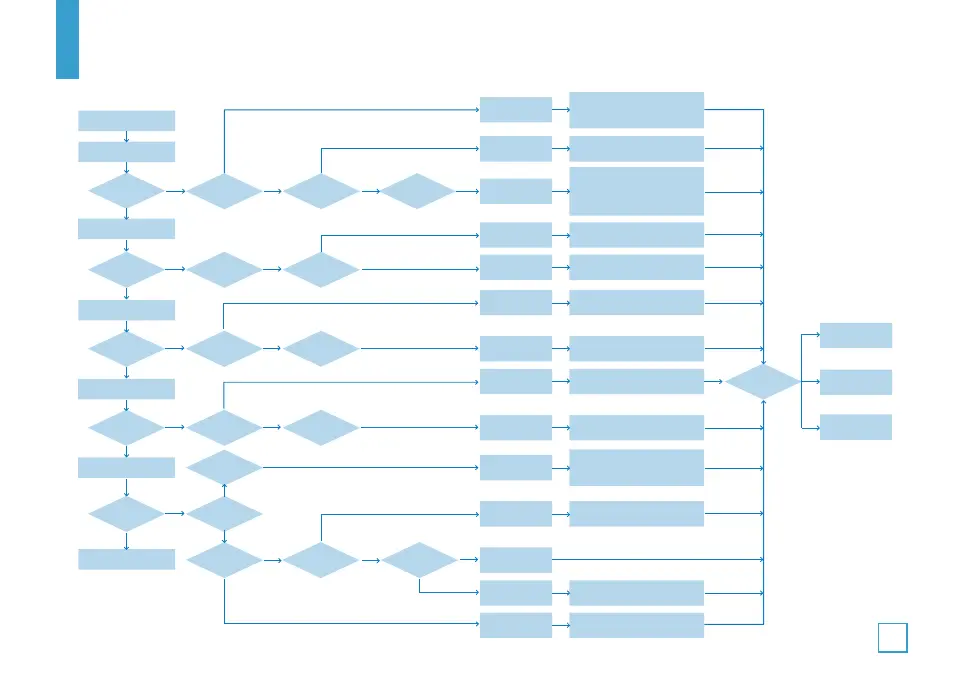
VII. TROUBLESHOOTING
35
Result
Slice
XYZ Motor
Limit Switch
Hot Bed
Thermistor
Damage&
Replacement
Resolved
Contact Us
Heat Pipe
Thermistor
SD-Card
File Name
Slice/Timing
belt
Coupling
Other
Filament
E-Motor
1.Erase the SD Card
2.Format the SD Card
3.Replace the SD Card
1.Restart the slicing
2.Adjust the tension of
the synchronous belt
Rename the file with
alphabet and number
1.Reconnect the cables
1.Clean the filament
2.Replace the filament
1.Reconnect the Cables
1.Reconnect the cables
1.Fasten the Coupling
1.Move the model and
restart the slicing
2.Restore the model with
Software
Start
Print from SD Card
Y/N
File is
identified
Move
Misaligned
Spray
E-Motor
working?
Bed Heated?
Left hand
corner
Any random
code
Other files
work
Y/N
Y/N
Y/N
Y/N
Home
Heat Bed
Heat Nozzle
Print
END
N
N
N
N
N
Y Y
N Y Y
N
N
N
N
N Y Y
Nozzle
Heated?
Temperature
normal
Temperature
normal
Feeding roller
working?
File is
identified
N
N
N
Y
Y Y
Y
Y
Y
Y

Related product manuals