50
E-KEEP WARM/CANCEL BUTTON: Use this button to set the Pressure Cooker to
Keep Warm. The Pressure Cooker will automatically set itself to Keep Warm after
cooking. Also press this button to Cancel ANY function at ANY time.
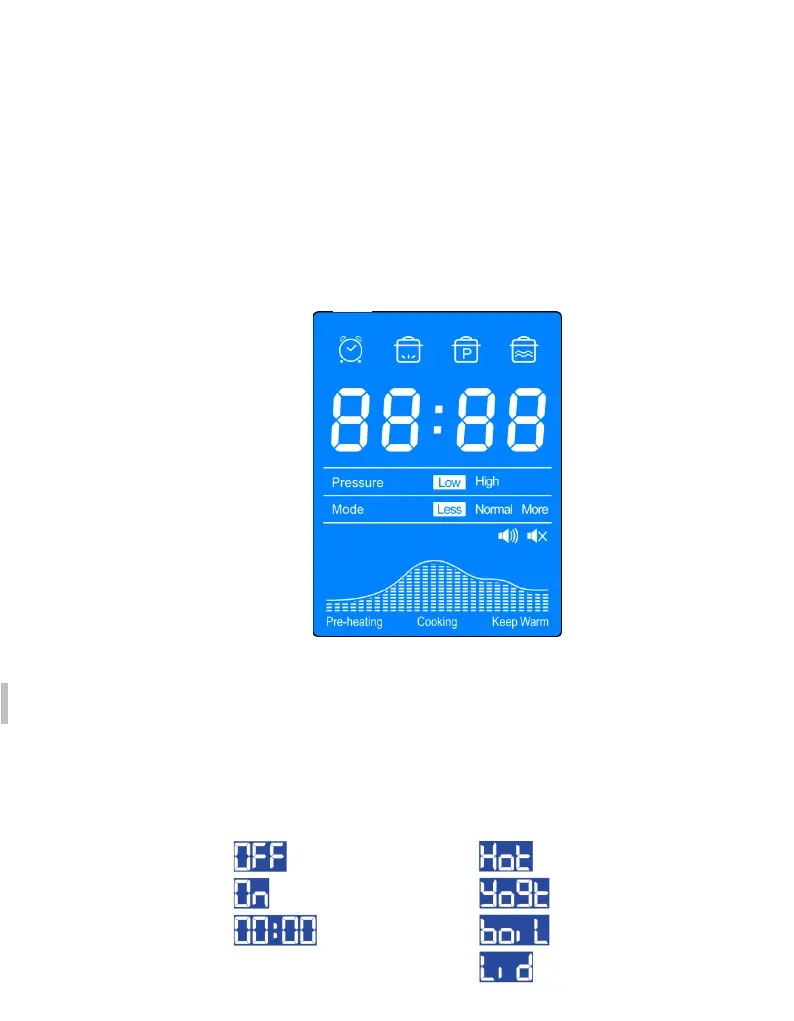
F-LCD DISPLAY
The LCD display uses icons, words, and numbers to depict time, pressure levels,
modes, cooking progress and messages.
1) Delay Start Icon 2) Pre-Heating Icon 3) Pressurized Icon 4) Keep Warm Icon
T
ime & message Display
Pressure Level Indicator
Mode Indicator
P
rogress Indicator
S
ound Indicator: display whether sound ON or OFF, Safety alerts never turn OFF
Turn the sound OFF: Press the ,, + “ button at least 3s until the icon change to icon
Turn the sound On: Press the ,, + “ button at least 3s until the icon change to icon
Common Messages



 To Next Page