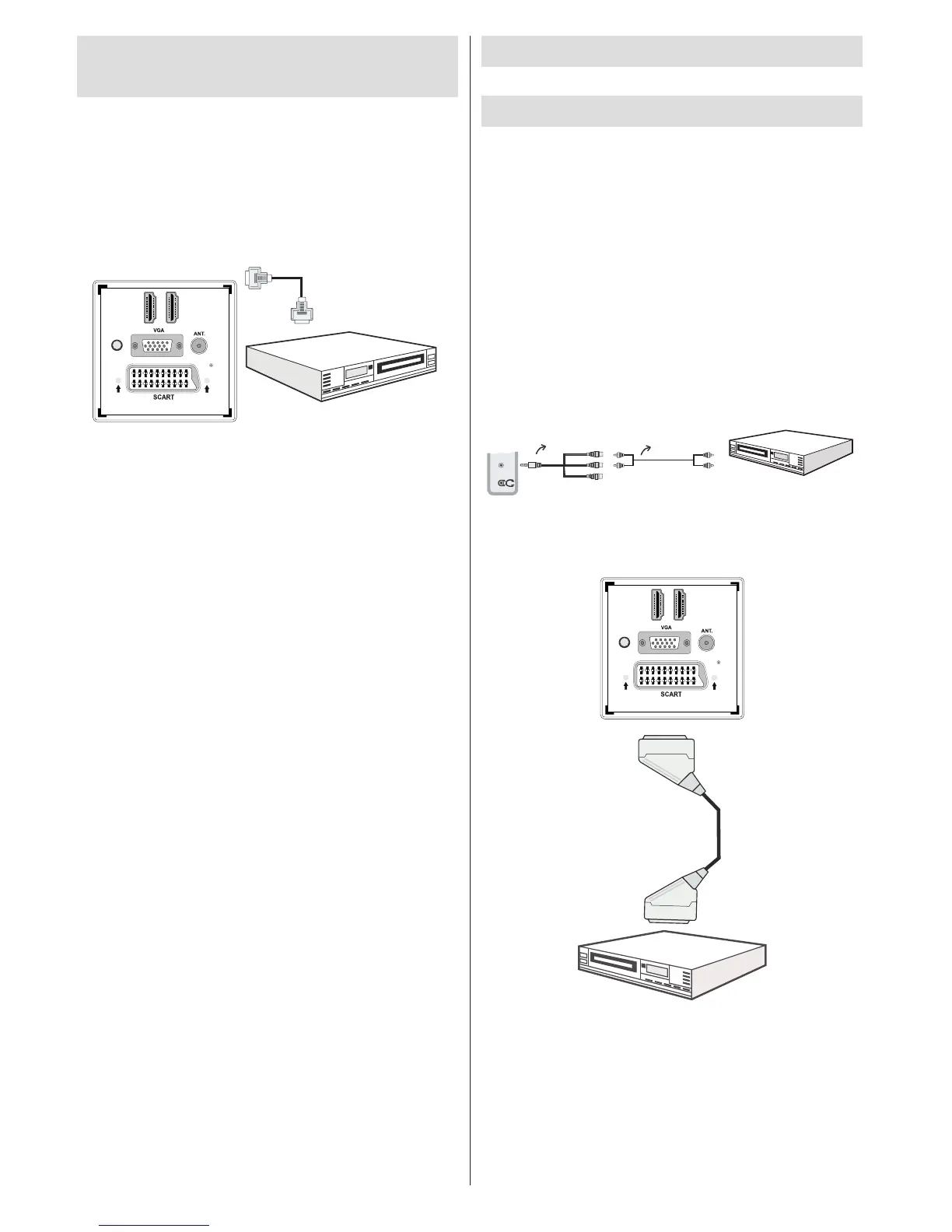
Connecting to a DVD Player
via HDMI
Please refer to your DVD player’s instruction book
for additional information. Power off both the TV and
the device before making any connections.
Note: Not all cables shown in the illustration are
supplied.
If your DVD player has an • HDMI socket, you can
connect via HDMI for better video and audio quality.
When you connect to DVD player as illustrated above, •
switch to the connected HDMI source. See, Input
Selection section for more information on changing
sources.
Connecting to a DVD Player
via Component Sockets
(YPbPr) or Scart Cable
Some DVD players are connected through •
COMPONENT SOCKETS (YPbPr). YPbPr can be
used only when you connect a device that has a
YPbPr output through the PC input with YPbPr to
PC cable (YPbPr cable is not supplied).
When the connection is made, switch to YPbPr •
source. See, “Input selection” section.
To enable audio connection, use the VGA/Component •
Audio cable. First, plug single jack of the cable to
the TV. Afterwards, insert your DVD player’s audio
cable’s connectors into the plural part of the VGA/
Component audio connection cable (see illustration
below). Colours of the connected jacks should match
( RED & WHITE).
When the connection is made, switch to YPbPr •
source. See, Input selection section.
You may also connect through the SCART input. •
Note: These three methods of connection perform the
same function but in different levels of quality. It is not
necessary to connect by all three methods.


 To Next Page