MODE
MODE
+Hr
+Hr
SELECT SET
<
<
8
MODE
MODE
+Hr
+Hr
SELECT SET
<
<
8
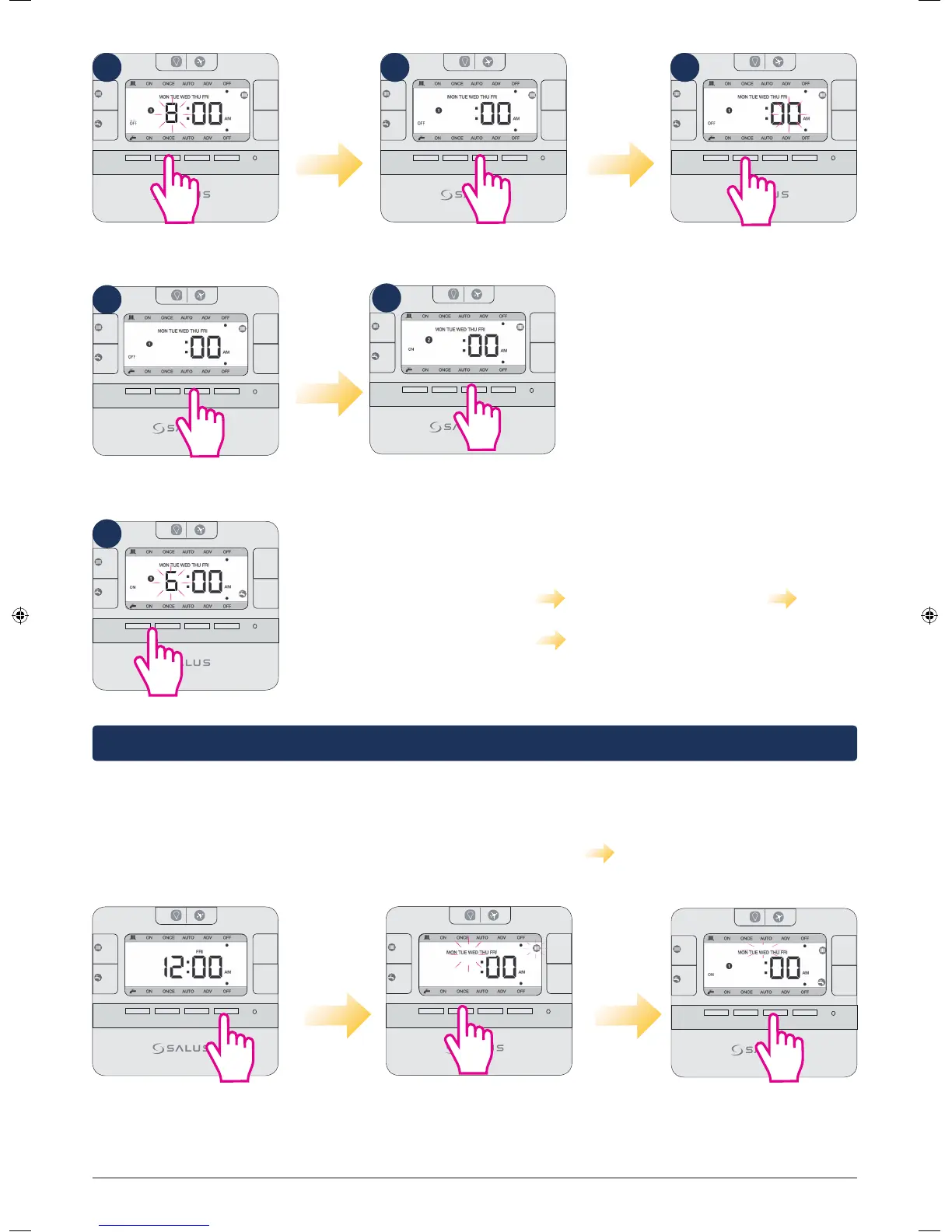
Press Select.
MODE
MODE
+Hr
+Hr
SELECT SET
<
<
Use up/down arrows to
select minutes.
8
Controller will now
go to program nr 2.
MODE
MODE
+Hr
+Hr
SELECT SET
<
<
8
Select an end time for
the first program.
MODE
MODE
+Hr
+Hr
SELECT SET
<
<
8
Press Select.
Please continue by following the same
steps for program nr 2 and 3. After you
finish programming CH for weekdays,
the controller will ask you to do the
same thing for the Hot Water. You can
choose different or similar end/start
time. The LCD will look like step 12.
MODE
MODE
+Hr
+Hr
SELECT SET
<
<
6
The sequences followed by the controller when programming CH
and HW individually goes at it follows:
Weekday CH (program 1-3) Weekday HW (program 1-3)
Weekend CH (program 1-3) Weekend HW (program 1-3) and all
over again.
Note: To save your settings and exist to home screen in normal mode, press Set at any time.
Programming CH and HW together
The programming principle is exactly the same, but you can only set the same Start/End time for the CH and
HW. The programming sequence goes as it follows: Weekday CH+HW Weekend CH+HW and all over
again. To program them together, follow the steps:
MODE
MODE
+Hr
+Hr
SELECT SET
<
<
Press Set to enter
setting programs .
MODE
MODE
+Hr
+Hr
SELECT SET
<
<
The CH icon and Mon-Fr
will start flashing. Press up
arrow 2 times.
MODE
MODE
+Hr
+Hr
SELECT SET
<
<
Press Select to start entering a
start time for the program and
then follow the same steps as
above from 3-11.
6
6
1 2 3
4
5
6
EP210 Installation Manual 15



 To Next Page