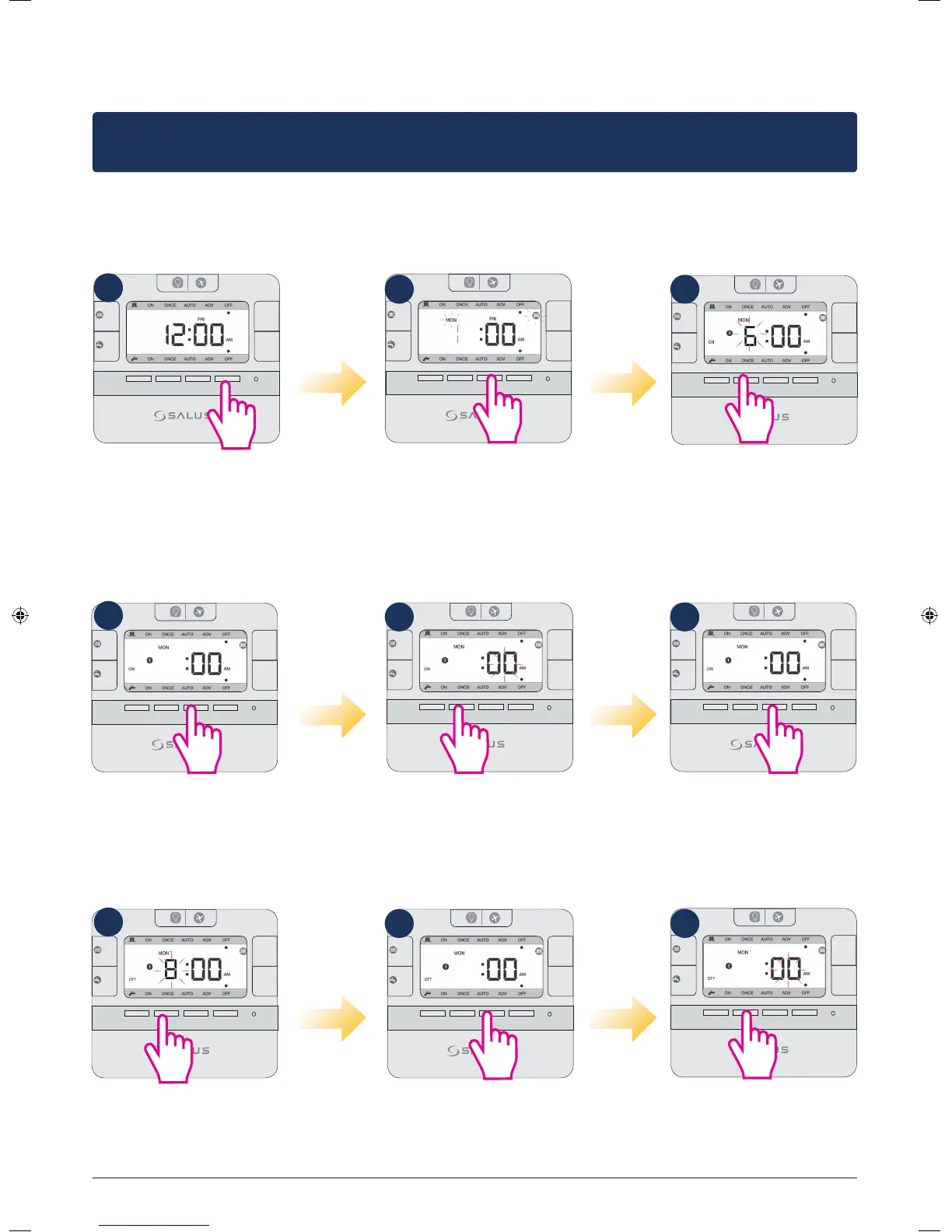
Setting dierent programs for each 24h
Note: Don’t forget to move the jumpers to 24h in order to have the individual program active.
After that please follow the same instructions as for the 5-2 days program.
MODE
MODE
+Hr
+Hr
SELECT SET
<
<
Press Set to enter
setting programs
MODE
MODE
+Hr
+Hr
SELECT SET
<
<
The CH icon and Mon will
start flashing. Tap Select.
MODE
MODE
+Hr
+Hr
SELECT SET
<
<
The CH icon will go steady,
the program number will
appear and you will need to
select a start time for the CH
program. Use up/
down arrows.
Programming CH and HW individually
6
MODE
MODE
+Hr
+Hr
SELECT SET
<
<
6
Press Select.
MODE
MODE
+Hr
+Hr
SELECT SET
<
<
Use up/down arrows
to select minutes.
6
MODE
MODE
+Hr
+Hr
SELECT SET
<
<
6
Press Select.
6
MODE
MODE
+Hr
+Hr
SELECT SET
<
<
8
Press Select.
MODE
MODE
+Hr
+Hr
SELECT SET
<
<
Use up/down arrows
to select minutes.
8
MODE
MODE
+Hr
+Hr
SELECT SET
<
<
8
Select an end time for
the first program.
1
4
7
2
5
8
3
6
9
16 EP210 Installation Manual



 To Next Page