Sleep Mode
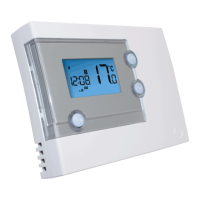
By pressing both the UP and DOWN keys together, the RT500 will enter
SLEEP mode. In this mode, all the RT500 functions will be paused to save
battery power.
While in SLEEP mode:
•
The LCD display will be blank.
•
All output from the thermostat will be turned off immediately.
•
The clock will continue to run in the background.
Press any key to wake up the RT500 and cancel SLEEP mode.
ENERGY TIP
One way to set and use your room thermostat is to find the lowest
temperature setting that you are comfortable with, and then leave it set at
this temperature. You can do this by setting the room thermostat to a low
temperature, (for example 17 °C) and then increasing the setting by one
degree each day until you are comfortable with the room temperature -
you won’t have to adjust the thermostat further, as adjustment above this
setting will waste energy - a 1 °C increase in temperature is equal to 3% of
your heating costs.
RT500 INSTRUCTION MANUAL
19



 To Next Page