Sam4S 230, 3xx, 4xx, 52xx Electronic Cash Register AU Service Mode Programming • 115
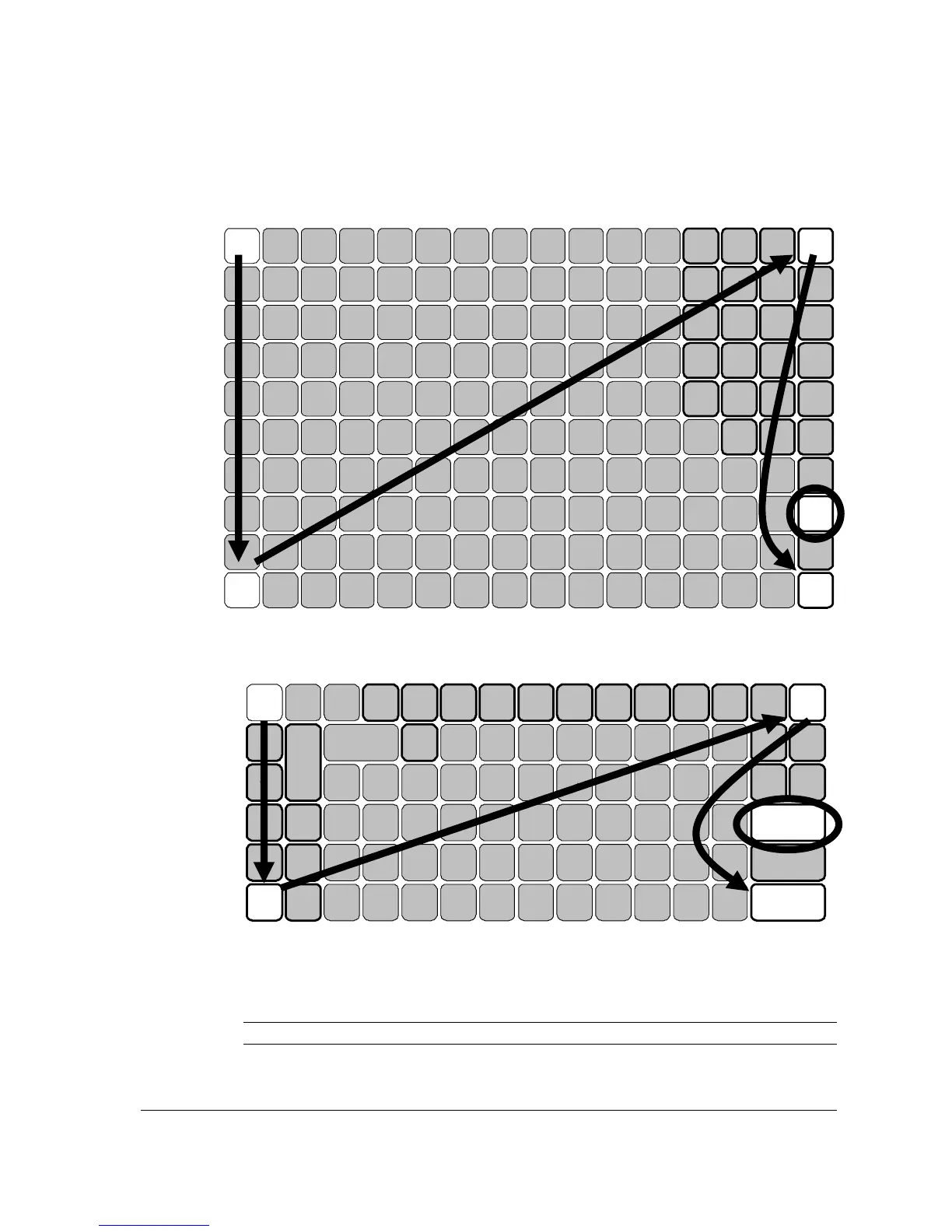
For ER-5200/ER-5200M, press the upper left button (RECT FEED) of the keyboard,
then the lower left button (PLU 9), then the upper right button (CLERK), and finally
press the lower right button (CASH).
1
SBTL
3
8
% 2 CONV2VOID
SERVICE
% 1 CONV1
RECD
ACC T
CHECK
#
% 3
EAT
IN
RETURN
ERROR
CORR
VALID
TAKE
OUT
CANCEL#/NS
CLEAR
CHARG
E2
X/TIMEPLU
TAX CLERK
PAID
OUT
ADD
CHECK
RECT
FEED
RCPT
ON/OFF
DETL
FEED
0
CASH
. 00
5
6
7
9
2
3
4
1
14
15
1610
11
12
13
8
25
26
27
17
22
23
24
18
19
20
21
For ER-5240/ER-5240M press the upper left button (RECT FEED) of the keyboard,
then the lower left button (%3), then the upper right button (CLERK), and finally
press the lower right button (CASH).
10
VALID
CANCEL
RETURN
P
L
U
RCPT
ON/OFF
#/NS TAX
CHECK
#
5
X/TIME
9
2 1
. 00 0
SBTL
CHECK
EAT
IN
CHARG
1
CONV2
4
DRIVE
THRU
VOID
9 14
TAKE
OUT
PAID
OUT
% 3
15
3 8 13
2
ERROR
CORR
%1
7 12
1
CLEAR
CHARG
2
6 11
SERVIC
E
CLERK
RECD
ACC T
% 2
RECT
FEED
DETL
FEED
CONV1
ADD
CHECK
PRINT
CHECK
CASH
19 24 29
20 25 30
18 23 28
17 22 27
16 21 26
34 39
35 40
33 38
32 37
31 36
9
14 15 1610 11
12
13
1
6
7
8
2
3
4
5
25
26
27
28
29
17
22
23
2418 19
20 21
7. When memory is cleared, the register prints a message “RAM ALL CLEAR OK!”
8. The display now shows SERVICE MODE CLOSED. The RAM Clear procedure is
complete.
NOTE: Please see Clerk Sign-On/Sign-Off for detail when CLOSE appear on the display.



 To Next Page