13
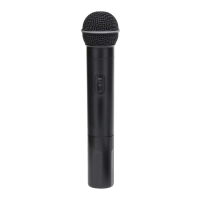
Guided Tour - UH-4
1: Power LED - This LED is an indicator of battery strength. If the
battery is sufficiently strong, when the UH-4 is first powered on, this
LED will light for about two-tenths of a second and then go off.* When
battery voltage is low, this LED lights steadily, indicating that the battery
needs to be replaced.
2: Power On-Off switch* - Use this to turn the UH-4 on or off (to
conserve battery power, be sure to leave it off when not in use).
3: Mute Off-On switch - When set to the “Off” position, audio signal is
transmitted. When set to the “On” position, the audio signal is muted.
Because the carrier signal remains during muting, no “pop” or “thud” will
be heard. Note that turning this off does
not turn off the transmitter
power—it is simply a way to temporarily mute the transmission of audio
signal. If you don’t plan on using the transmitter for extended periods,
turn off the transmitter power by using the power on-off switch (see #2
above).
4: Audio Level control (trimpot) - Use the supplied plastic screwdriver
to set this to the optimum microphone output level. See the “Setting Up
and Using the UHF Series System” section on page 15 for more
information.
5: Antenna - Connect the supplied transmitter antenna to this mount-
ing. Replacement antennas are available from Samson Technologies if
required.
* Be sure to mute the audio signal at your external mixer or amplifier
before turning transmitter power on or off, or an audible pop may result.



 To Next Page