XML POWERED MIXERS
12
Controls and Functions
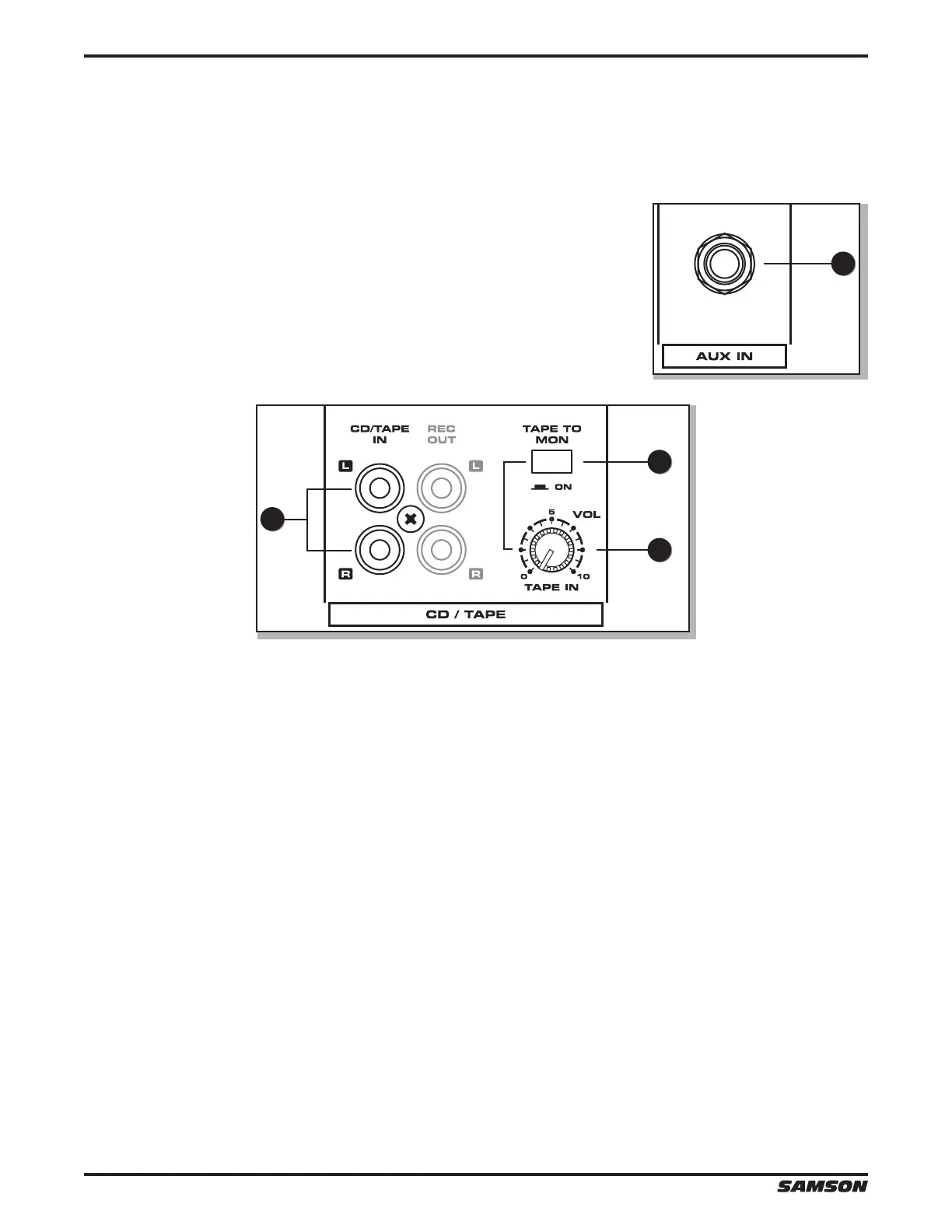
External Input Jacks (AUX IN and CD/TAPE IN)
These input jacks allow the signal from an external device to be added to the MAIN output.
29. AUX IN (XML410 Only) - This input jack allows the signal from an external
device to be added to the MAIN output.
30. CD/TAPE IN - Use this stereo RCA input to connect a stereo output device such as an MP3 player or CD player to the
mixer.
31. TAPE IN VOLUME - The TAPE IN VOLUME is used to set the level of the CD/TAPE IN jacks.
32. TAPE TO MON (XML610 and XML910 Only) - The TAPE TO MON switch allows you to add the CD/TAPE IN signal to
the MONITOR bus. When you press this switch, the signal at the CD/TAPE IN is mixed in to the AUX 1/MON and the
level is controlled by the TAPE IN VOLUME control.
NOTE: When the TAPE TO MON button is in the down position, the TAPE IN VOLUME control is used to adjust the
amount of signal that is sent from the CD/TAPE IN jacks to the MONITOR bus.
29
30
31
32


 To Next Page