Owner's Manual
9
XML POWERED MIXERS
Controls and Functions
12
13
14
15
16
17
18
24-Bit Digital Effects Section
The XML mixers feature built-in, 24-bit digital eects processors with 100 high-quality, studio grade eects like Delay,
Chorus and Reverb. The following section describes the features of the powerful on-board digital eects section.
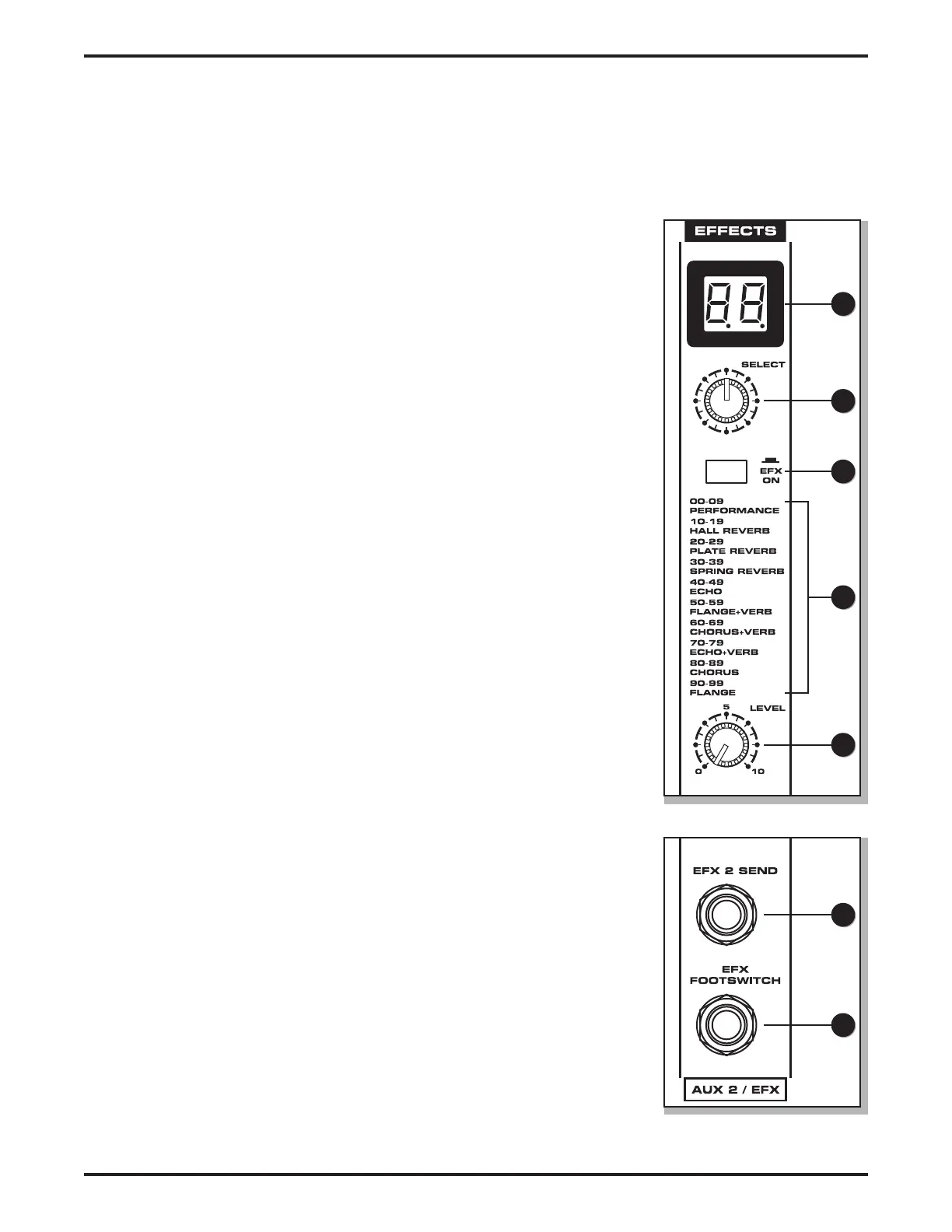
12. Eects Program Display - The XML mixers’ digital-eects processors feature
dual-digit, seven-segment numerical display for showing the eects PRO-
GRAM number from 00 - 99. You will see the PROGRAM numbers change as
you scroll through the eects preset using the DSP SELECT control. When the
Eects Display shows two straight lines through the center of each segment,
the eects are turned o and the EFX ON switch is in the out position.
13. Eects SELECT - The SELECT control knob is a continuously variable encoder,
that allows you to call up one of the 100 built-in digital eects presets. Rotate
the SELECT knob to scroll through the preset programs using the Eects Pro-
gram Display to choose the number of the eect you want.
14. Eects ON Switch - The Eects ON switch is used to turn the internal digital
eects on and o. The eects are bypassed when the switch is in the out posi-
tion and the Eects Display shows two dashes.
15. Eects PROGRAM List - This section identies the ten banks of built-in DSP
eects presets. The rst bank of ten presets is designed for live performance,
and the subsequent banks are arranged in groups by the type of eect.
16. Eects LEVEL Control - The Aux 2/EFX signals from input channels are mixed
together and sent to the internal DSP and EFX 2 Output. The Eects LEVEL
control is used to adjust the amount of signal send to the DSP and EFX 2
Output.
17. EFX 2 Send Jack - The unbalanced 1/4” EFX 2 Send is used to route a signal
to an external signal processor such as a delay or reverb. The signal present at
the EFX 2 Send is routed from the EFX bus, which is fed from the input chan-
nel’s Aux 2/EFX control knob.
18. EFX FOOTSWITCH Jack - Connect a footswitch to the EFX FOOTSWITCH
phone input jack to toggle the internal digital eects On and O.


 To Next Page