RECORDING
39
NOTICE
Take photographs within the flash range.
The flash ranges are listed below.
The image quality is not guaranteed if the subject is too close or highly reflective.
The LCD monitor is turned off for a while after using the flash to recharge it.
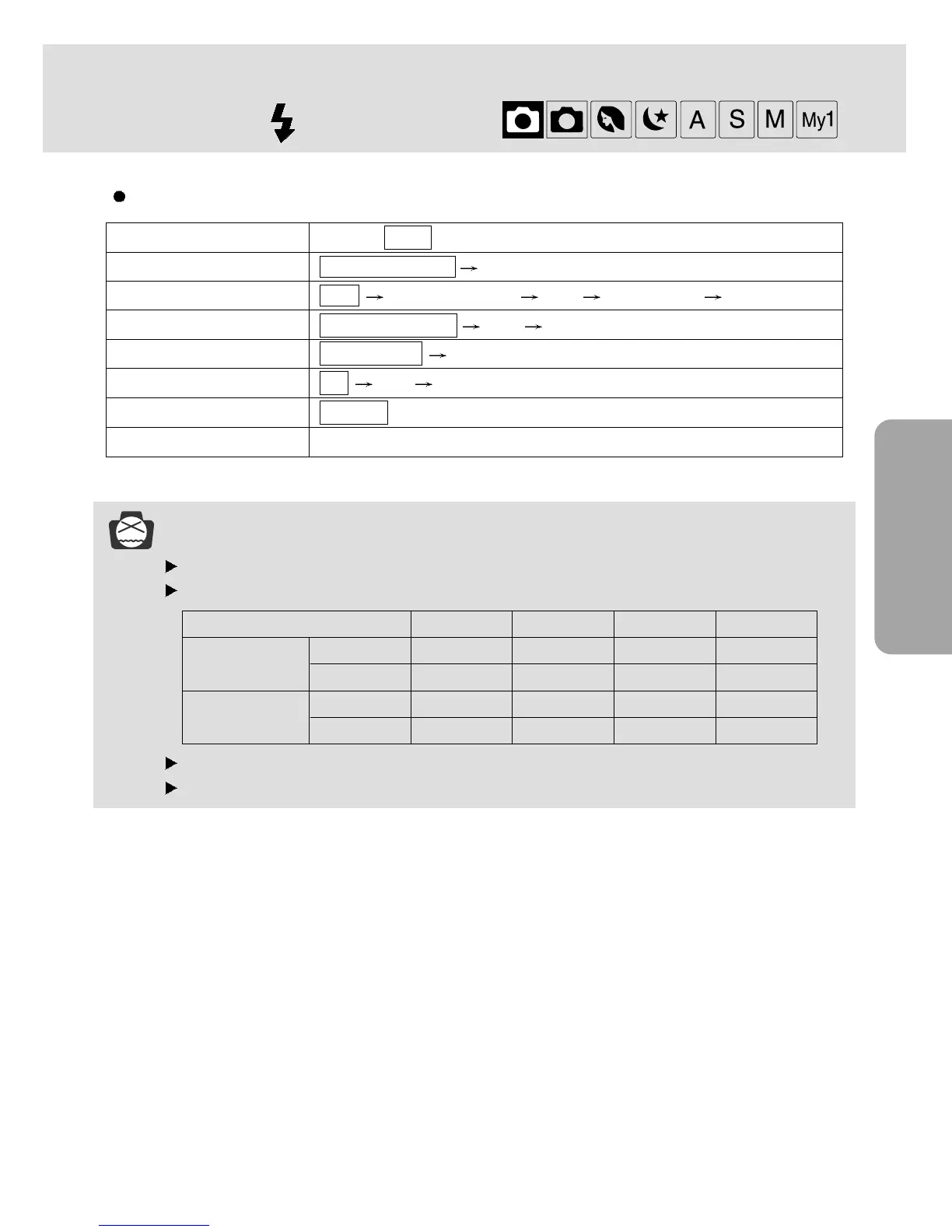
Flash mode setting
Camera working mode Setting ( marked camera working mode is the default setting.)
EASY Red eye reduction Off
PROGRAM, MySET Auto Red eye reduction Fill in Slow synchro Off
PORTRAIT Red eye reduction Fill in Off
NIGHT SCENE Slow synchro Off
A/ S/ M Off Fill in Slow synchro
MOVIE CLIP Flash off (Fixed)
VOICE RECORDING Not Available
ISO Auto 100 200 400
WIDE 0.8 ~ 3m 0.8 ~ 2.6m 1 ~ 3.7m 1 ~ 5.2m
TELE 0.8 ~ 2m 0.8 ~ 1.5m 1 ~ 2.1m 1 ~ 2.9m
WIDE 0.3 ~ 0.8m 0.3 ~ 0.8m 0.3 ~ 0.8m 0.3 ~ 0.8m
TELE 0.3 ~ 0.8m 0.3 ~ 0.8m 0.3 ~ 0.8m 0.3 ~ 0.8m
Normal focus
MACRO
FLASH ( ) button




 To Next Page