58
Sharpness
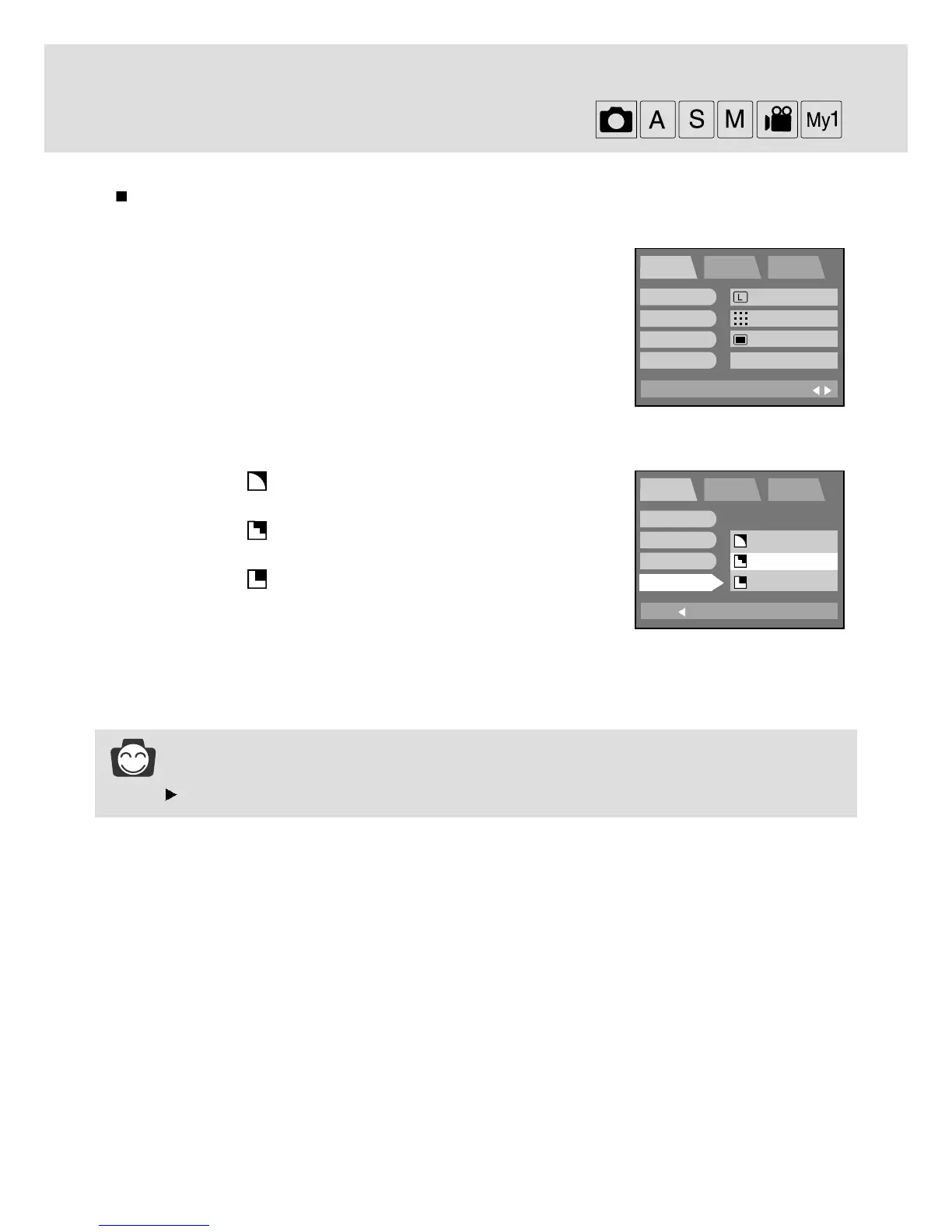
You can select the sharpness of still image.
1. Rotate the mode dial to the RECORDING mode and press the
MENU button.
2.
Press the DOWN button and the cursor will be shifted to the main menu.
3. Select the [SHOOTING] menu by pressing the UP/DOWN button.
4. Press the DOWN button on the [SHOOTING] menu and the next
menu page will be displayed.
5.
Select the [SHARP] menu by pressing the UP/DOWN button.
6.
Press the RIGHT button and the cursor will shift to the [SHARP] sub menu.
7. Select the desired sub menu by pressing the UP/DOWN button.
- SOFT : This gives smooth edges and the final image
will have a soft appearance.
- NORMAL : This setting will give a standard finish to the
final image.
- VIVID : This will give the image a crisp and clear
appearance.
8. Press the OK button to confirm the setting.
Press the menu button twice and the menu display will disappear.
Take a picture.
INFORMATION
BACK:
PROG SETUP MyCAM
SET:OK
ISO
W.B
EFFECT
SHARP
EXIT:
MENU
PROG SETUP MyCAM
PAGE:
SIZE
QUALITY
METERING
SHOOTING
2048x1536
FINE
MULTI
SINGLE
SOFT
NORMAL
VIVID






 To Next Page