60
Change
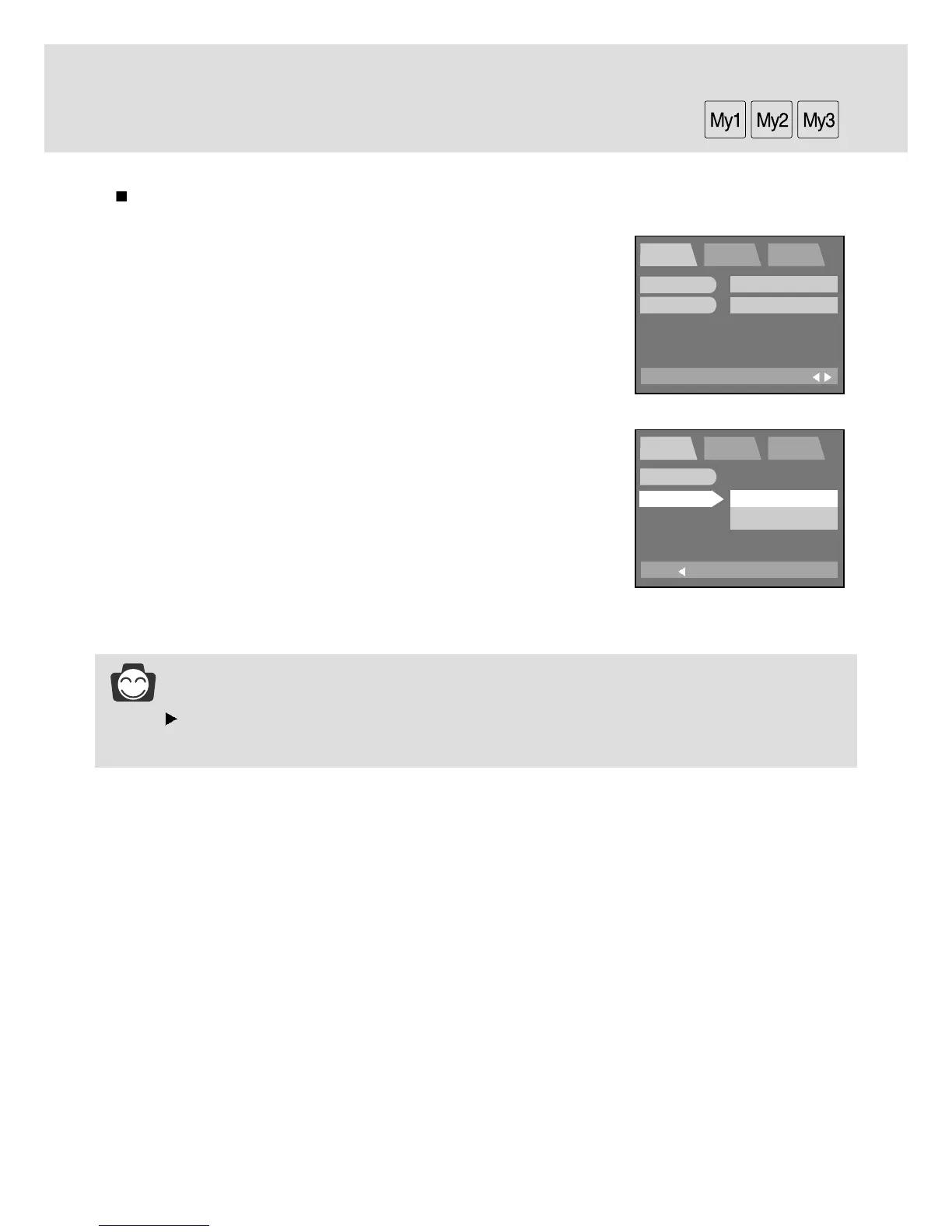
The loaded My SET setting will be applied to the camera from this menu.
1.
Rotate the mode dial to the MySET mode and press the MENU button.
2. Press the DOWN button and the cursor will be shifted to the main
menu.
3. Select the [CHANGE] menu by pressing the UP/DOWN button.
4. Press the RIGHT button and the cursor will shift to the [CHANGE]
sub menu.
5. Select the desired sub menu by pressing the UP/DOWN button.
- Selecting [NO] : The My SET menu will not be changed.
- Selecting [YES] : You can change your favorite menus.
Refer to page 49 ~ 58 for information about
the menus.
6. Press the OK button to confirm the setting.
Press the menu button twice and the menu display will disappear.
Take a picture
INFORMATION
P/A/S/M in the main menu stands for Program mode(P), Aperture priority(A), Shutter priority(S)
and Manual mode(M). You can save one of the camera modes in the My SET mode.
EXIT:MENU
MySET SETUP MyCAM
PAGE:
MODE
CHANGE
MYSET1
NO
BACK:
MySET SETUP MyCAM
SET:OK
MODE
CHANGE
NO
YES




 To Next Page