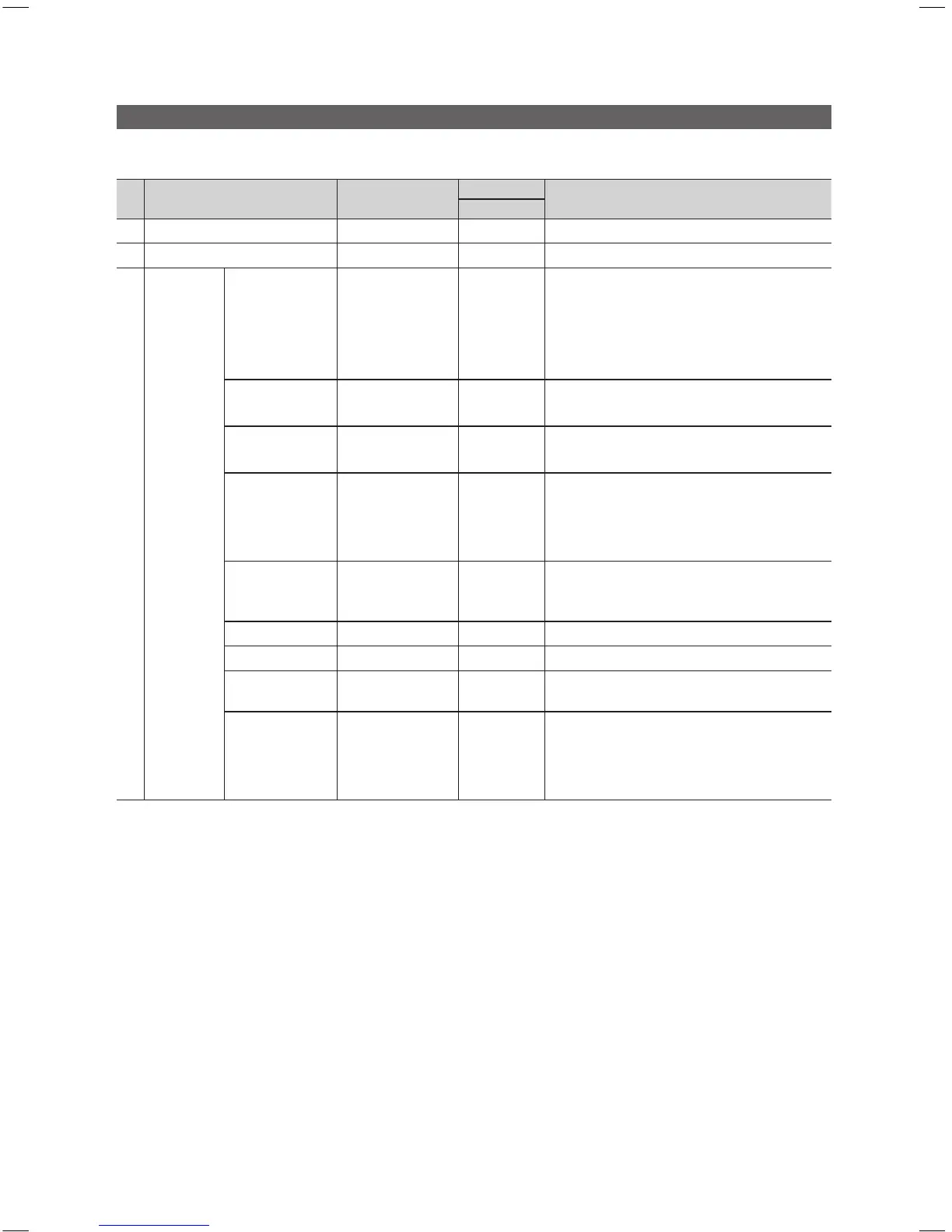
Setting the Hotel Option Data
To Enter: Press the MUTE → 1 → 1 → 9 → ENTERE buttons in order. (From the Hospitality mode, the Standalone mode is set.)
To Exit from this menu : power off and turn on again.
No Item
Sub item
initial value
Description
Standalone
1 Hospitality Mode Standalone Standalone
Select the Hospitality mode.
2 SI Vendor *** OFF
Select the SI Vendor
3 Power On
Power On
Channel EN
User Defined /
Last Saved
Last Saved
This feature Configures the Power On Channel on
TV (In Interactive Mode ONLY User Defined to be
Displayed)
•UserDened:TVcanbeconguredtoPowerON
to a user defined/specified Channel.
•LastSaved:TVwillalwaysTurnOntothelast
viewed Channel
Power On
Channel
*** 1
When the TV is turned on, it switches automatically
to this channel. (Available when the 'User Defined' is
selected in Power On Channel EN)
Channel Type
ATV / DTV
/ CDTV
ATV
This feature determines the type of Power on
Channel Type. (Available when the 'User Defined' is
selected in Power On Channel EN)
Power On Volume
EN
User Defined /
Last Saved
Last Saved
This feature configures the Power On Volume of
the TV
•UserDened:-TheTVcanbeconguredto
Power ON at a user defined/specified Volume.
•LastSaved:-TheTVwillalwaysturnonatthelast
set Volume Level.
Power On Volume 0~100 10
When the TV is turned on, it switches automatically
to this volume level.
Available when the 'User Defined' is selected in
Power On Volume EN
Min Volume 0~100 0
Set the minimum Volume Levels
Max Volume 0~100 100
Set the maximum Volume Levels
Power on source
TV / HDMI / AV1 /
COMP / PC
TV
Select the Input source when the TV is turned on
initially.
Power On Option
Power On /
Standby /
Last Option
Last Option
Determines the TV's state when power returns after
a power failure or after you have unplugged the TV
and then plugged it in again.
•Standby:StandbyState
•PowerON:PowerOn
•LastOption:LastPowerState
[HB460-XC]Install Guide-ENG.indd 12 2013-04-03 �� 3:27:00



 To Next Page