Using the TV's Controller
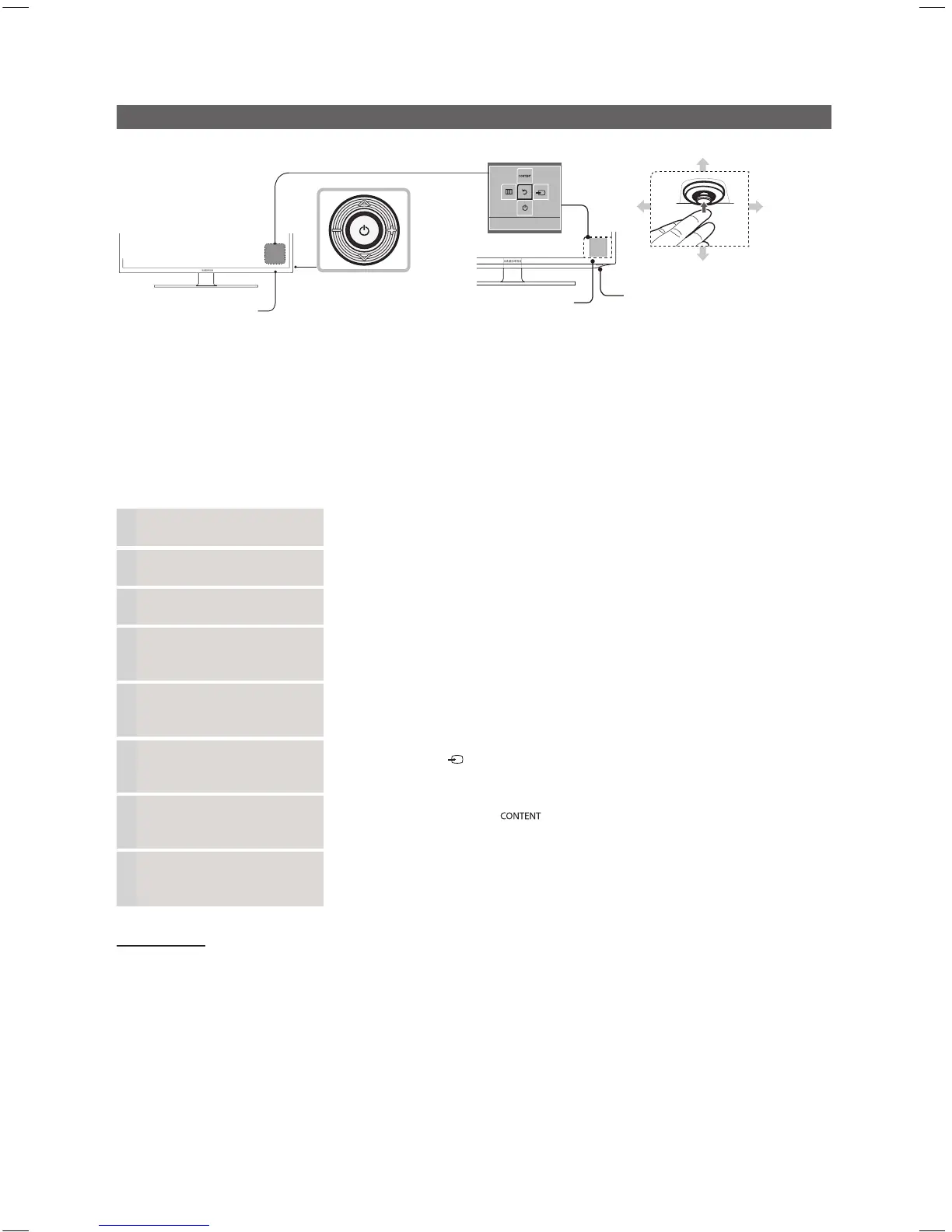
Remote control sensor
TV Controller
The image is drawn
facing the front of
the TV.
Function menu
Remote control sensor
TV Controller
Function menu
Return
Down (Front)
Up (Rear)
Right
Left
HG28EB460 HG32EB460, HG39EB460
TV Controller is a multi directional button that helps navigate without remote control.
✎
The product color and shape may vary depending on the model.
✎
Exits the menu when pressing the controller more than 1 second.
✎
When selecting the function by moving the controller to the up/down/left/right directions, be sure not to press the
controller. If you press it first, you cannot operate it to move the up/down/left/right directions.
Power on Turns the TV on by pressing the controller in standby mode.
Adjusting the volume Adjusts the volume by moving the controller from side to side when the power is on.
Selecting a channel Selects a channel by moving the controller up and down when the power is on.
Using the function menu Press the controller when the power is on, then the function menu screen appears. If
you press it again, the function menu screen disappears.
Using the Menu
Selects the Menu(
m
) by moving the controller in the function menu screen. The
OSD(On Screen Display) of your TV’s feature appears.
Selecting the Source Selects the Source( ) by moving the controller in the function menu screen. The
Source list screen appears.
Selecting the Contents
Home
Selects the Contents Home( ) by moving the controller in the function menu
screen. The Contents Home main screen appears.
Power Off
Selects the Power Off(
P
) to turn the TV off by moving the controller in the function
menu screen.
Standby mode
Your TV enters Standby mode when you turn it off and continues to consume a small amount of electric power. To be safe
and to decrease power consumption, do not leave your TV in standby mode for long periods of time (when you are away on
vacation, for example). It is best to unplug the power cord.
[HB460-XC]Install Guide-ENG.indd 9 2013-04-03 �� 3:26:57



 To Next Page