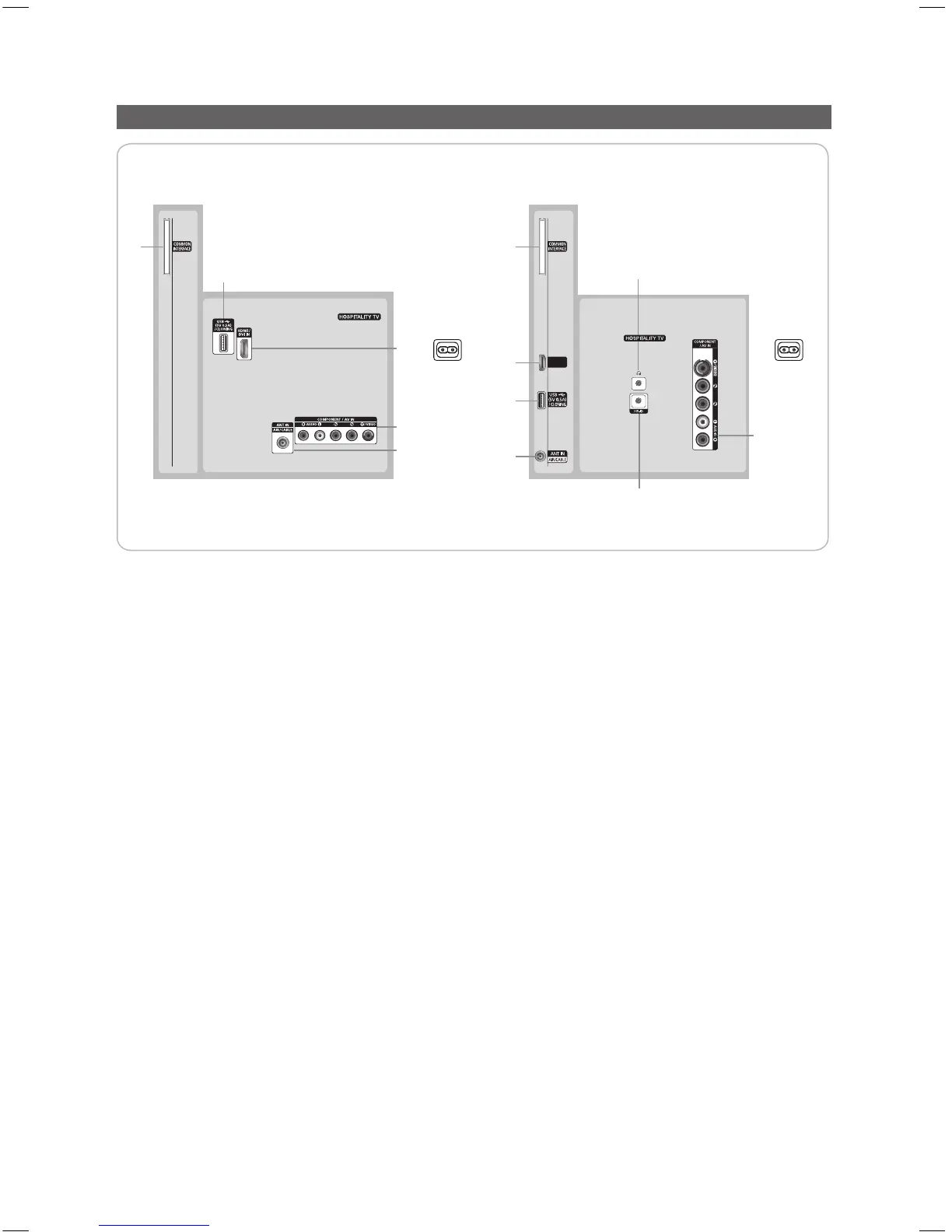
Viewing the Connection Panel
HG28EB460HG32EB460, HG39EB460
3
7
2
1
4
5
3
HDMI IN
(DVI)
6
7
1
2
6
Power
Input
Power
Input
✎
Whenever you connect an external device to your TV, make sure that power on the unit is turned off.
✎
When connecting an external device, match the color of the connection terminal to the cable.
1 USB / CLONING
– Connector for software upgrades and Media Play, etc.
– Service connection.
2 ANT IN: To view television channels correctly, a signal must be received by the set from one of the following sources. An
outdoor antenna / A cable television network / A satellite network.
✎
For Norway & For Sweden: Equipment which is connected to protective earth through a network plug and/or
through other equipment connected to earth, and connected to a cable network, may cause risk of fire. To prevent
this from happening, a galvanic isolator is also installed between the equipment and the cable network when
connecting the equipment to the cable network.
3 COMPONENT / AV IN
– Connects Component video / audio.
– Connect component video cables (optional) to the component jacks ("PR", "PB", "Y") on the rear of your TV and the
other ends to corresponding component video out jacks on the DVD.
– If you wish to connect both the Set-Top Box and DVD, you should connect the Set-Top Box to the DVD and connect
the DVD to the component jacks ("PR", "PB", "Y") on your TV.
– The PR, PB and Y jacks on your component devices (DVD) are sometimes labeled Y, B-Y and R-Y or Y, Cb and Cr.
– Connect RCA audio cables (optional) to [R - AUDIO - L] on the rear of the TV set and the other ends to corresponding
audio out jacks on the DVD.
4 HEADPHONE JACK
– Headphones may be connected to the headphone jack on your TV. While the headphones are connected, the sound
from the built-in speakers will be disabled.
5 HP-ID: Connect the cable to HP-ID and Headphone Jack simultaneously and connect it to separated Headphone Box.
When connecting Headphone to Headphone Box, it works same as Headphone function.
6 COMMON INTERFACE
[HB460-XC]Install Guide-ENG.indd 6 2013-04-03 �� 3:26:53



 To Next Page