How
to
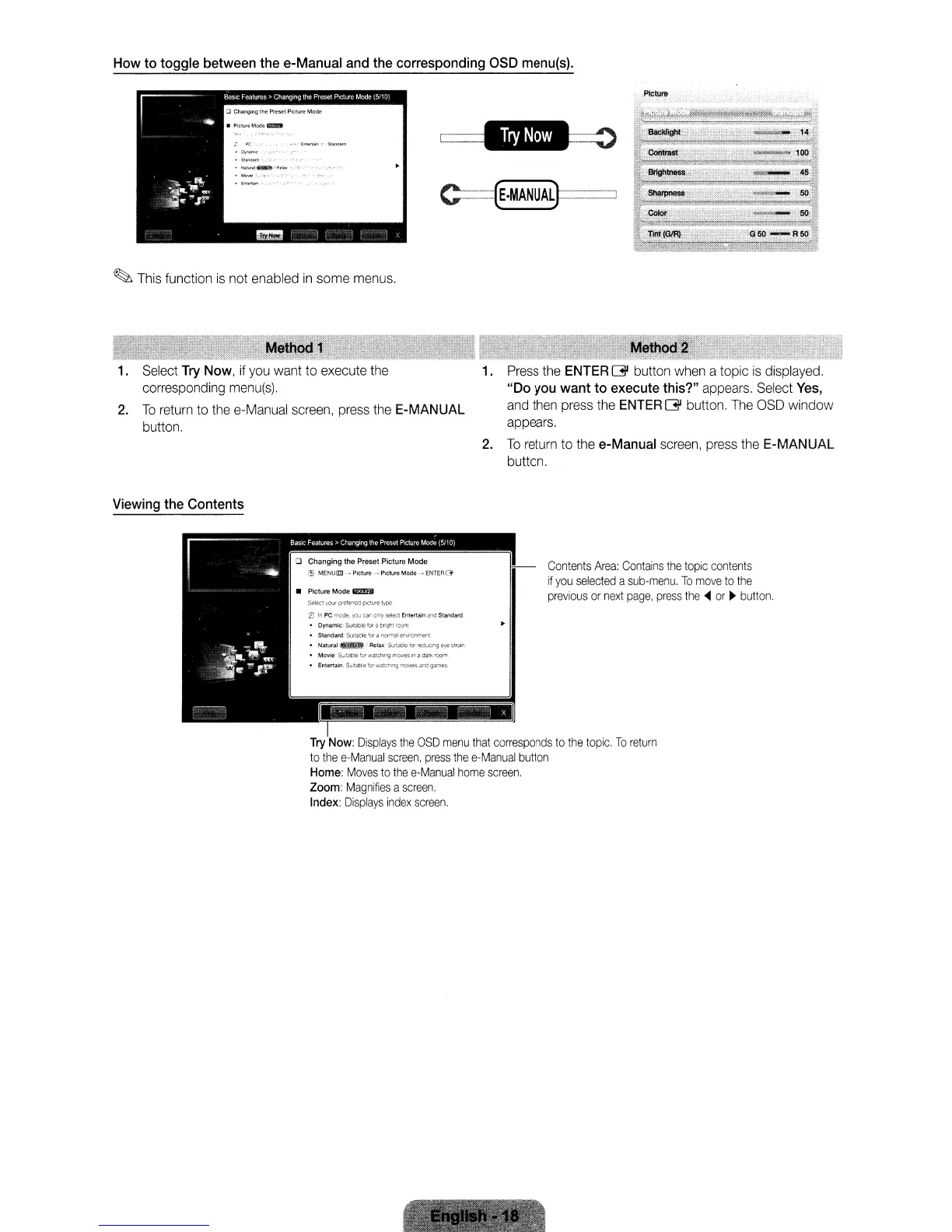
toggle between the e-Manual and the corresponding aSD menu(s).
C===(EoMANUAL}---:
PiCture
~
This function
is
not enabled
in
some menus.
1. Select Try Now, if
you
want to execute the
corresponding
menu(s).
2.
To
return to the e-Manual screen, press the E-MANUAL
button.
1.
Press
the ENTER G button when a topic
is
displayed.
"Do
you
want
to
execute this?" appears. Select Yes,
and
then press the ENTER G button.
The
OSD
window
appears.
2.
To
return to the e-Manual screen, press the E-MANUAL
button.
Viewing the Contents
Contents
Area:
Contains
the
topic
contents
if
you
selected
a
sub-menu.
To
move
to
the
previous
or
next
page,
press
the'"
or
~
button.
I~
Try
Now:
Displays
the
OSD
menu
that
corresponds
to
the
topic.
To
return
to
the
e-Manual
screen,
press
the
e-Manual
button
Home:
Moves
to
the
e-Manual
home
screen.
Zoom:
Magnifies
a
screen.
Index:
Displays
index
screen.
Select your preferred piCture typ€
FJ
In
PC
mode.
you
can
only
select
Entertain "nd Standard
• Dynamic:
S(JIlabl€
lor
a bng'll
room
•
Standard:
SUitable
for
a normal enwonment.
•
Natural~
i Relax:
&l'tab~eforreducir'l9eyestrall1
• Movie
SUitable
fur
watching
mOIll€S
WI
a
dark
room
• Entertain
SUltab~eforwatet1lng
moVIeS and games
• Picture Mode
m:!!ii)
How
to
toggle between the e-Manual and the corresponding aSD menu(s).
C===(EoMANUAL}---:
PiCture
~
This function
is
not enabled
in
some menus.
1. Select Try Now, if
you
want to execute the
corresponding
menu(s).
2.
To
return to the e-Manual screen, press the E-MANUAL
button.
1.
Press
the ENTER G button when a topic
is
displayed.
"Do
you
want
to
execute this?" appears. Select Yes,
and
then press the ENTER G button.
The
OSD
window
appears.
2.
To
return to the e-Manual screen, press the E-MANUAL
button.
Viewing the Contents
Contents
Area:
Contains
the
topic
contents
if
you
selected
a
sub-menu.
To
move
to
the
previous
or
next
page,
press
the'"
or
~
button.
I~
Try
Now:
Displays
the
OSD
menu
that
corresponds
to
the
topic.
To
return
to
the
e-Manual
screen,
press
the
e-Manual
button
Home:
Moves
to
the
e-Manual
home
screen.
Zoom:
Magnifies
a
screen.
Index:
Displays
index
screen.
Select your preferred piCture typ€
FJ
In
PC
mode.
you
can
only
select
Entertain "nd Standard
• Dynamic:
S(JIlabl€
lor
a bng'll
room
•
Standard:
SUitable
for
a normal enwonment.
•
Natural~
i Relax:
&l'tab~eforreducir'l9eyestrall1
• Movie
SUitable
fur
watching
mOIll€S
WI
a
dark
room
• Entertain
SUltab~eforwatet1lng
moVIeS and games
• Picture Mode
m:!!ii)
How
to
toggle between the e-Manual and the corresponding aSD menu(s).
C===(EoMANUAL}---:
PiCture
~
This function
is
not enabled
in
some menus.
1. Select Try Now, if
you
want to execute the
corresponding
menu(s).
2.
To
return to the e-Manual screen, press the E-MANUAL
button.
1.
Press
the ENTER G button when a topic
is
displayed.
"Do
you
want
to
execute this?" appears. Select Yes,
and
then press the ENTER G button.
The
OSD
window
appears.
2.
To
return to the e-Manual screen, press the E-MANUAL
button.
Viewing the Contents
Contents
Area:
Contains
the
topic
contents
if
you
selected
a
sub-menu.
To
move
to
the
previous
or
next
page,
press
the'"
or
~
button.
I~
Try
Now:
Displays
the
OSD
menu
that
corresponds
to
the
topic.
To
return
to
the
e-Manual
screen,
press
the
e-Manual
button
Home:
Moves
to
the
e-Manual
home
screen.
Zoom:
Magnifies
a
screen.
Index:
Displays
index
screen.
Select your preferred piCture typ€
FJ
In
PC
mode.
you
can
only
select
Entertain "nd Standard
• Dynamic:
S(JIlabl€
lor
a bng'll
room
•
Standard:
SUitable
for
a normal enwonment.
•
Natural~
i Relax:
&l'tab~eforreducir'l9eyestrall1
• Movie
SUitable
fur
watching
mOIll€S
WI
a
dark
room
• Entertain
SUltab~eforwatet1lng
moVIeS and games
• Picture Mode
m:!!ii)









 To Next Page