1V
Rear
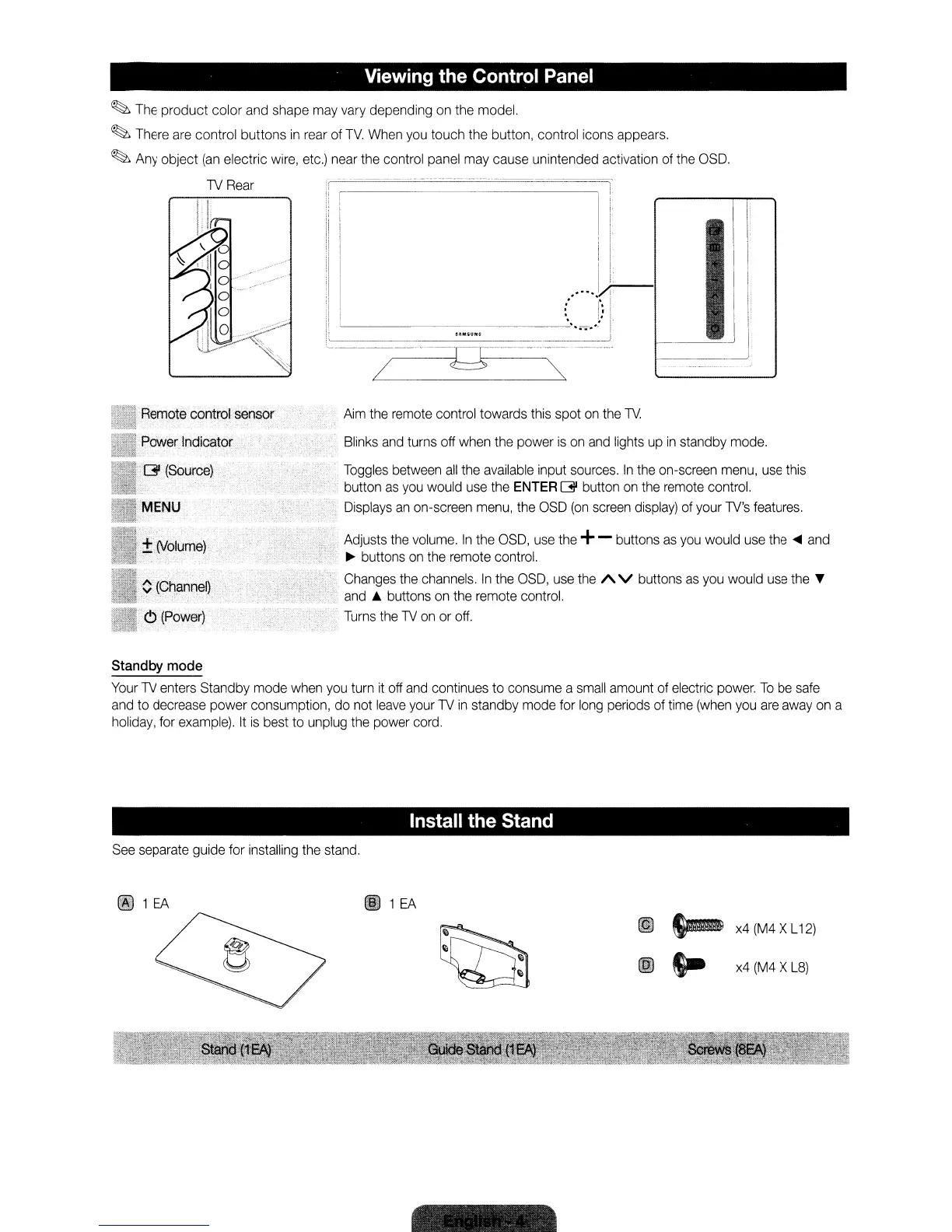
Viewing the Control Panel
~
The
product color
and
shape
may
vary
depending
on
the
model.
~
There
are
control buttons
in
rear
of
TV.
When
you
touch the button, control icons appears.
~
Any
object
(an
electric
wire,
etc.)
near
the
control panel
may
cause unintended activation
of
the
OSO.
-
~
-
-.
-.~
---.
-
..
-
..
_,-_._.
I
! I
I I
I I
.....
,r-
:'
I':
I
'------_
.....
'"
...
~j
--.--~------
-~I:----------
/
~
~
R~motec6nttol
sensor
Aim
the
remote
control towards this spot
on
the
1V.
Blinks
and
turns off
when
the
power
is
on
and
lights
up
in
standby mode.
Toggles
between
all
the
available
input
sources.
In
the
on-screen
menu,
use
this
button
as
you
would
use
the ENTER
[31 button
on
the
remote
control.
Displays
an
on-screen
menu,
the
OSO
(on
screen
display)
of
your 1V's
features.
Adjusts
the
volume.
In
the
OSO,
use
the
+- buttons
as
you
would
use
the
....
and
~
buttons
on
the
remote control.
Changes
the
channels.
In
the
OSO,
use
the
/\
V buttons
as
you
would
use
the
T
and
..
buttons
on
the
remote
control.
Turns
the
1V
on
or
off.
Standby mode
Your
1V
enters
Standby mode
when
you
turn
it
off
and
continues to consume a
small
amount
of
electric
power.
To
be
safe
and
to decrease power consumption,
do
not
leave
your
1V
in
standby mode for
long
periods
of
time
(when
you
are
away
on
a
holiday,
for
example).
It
is
best to unplug
the
power cord.
Install the Stand
See
separate guide for installing
the
stand.
~
1
EA
Il
~
x4
(M4
X
L12)
til
S-
x4
(M4
X
L8)
1V
Rear
Viewing the Control Panel
~
The
product color
and
shape
may
vary
depending
on
the
model.
~
There
are
control buttons
in
rear
of
TV.
When
you
touch the button, control icons appears.
~
Any
object
(an
electric
wire,
etc.)
near
the
control panel
may
cause unintended activation
of
the
OSO.
-
~
-
-.
-.~
---.
-
..
-
..
_,-_._.
I
! I
I I
I I
.....
,r-
:'
I':
I
'------_
.....
'"
...
~j
--.--~------
-~I:----------
/
~
~
R~motec6nttol
sensor
Aim
the
remote
control towards this spot
on
the
1V.
Blinks
and
turns off
when
the
power
is
on
and
lights
up
in
standby mode.
Toggles
between
all
the
available
input
sources.
In
the
on-screen
menu,
use
this
button
as
you
would
use
the ENTER
[31 button
on
the
remote
control.
Displays
an
on-screen
menu,
the
OSO
(on
screen
display)
of
your 1V's
features.
Adjusts
the
volume.
In
the
OSO,
use
the
+- buttons
as
you
would
use
the
....
and
~
buttons
on
the
remote control.
Changes
the
channels.
In
the
OSO,
use
the
/\
V buttons
as
you
would
use
the
T
and
..
buttons
on
the
remote
control.
Turns
the
1V
on
or
off.
Standby mode
Your
1V
enters
Standby mode
when
you
turn
it
off
and
continues to consume a
small
amount
of
electric
power.
To
be
safe
and
to decrease power consumption,
do
not
leave
your
1V
in
standby mode for
long
periods
of
time
(when
you
are
away
on
a
holiday,
for
example).
It
is
best to unplug
the
power cord.
Install the Stand
See
separate guide for installing
the
stand.
~
1
EA
Il
~
x4
(M4
X
L12)
til
S-
x4
(M4
X
L8)
1V
Rear
Viewing the Control Panel
~
The
product color
and
shape
may
vary
depending
on
the
model.
~
There
are
control buttons
in
rear
of
TV.
When
you
touch the button, control icons appears.
~
Any
object
(an
electric
wire,
etc.)
near
the
control panel
may
cause unintended activation
of
the
OSO.
-
~
-
-.
-.~
---.
-
..
-
..
_,-_._.
I
! I
I I
I I
.....
,r-
:'
I':
I
'------_
.....
'"
...
~j
--.--~------
-~I:----------
/
~
~
R~motec6nttol
sensor
Aim
the
remote
control towards this spot
on
the
1V.
Blinks
and
turns off
when
the
power
is
on
and
lights
up
in
standby mode.
Toggles
between
all
the
available
input
sources.
In
the
on-screen
menu,
use
this
button
as
you
would
use
the ENTER
[31 button
on
the
remote
control.
Displays
an
on-screen
menu,
the
OSO
(on
screen
display)
of
your 1V's
features.
Adjusts
the
volume.
In
the
OSO,
use
the
+- buttons
as
you
would
use
the
....
and
~
buttons
on
the
remote control.
Changes
the
channels.
In
the
OSO,
use
the
/\
V buttons
as
you
would
use
the
T
and
..
buttons
on
the
remote
control.
Turns
the
1V
on
or
off.
Standby mode
Your
1V
enters
Standby mode
when
you
turn
it
off
and
continues to consume a
small
amount
of
electric
power.
To
be
safe
and
to decrease power consumption,
do
not
leave
your
1V
in
standby mode for
long
periods
of
time
(when
you
are
away
on
a
holiday,
for
example).
It
is
best to unplug
the
power cord.
Install the Stand
See
separate guide for installing
the
stand.
~
1
EA
Il
~
x4
(M4
X
L12)
til
S-
x4
(M4
X
L8)









 To Next Page