How
to Navigate Menus
Before
using
the
1V,
follow
the
steps
below
to
learn
how
to
navigate
the
menu
and
select
and
adjust
different
functions.
How
to
Operate
the
OSD
(On
Screen
Display)
The
access
steps
may
differ
depending
on
the
selected
menu.
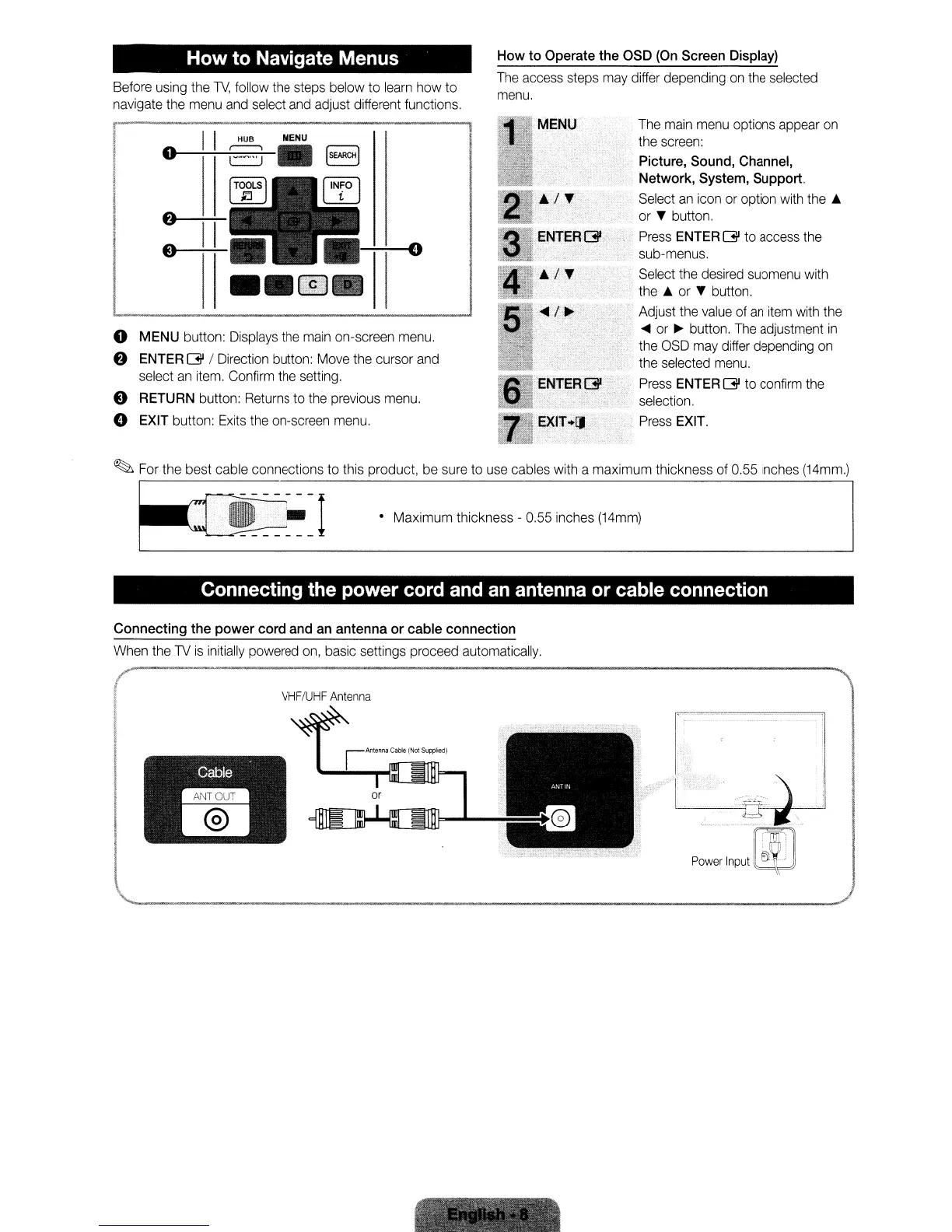
o
MENU
button:
Displays
the
main
on-screen
menu.
f)
ENTER
Gl
/
Direction
button:
Move
the
cursor
and
select
an
item.
Confirm
the
setting.
e
RETURN
button:
Returns
to
the
previous
menu.
e
EXIT
button:
Exits
the
on-screen
menu.
The
main
menu
options
appear
on
the
screen:
Picture,
Sound,
Channel,
Network,
System,
Support.
Select
an
icon
or
option
with
the
..
or
T button.
Press
ENTER
Gl
to
access
the
sub-menus.
Select
the
desired
submenu
with
the
..
or
T
button.
Adjust
the
value
of
an
item
with
the
....
or
~
button.
The
adjustment
in
the
OSD
may
differ
depending
on
the
selected
menu.
Press
ENTER
Gl
to
confirm
the
selection.
Press
EXIT.
~
For
the
best cable connections to
this
product,
be
sure
to
use
cables
with
a maximum thickness
of
0.55
inches
(14mm.)
• Maximum thickness -
0.55
inches
(14mm)
Connecting the power cord and an antenna or cable connection
Connecting
the
power
cord
and
an
antenna
or
cable
connection
When
the
1V
is
initially
powered
on,
basic
settings proceed
automatically.
VHF/UHF
Antenna
How
to Navigate Menus
Before
using
the
1V,
follow
the
steps
below
to
learn
how
to
navigate
the
menu
and
select
and
adjust
different
functions.
How
to
Operate
the
OSD
(On
Screen
Display)
The
access
steps
may
differ
depending
on
the
selected
menu.
o
MENU
button:
Displays
the
main
on-screen
menu.
f)
ENTER
Gl
/
Direction
button:
Move
the
cursor
and
select
an
item.
Confirm
the
setting.
e
RETURN
button:
Returns
to
the
previous
menu.
e
EXIT
button:
Exits
the
on-screen
menu.
The
main
menu
options
appear
on
the
screen:
Picture,
Sound,
Channel,
Network,
System,
Support.
Select
an
icon
or
option
with
the
..
or
T button.
Press
ENTER
Gl
to
access
the
sub-menus.
Select
the
desired
submenu
with
the
..
or
T
button.
Adjust
the
value
of
an
item
with
the
....
or
~
button.
The
adjustment
in
the
OSD
may
differ
depending
on
the
selected
menu.
Press
ENTER
Gl
to
confirm
the
selection.
Press
EXIT.
~
For
the
best cable connections to
this
product,
be
sure
to
use
cables
with
a maximum thickness
of
0.55
inches
(14mm.)
• Maximum thickness -
0.55
inches
(14mm)
Connecting the power cord and an antenna or cable connection
Connecting
the
power
cord
and
an
antenna
or
cable
connection
When
the
1V
is
initially
powered
on,
basic
settings proceed
automatically.
VHF/UHF
Antenna
How
to Navigate Menus
Before
using
the
1V,
follow
the
steps
below
to
learn
how
to
navigate
the
menu
and
select
and
adjust
different
functions.
How
to
Operate
the
OSD
(On
Screen
Display)
The
access
steps
may
differ
depending
on
the
selected
menu.
o
MENU
button:
Displays
the
main
on-screen
menu.
f)
ENTER
Gl
/
Direction
button:
Move
the
cursor
and
select
an
item.
Confirm
the
setting.
e
RETURN
button:
Returns
to
the
previous
menu.
e
EXIT
button:
Exits
the
on-screen
menu.
The
main
menu
options
appear
on
the
screen:
Picture,
Sound,
Channel,
Network,
System,
Support.
Select
an
icon
or
option
with
the
..
or
T button.
Press
ENTER
Gl
to
access
the
sub-menus.
Select
the
desired
submenu
with
the
..
or
T
button.
Adjust
the
value
of
an
item
with
the
....
or
~
button.
The
adjustment
in
the
OSD
may
differ
depending
on
the
selected
menu.
Press
ENTER
Gl
to
confirm
the
selection.
Press
EXIT.
~
For
the
best cable connections to
this
product,
be
sure
to
use
cables
with
a maximum thickness
of
0.55
inches
(14mm.)
• Maximum thickness -
0.55
inches
(14mm)
Connecting the power cord and an antenna or cable connection
Connecting
the
power
cord
and
an
antenna
or
cable
connection
When
the
1V
is
initially
powered
on,
basic
settings proceed
automatically.
VHF/UHF
Antenna










 To Next Page