. Remote Control Buttons
~
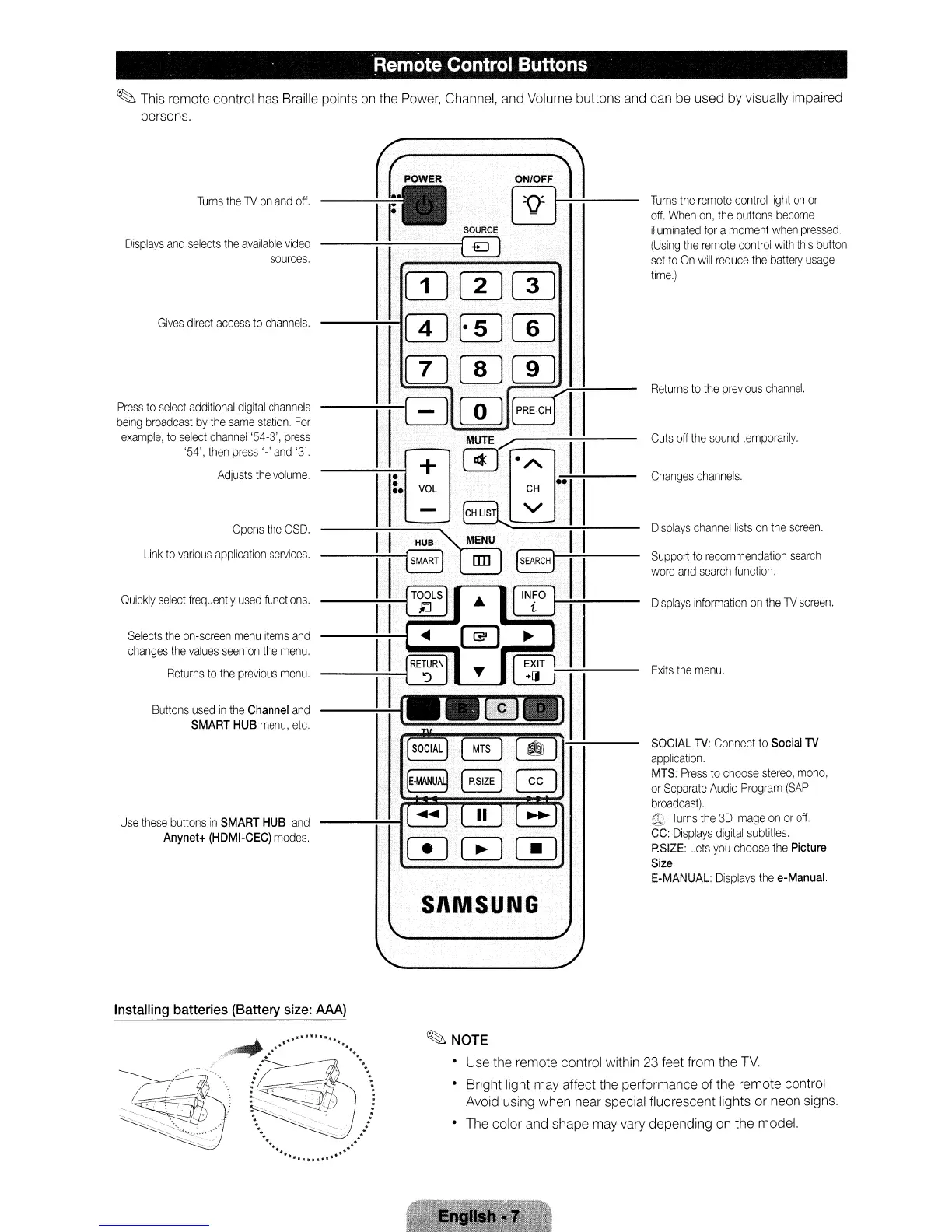
This remote control has Braille points
on
the Power, Channel, and Volume buttons and can be used by visually impaired
persons.
Changes
channels
.
Support
to
recommendation
search
word
and
search
function.
Displays
channel
lists
on
the
screen.
Displays
information
on
the
lV
screen.
Exits
the
menu.
Cuts
off
the
sound
temporarily.
Returns
to
the
previous
channel.
SOCIAL
lV:
Connect
to
Social
TV
application.
MTS:
Press
to
choose
stereo,
mono,
or
Separate
Audio
Program
(SAP
broadcast).
:i1
:
Turns
the
3D
image
on
or
off.
CC:
Displays
digital
subtitles.
P.SIZE:
Lets
you
choose
the
Picture
Size.
E-MANUAL:
Displays
the
e-Manual.
Turns
the
remote
control
light
on
or
off,
When
on,
the
buttons
become
illuminated
for
a
moment
when
pressed.
(Using
the
remote
control
with
this
button
set
to
On
will
reduce
the
battery
usage
time.)
II
SOURCE
@]
•
+
•
VOL
..
HUB
8
€J
[Dm[I)
wE[][]]
IT]C[Jrn
-----ttEJlm
II
PRE·CH
Selects
the
on-screen
menu
items
and
changes
the
values
seen
on
the
menu.
Returns
to
the
previous
menu.
Buttons
used
in
the
Channel
and
SMART
HUB
menu,
etc.
Turns
the
lV
on
and
off.
Gives
direct
access
to
channels.
Opens
the
OSD.
Link
to
various
application
services.
Displays
and
selects
the
available
video
sources.
Quickly
select
frequently
used
functions.
Use
these
buttons
in
SMART
HUB
and
Anynet+
(HDMI-CEC)
modes.
Press
to
select
additional
digital
channels
being
broadcast
by
the
same
station.
For
example,
to
select
channel
'54-3',
press
'54',
then
press
'-'
and
'3'.
Adjusts
the
volume.
SI\MSUNG
Installing
batteries
(Battery
size:
AAA)
~NOTE
• Use the remote control within 23 feet from the
TV.
• Bright light may affect the performance of the remote control
Avoid using when near special fluorescent lights or neon signs.
• The color and shape may vary depending on the model.
. Remote Control Buttons
~
This remote control has Braille points
on
the Power, Channel, and Volume buttons and can be used by visually impaired
persons.
Changes
channels
.
Support
to
recommendation
search
word
and
search
function.
Displays
channel
lists
on
the
screen.
Displays
information
on
the
lV
screen.
Exits
the
menu.
Cuts
off
the
sound
temporarily.
Returns
to
the
previous
channel.
SOCIAL
lV:
Connect
to
Social
TV
application.
MTS:
Press
to
choose
stereo,
mono,
or
Separate
Audio
Program
(SAP
broadcast).
:i1
:
Turns
the
3D
image
on
or
off.
CC:
Displays
digital
subtitles.
P.SIZE:
Lets
you
choose
the
Picture
Size.
E-MANUAL:
Displays
the
e-Manual.
Turns
the
remote
control
light
on
or
off,
When
on,
the
buttons
become
illuminated
for
a
moment
when
pressed.
(Using
the
remote
control
with
this
button
set
to
On
will
reduce
the
battery
usage
time.)
II
SOURCE
@]
•
+
•
VOL
..
HUB
8
€J
[Dm[I)
wE[][]]
IT]C[Jrn
-----ttEJlm
II
PRE·CH
Selects
the
on-screen
menu
items
and
changes
the
values
seen
on
the
menu.
Returns
to
the
previous
menu.
Buttons
used
in
the
Channel
and
SMART
HUB
menu,
etc.
Turns
the
lV
on
and
off.
Gives
direct
access
to
channels.
Opens
the
OSD.
Link
to
various
application
services.
Displays
and
selects
the
available
video
sources.
Quickly
select
frequently
used
functions.
Use
these
buttons
in
SMART
HUB
and
Anynet+
(HDMI-CEC)
modes.
Press
to
select
additional
digital
channels
being
broadcast
by
the
same
station.
For
example,
to
select
channel
'54-3',
press
'54',
then
press
'-'
and
'3'.
Adjusts
the
volume.
SI\MSUNG
Installing
batteries
(Battery
size:
AAA)
~NOTE
• Use the remote control within 23 feet from the
TV.
• Bright light may affect the performance of the remote control
Avoid using when near special fluorescent lights or neon signs.
• The color and shape may vary depending on the model.
. Remote Control Buttons
~
This remote control has Braille points
on
the Power, Channel, and Volume buttons and can be used by visually impaired
persons.
Changes
channels
.
Support
to
recommendation
search
word
and
search
function.
Displays
channel
lists
on
the
screen.
Displays
information
on
the
lV
screen.
Exits
the
menu.
Cuts
off
the
sound
temporarily.
Returns
to
the
previous
channel.
SOCIAL
lV:
Connect
to
Social
TV
application.
MTS:
Press
to
choose
stereo,
mono,
or
Separate
Audio
Program
(SAP
broadcast).
:i1
:
Turns
the
3D
image
on
or
off.
CC:
Displays
digital
subtitles.
P.SIZE:
Lets
you
choose
the
Picture
Size.
E-MANUAL:
Displays
the
e-Manual.
Turns
the
remote
control
light
on
or
off,
When
on,
the
buttons
become
illuminated
for
a
moment
when
pressed.
(Using
the
remote
control
with
this
button
set
to
On
will
reduce
the
battery
usage
time.)
II
SOURCE
@]
•
+
•
VOL
..
HUB
8
€J
[Dm[I)
wE[][]]
IT]C[Jrn
-----ttEJlm
II
PRE·CH
Selects
the
on-screen
menu
items
and
changes
the
values
seen
on
the
menu.
Returns
to
the
previous
menu.
Buttons
used
in
the
Channel
and
SMART
HUB
menu,
etc.
Turns
the
lV
on
and
off.
Gives
direct
access
to
channels.
Opens
the
OSD.
Link
to
various
application
services.
Displays
and
selects
the
available
video
sources.
Quickly
select
frequently
used
functions.
Use
these
buttons
in
SMART
HUB
and
Anynet+
(HDMI-CEC)
modes.
Press
to
select
additional
digital
channels
being
broadcast
by
the
same
station.
For
example,
to
select
channel
'54-3',
press
'54',
then
press
'-'
and
'3'.
Adjusts
the
volume.
SI\MSUNG
Installing
batteries
(Battery
size:
AAA)
~NOTE
• Use the remote control within 23 feet from the
TV.
• Bright light may affect the performance of the remote control
Avoid using when near special fluorescent lights or neon signs.
• The color and shape may vary depending on the model.









 To Next Page