Installing the Wall Mount .
Preparing
before
installing
Wall-Mount
To
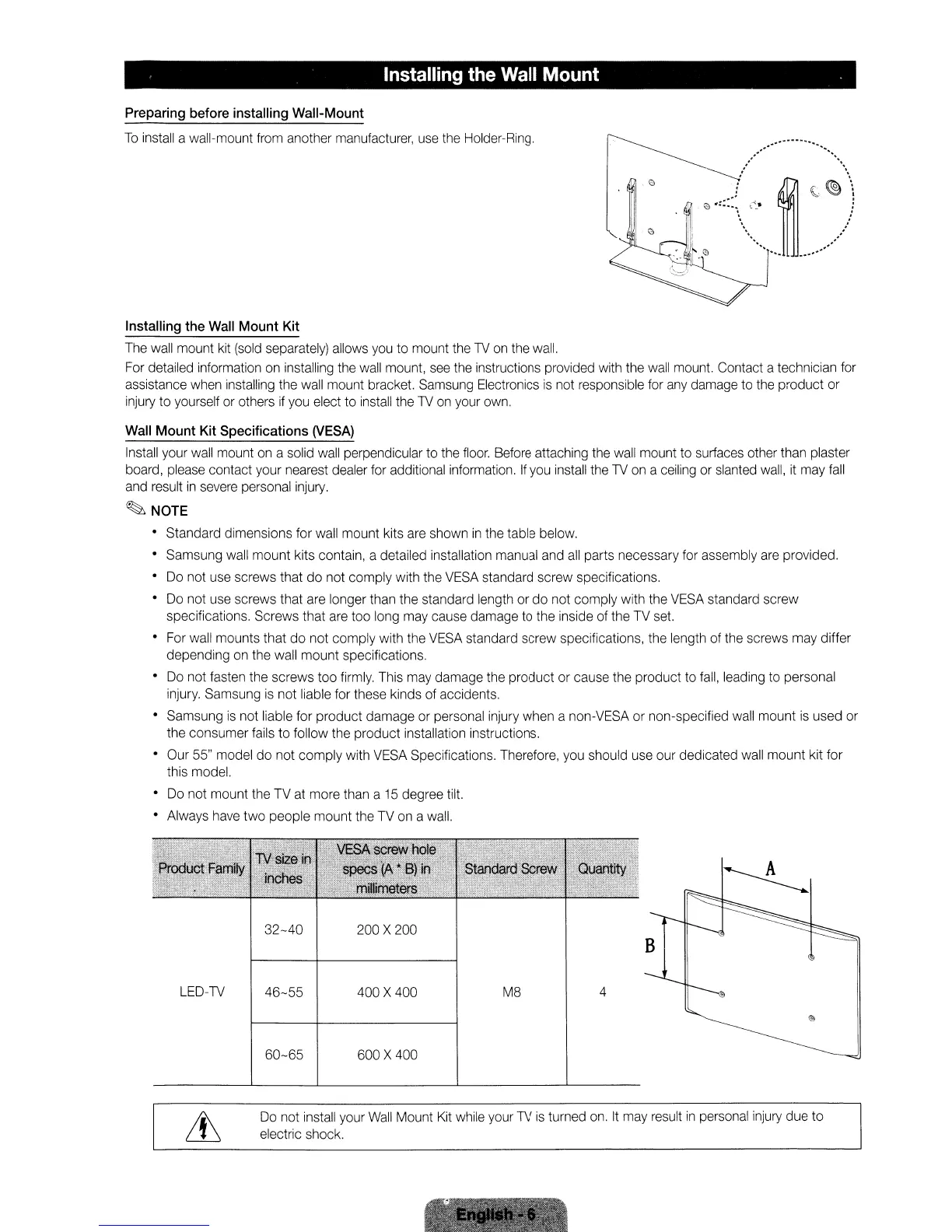
install a wall-mount from another manufacturer, use the Holder-Ring,
Installing
the
Wall
Mount
Kit
The wall
mount
kit (sold separately) allows you
to
mount the
TV
on the wall.
For detailed information on installing the wall mount, see the instructions provided with the wall mount. Contact a technician for
assistance when installing the wall mount bracket. Samsung Electronics
is
not responsible for any damage
to
the
product
or
injury
to
yourself or others if you elect
to
install the TV on your own,
Wall
Mount
Kit
Specifications
(VESA)
Install your wall mount on a solid wall perpendicular to the floor, Before attaching the wall mount
to
surfaces other than plaster
board, please contact your nearest dealer for additional information,
If
you install the TV on a ceiling or slanted wall, it may fall
and result
in
severe personal injury,
~NOTE
• Standard dimensions
for
wall
mount
kits are shown
in
the table below,
•
Samsung
wall
mount
kits contain, a detailed installation manual and all parts necessary for assembly are provided,
• Do not use screws that
do
not
comply
with the VESA standard
screw
specifications,
• Do not use screws that are longer than
the
standard length
or
do
not
comply
with the VESA standard
screw
specifications,
Screws
that are
too
long may cause damage to the inside
of
the
TV
set.
• For wall
mounts
that
do
not
comply
with the VESA standard
screw
specifications, the length of the screws may differ
depending
on the wall
mount
specifications,
• Do
not
fasten the
screws
too
firmly, This may
damage
the
product
or cause
the
product
to fall, leading
to
personal
injury, Samsung is
not
liable for these kinds of accidents.
• Samsung
is
not liable for
product
damage
or personal injury
when
a non-VESA or non-specified wall
mount
is
used
or
the
consumer
fails
to
follow the
product
installation instructions,
• Our 55" model
do
not
comply
with VESA Specifications, Therefore, you should use our dedicated wall
mount
kit
for
this model.
• Do
not
mount
the
TV
at
more
than a 15 degree tilt.
• Always have
two
people
mount
the
TV
on a wall,
LED-TV
32-40
46-55
60-65
200 X 200
400 X 400
600 X 400
M8
4
B
Do not install your Wall Mount
Kit
while your TV is turned on, It may result
in
personal injury due
to
electric shock,
Installing the Wall Mount .
Preparing
before
installing
Wall-Mount
To
install a wall-mount from another manufacturer, use the Holder-Ring,
Installing
the
Wall
Mount
Kit
The wall
mount
kit (sold separately) allows you
to
mount the
TV
on the wall.
For detailed information on installing the wall mount, see the instructions provided with the wall mount. Contact a technician for
assistance when installing the wall mount bracket. Samsung Electronics
is
not responsible for any damage
to
the
product
or
injury
to
yourself or others if you elect
to
install the TV on your own,
Wall
Mount
Kit
Specifications
(VESA)
Install your wall mount on a solid wall perpendicular to the floor, Before attaching the wall mount
to
surfaces other than plaster
board, please contact your nearest dealer for additional information,
If
you install the TV on a ceiling or slanted wall, it may fall
and result
in
severe personal injury,
~NOTE
• Standard dimensions
for
wall
mount
kits are shown
in
the table below,
•
Samsung
wall
mount
kits contain, a detailed installation manual and all parts necessary for assembly are provided,
• Do not use screws that
do
not
comply
with the VESA standard
screw
specifications,
• Do not use screws that are longer than
the
standard length
or
do
not
comply
with the VESA standard
screw
specifications,
Screws
that are
too
long may cause damage to the inside
of
the
TV
set.
• For wall
mounts
that
do
not
comply
with the VESA standard
screw
specifications, the length of the screws may differ
depending
on the wall
mount
specifications,
• Do
not
fasten the
screws
too
firmly, This may
damage
the
product
or cause
the
product
to fall, leading
to
personal
injury, Samsung is
not
liable for these kinds of accidents.
• Samsung
is
not liable for
product
damage
or personal injury
when
a non-VESA or non-specified wall
mount
is
used
or
the
consumer
fails
to
follow the
product
installation instructions,
• Our 55" model
do
not
comply
with VESA Specifications, Therefore, you should use our dedicated wall
mount
kit
for
this model.
• Do
not
mount
the
TV
at
more
than a 15 degree tilt.
• Always have
two
people
mount
the
TV
on a wall,
LED-TV
32-40
46-55
60-65
200 X 200
400 X 400
600 X 400
M8
4
B
Do not install your Wall Mount
Kit
while your TV is turned on, It may result
in
personal injury due
to
electric shock,
Installing the Wall Mount .
Preparing
before
installing
Wall-Mount
To
install a wall-mount from another manufacturer, use the Holder-Ring,
Installing
the
Wall
Mount
Kit
The wall
mount
kit (sold separately) allows you
to
mount the
TV
on the wall.
For detailed information on installing the wall mount, see the instructions provided with the wall mount. Contact a technician for
assistance when installing the wall mount bracket. Samsung Electronics
is
not responsible for any damage
to
the
product
or
injury
to
yourself or others if you elect
to
install the TV on your own,
Wall
Mount
Kit
Specifications
(VESA)
Install your wall mount on a solid wall perpendicular to the floor, Before attaching the wall mount
to
surfaces other than plaster
board, please contact your nearest dealer for additional information,
If
you install the TV on a ceiling or slanted wall, it may fall
and result
in
severe personal injury,
~NOTE
• Standard dimensions
for
wall
mount
kits are shown
in
the table below,
•
Samsung
wall
mount
kits contain, a detailed installation manual and all parts necessary for assembly are provided,
• Do not use screws that
do
not
comply
with the VESA standard
screw
specifications,
• Do not use screws that are longer than
the
standard length
or
do
not
comply
with the VESA standard
screw
specifications,
Screws
that are
too
long may cause damage to the inside
of
the
TV
set.
• For wall
mounts
that
do
not
comply
with the VESA standard
screw
specifications, the length of the screws may differ
depending
on the wall
mount
specifications,
• Do
not
fasten the
screws
too
firmly, This may
damage
the
product
or cause
the
product
to fall, leading
to
personal
injury, Samsung is
not
liable for these kinds of accidents.
• Samsung
is
not liable for
product
damage
or personal injury
when
a non-VESA or non-specified wall
mount
is
used
or
the
consumer
fails
to
follow the
product
installation instructions,
• Our 55" model
do
not
comply
with VESA Specifications, Therefore, you should use our dedicated wall
mount
kit
for
this model.
• Do
not
mount
the
TV
at
more
than a 15 degree tilt.
• Always have
two
people
mount
the
TV
on a wall,
LED-TV
32-40
46-55
60-65
200 X 200
400 X 400
600 X 400
M8
4
B
Do not install your Wall Mount
Kit
while your TV is turned on, It may result
in
personal injury due
to
electric shock,










 To Next Page