EasyManua.ls Logo

Samsung 6500 - Page 5

Samsung 6500
42 pages
Print Icon
To Next Page IconTo Next Page
To Previous Page IconTo Previous Page
Loading...
o
I)~X4
(M4
X
L12)
. \
M..
,iff
III
III
o
SideView
r-------------'"
:
Top
View
:
I I
J~i
,~
I
,'
...
\.
J
ril
'
,
,
,
I
I
I
I
I
~
I
" I
,.
'"
=::::0
I
",;
..
I
...............
1 ,
I
DO
NOT
USE
DO
NOT
USE
DO
NOT
USE
I
CHEMICALS
GREASE
OIL
(Correct
assembly)
~
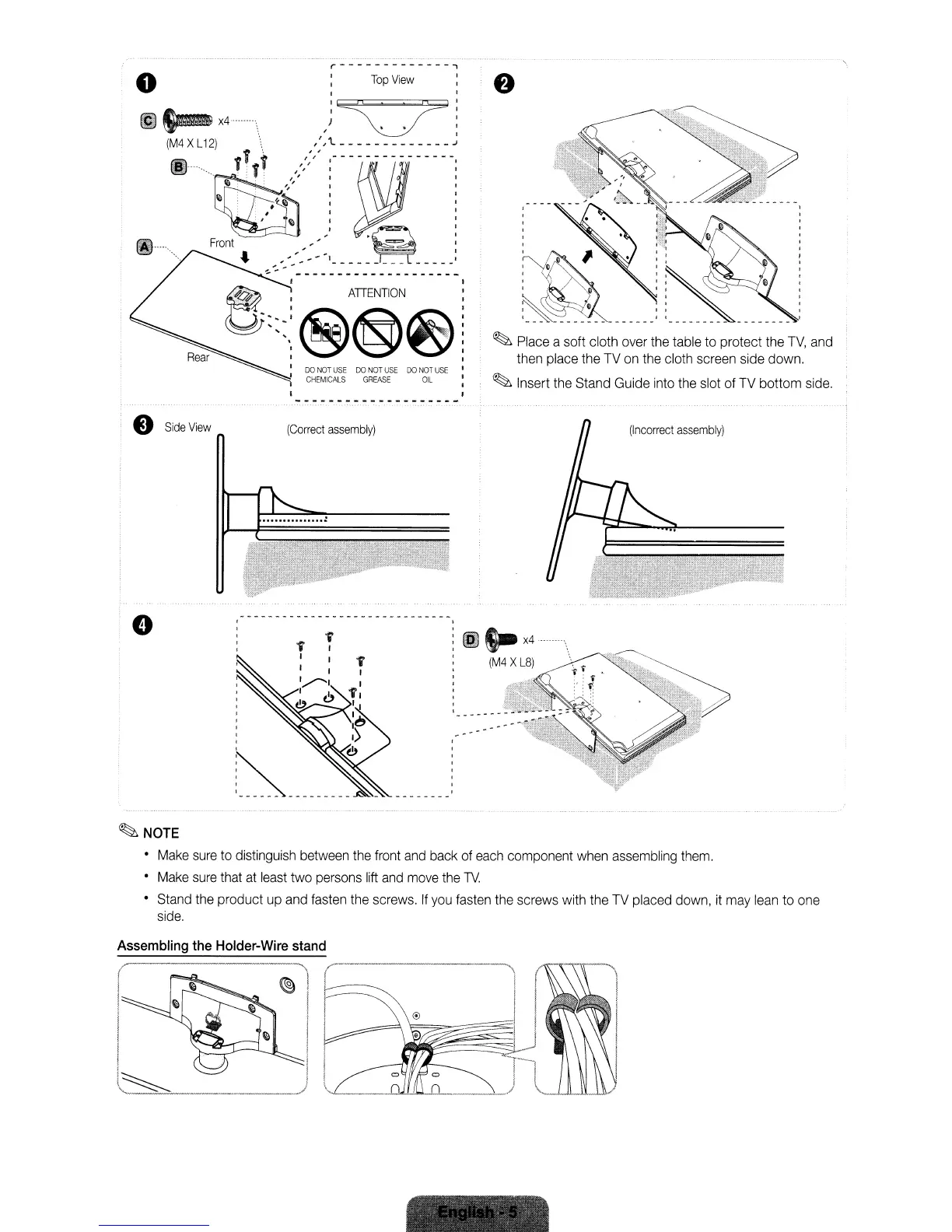
Place
a soft cloth
over
the
table
to
protect
the
TV,
and
then
place
the
TV
on
the
cloth
screen
side
down.
~
Insert
the
Stand
Guide
into
the
slot
of
TV
bottom
side.
(Incorrect
assembly)
f
I
,
,
,
,
,
,
,
,
,
~---------
(G
S-
x4
(M4
X
L8)
~NOTE
Make
sure
to
distinguish
between
the
front
and
back
of
each
component
when
assembling
them.
Make
sure
that
at
least
two
persons
lift
and
move
the
TV.
Stand
the
product
up
and
fasten
the
screws.
If
you
fasten
the
screws
with
the
TV
placed
down,
it
may
lean
to
one
side.
Assembling
the
Holder-Wire
stand
o
I)~X4
(M4
X
L12)
. \
M..
,iff
III
III
o
SideView
r-------------'"
:
Top
View
:
I I
J~i
,~
I
,'
...
\.
J
ril
'
,
,
,
I
I
I
I
I
~
I
" I
,.
'"
=::::0
I
",;
..
I
...............
1 ,
I
DO
NOT
USE
DO
NOT
USE
DO
NOT
USE
I
CHEMICALS
GREASE
OIL
(Correct
assembly)
~
Place
a soft cloth
over
the
table
to
protect
the
TV,
and
then
place
the
TV
on
the
cloth
screen
side
down.
~
Insert
the
Stand
Guide
into
the
slot
of
TV
bottom
side.
(Incorrect
assembly)
f
I
,
,
,
,
,
,
,
,
,
~---------
(G
S-
x4
(M4
X
L8)
~NOTE
Make
sure
to
distinguish
between
the
front
and
back
of
each
component
when
assembling
them.
Make
sure
that
at
least
two
persons
lift
and
move
the
TV.
Stand
the
product
up
and
fasten
the
screws.
If
you
fasten
the
screws
with
the
TV
placed
down,
it
may
lean
to
one
side.
Assembling
the
Holder-Wire
stand
o
I)~X4
(M4
X
L12)
. \
M..
,iff
III
III
o
SideView
r-------------'"
:
Top
View
:
I I
J~i
,~
I
,'
...
\.
J
ril
'
,
,
,
I
I
I
I
I
~
I
" I
,.
'"
=::::0
I
",;
..
I
...............
1 ,
I
DO
NOT
USE
DO
NOT
USE
DO
NOT
USE
I
CHEMICALS
GREASE
OIL
(Correct
assembly)
~
Place
a soft cloth
over
the
table
to
protect
the
TV,
and
then
place
the
TV
on
the
cloth
screen
side
down.
~
Insert
the
Stand
Guide
into
the
slot
of
TV
bottom
side.
(Incorrect
assembly)
f
I
,
,
,
,
,
,
,
,
,
~---------
(G
S-
x4
(M4
X
L8)
~NOTE
Make
sure
to
distinguish
between
the
front
and
back
of
each
component
when
assembling
them.
Make
sure
that
at
least
two
persons
lift
and
move
the
TV.
Stand
the
product
up
and
fasten
the
screws.
If
you
fasten
the
screws
with
the
TV
placed
down,
it
may
lean
to
one
side.
Assembling
the
Holder-Wire
stand

Related product manuals