3 Alignments and Adjustments
3-4
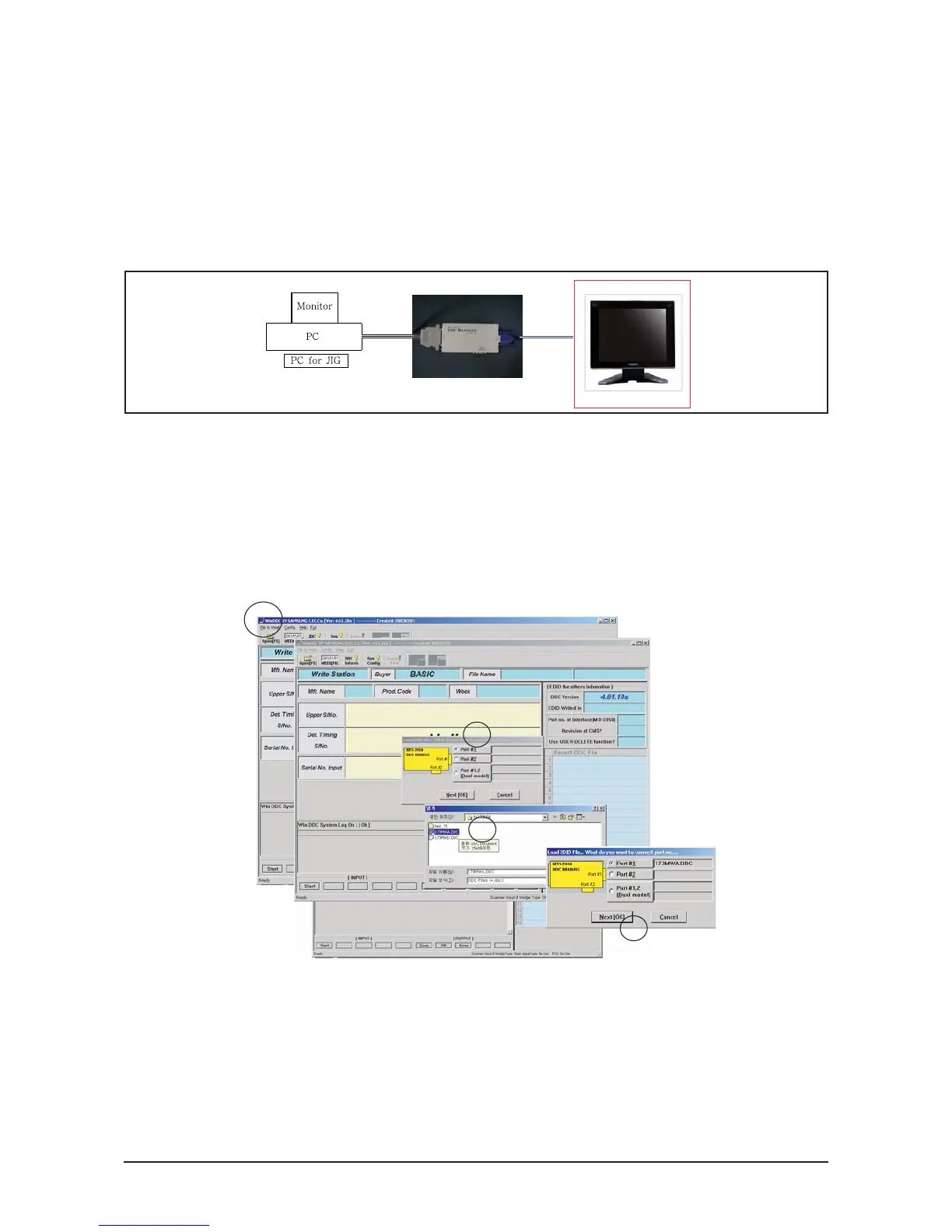
3-7 How to execute DDC
3-7-1 After exchange the Main PBA, confirm below items
1. Open file.
2. Select Port #1.
3. Select DDC file.
4. Click, "Next" Button
1. PC color status check (Auto Color)
2. EDID Input (Analog and Digital)
3. Check the MCU Code
(After change MCU Code, Do Auto color )
4. Factory Reset
1) Run DDC Manager MTI-2050.
2) Select a DDC file name.
Progtam : WinDDC BY SAMSUNG ELEC.Co. [Ver:4.65.12V] --- Modify : 20050425
DDC : 732N.ddc or 932B.ddc
3) Insert into DDC Manager Port 1 (analog) and make the DDC input as for the old dual model.
4) Insert into DDC Manager Port 2 (Digital) and make the DDC input.






 To Next Page