Troubleshooting
4-24 Samsung Electronics
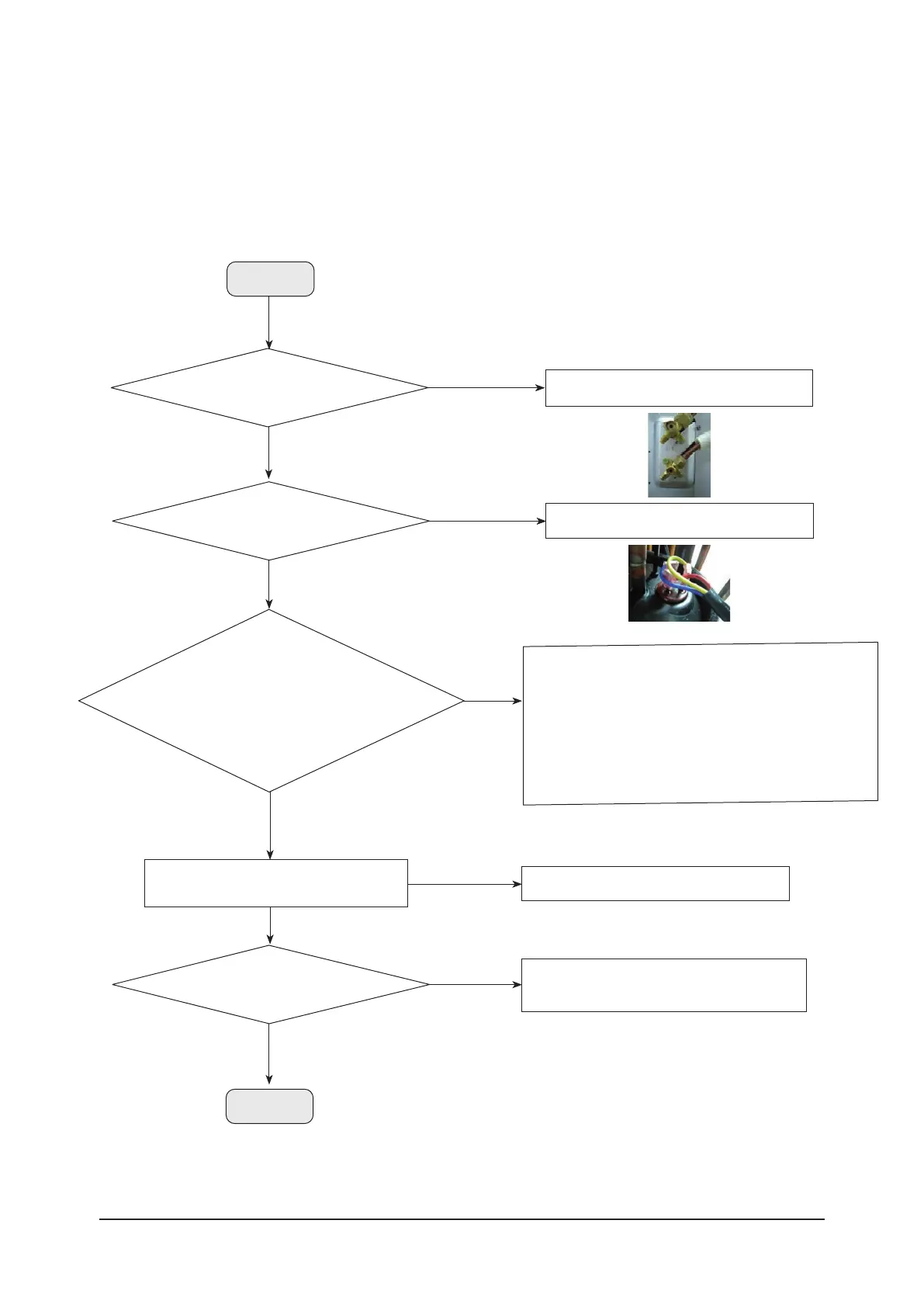
IPM (Over Current) error - (E464) (cont.)
Yes
Turn off the power and change the location
of the temperature sensor or replace it.
No
Are the position
and measuring value of the temperature
sensor normal?
Continue
Check the connection status of compressor.
No
Is compressor wire connected properly
to the compressor?
Yes
1. Replace the compressor : If the resistance value between phases
of the compressor is different.
→ Power on.→ Check the normal operation. → End the service.
2. Reassemble wire : If the wire connection of the compressor is
wrong.
→ Power on. → Check the normal operation. → End the service.
3. Replace the compressor : When loud abnormal noise generates
(metal cutting or grinding noise), or severe vibration.
No
Check the compressor.
1. Are all the resistance values between
phases matched? (U ↔ V, U ↔ W, V ↔ W)
2. Is compressor wiring normal? (disconnection, wrong connection)
3. Is there any abnormal noise from
compressor rotation?
Yes
Replace the compressor.
No
Yes
Is there a reading of MegaΩ of resistance
between compressor body and chassis?
Open the valve.
No
Is service valve fully opened?
Continue



 To Next Page