Samsung Electronics 4-1
4. Troubleshooting
4-1. Diagnostic Checkliest
4-1-1. Test operation mode and check mode
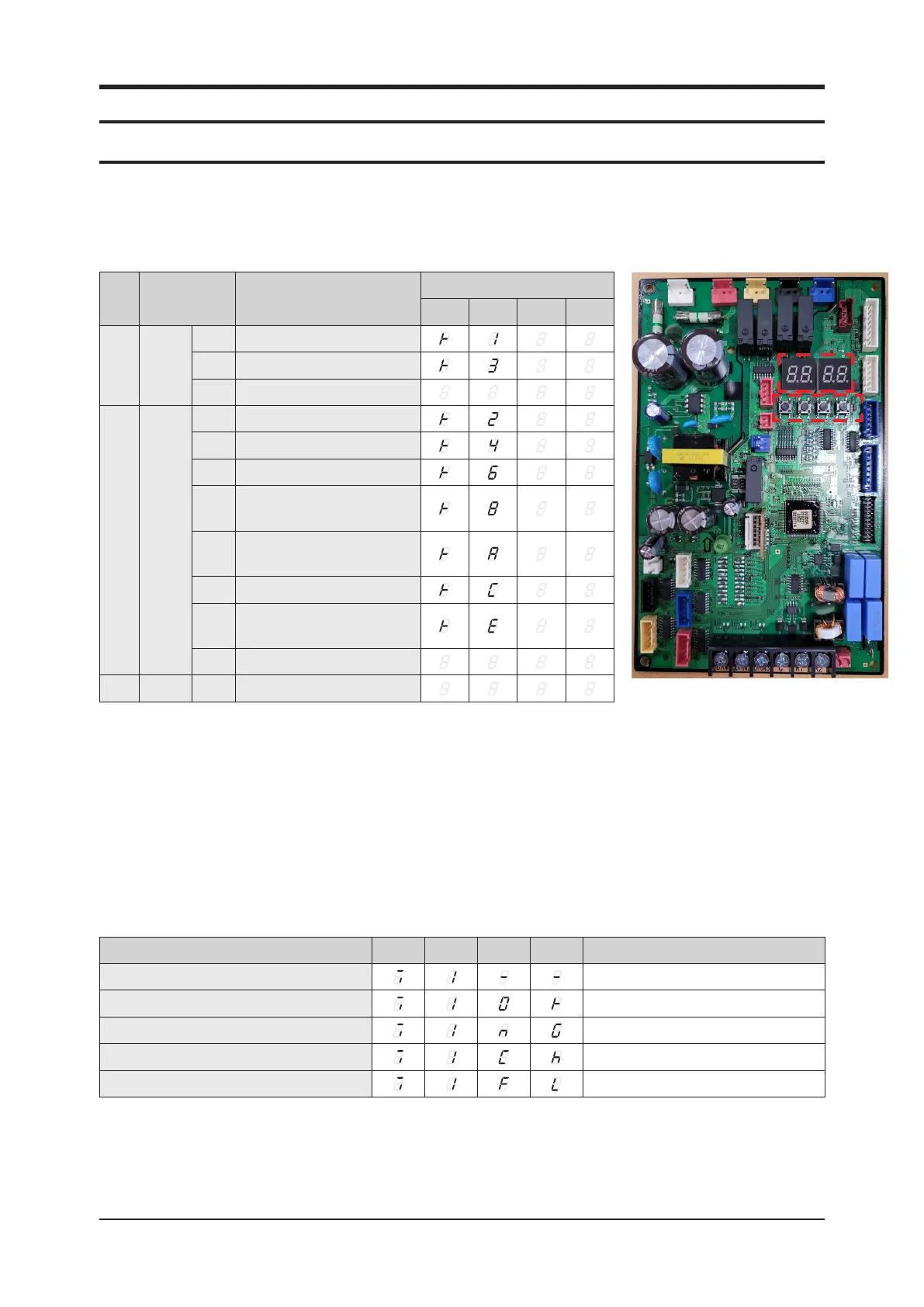
■ Display Option key
SEG1 SEG2 SEG3 SEG4 Action to take
Fault detection is in progress
-
OK -
NG PBA defect: Replace the PBA
Check Manual inspection is required
Going into fault detection mode failed Try fault detection again
7-segment display7-segment display
Key switchKey switch
Key Push type Mode
Display
SEG 1 SEG 2 SEG 3 SEG 4
K1 Short
1st
Heating test mode
1)
2nd
Defrost test mode
2)
3rd
End Key operation
K2 Short
1st
Cooling test mode
3)
2nd
Inverter check
3rd
Pump down
4th
Reserved
5th
On Device Inverter Checker
(Comp#1)
4)
6th
Auto test mode
5)
7th
Auto check
6)
(Install commissioning mode)
8th
End Key operation
K3 Short 1st
Reset
1) Heating test mode : system operates in heating mode (set 104℉ (40℃)) and checks for any error.
2) Defrost test mode operates when outdoor temperature is under 50℉(10℃) for 1 minute after pressing K1 for defrost test mode.
3) Cooling test mode : system operates in cooling mode (set 37.4℉ (3℃)) and checks for any error.
4) Indication on the display and action to take when an inverter fault is detected.
5) Auto Test Mode: System will determine test mode (cool or heat) based on ambient temperature
* Test mode will continue to operate for 10 hours; any K button press pressing any K button will terminate the test mode
* If an error occurs during the test operation, the test mode will terminate and display the associated error codes
6) Auto Check Mode: System will determine test mode (cool or heat) based on ambient temperature
* Test mode will continue to operate for 10~20mins and self-terminate test mode if no errors are found; pressing any K button press
will terminate the test mode
* If an error occurs during the test operation, the test mode will terminate and display the associated error codes



 To Next Page