EasyManua.ls Logo

Samsung Android phone - To Insert the Memory Card

Samsung Android phone
17 pages
Print Icon
To Next Page IconTo Next Page
To Previous Page IconTo Previous Page
Loading...
information.The
battery
icon
I
will
appear
blank.
If the
battery
is tob
low, the
phone
will
automatically
shut
down.
Need to
continue to
charge
the
battery
befgre
using
the
phone.
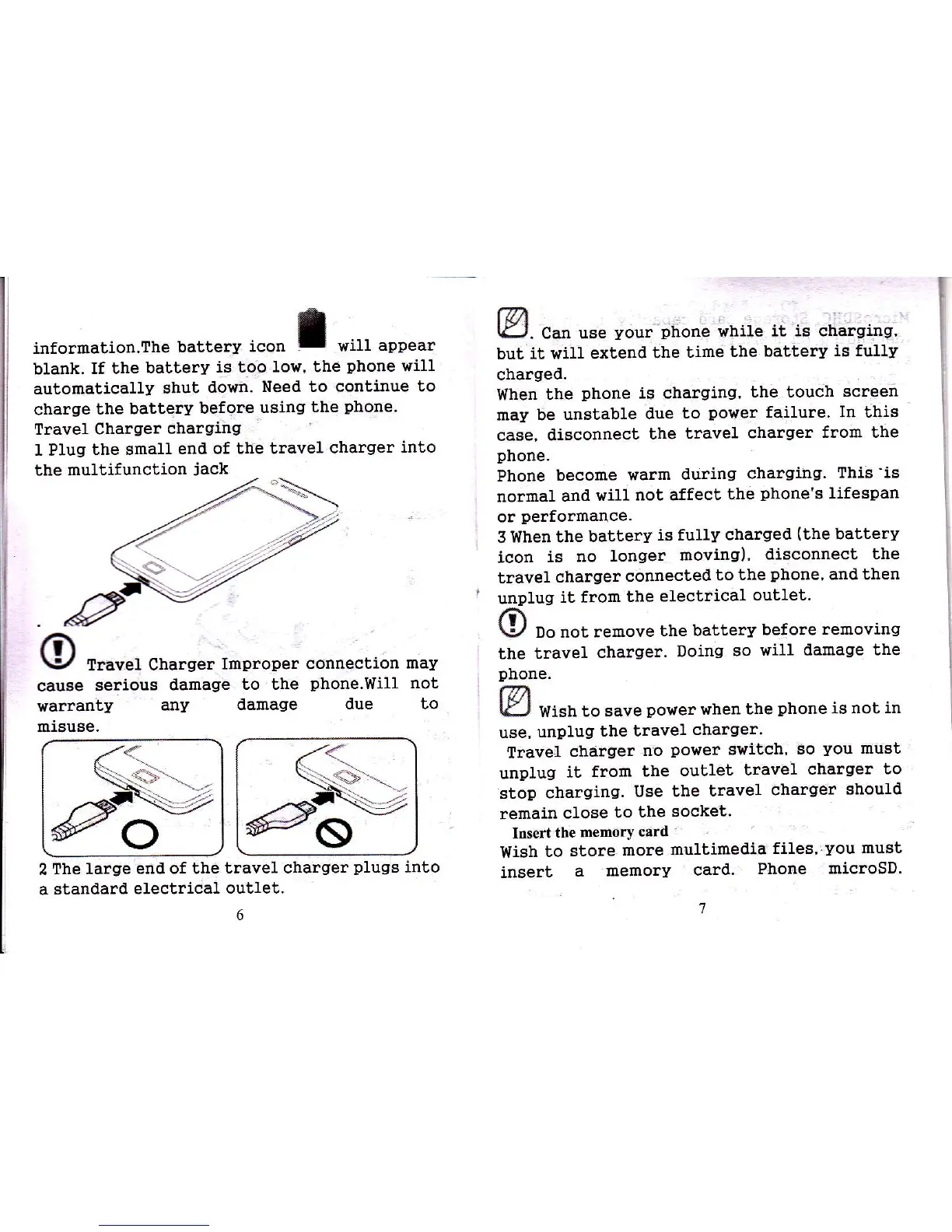
Travel Charger
chargiirg
I Plug
the small
end of
the travel
charger
into
the multifunction
jack
Travel
Charger
Improper
connection
may
cause
serious
alamage
to the
phone.Will
not
warranty
any
damage
due to
miause.
fvt
tEJ.
can use
your
phone
while
it is charging'
but
it wiu extend
the time
the
battery
is fuuy
charged.
When
the
phone
is charging,
the touch
screen
may be
unstable
due
to
power
failure'
In
this
case,
disconnect
the
travet
charger
from the
phone.
Phone
become
warm
during
charging.
This'is
normal
and
will
not affect
the
phone's
lifespan
or
performance.
3
When the
battery
is fully
charged
(the
batterv
icon
is
no
longer
moving)'
disconnect the
travel
charger
connected
to
the
phone,
and then
unplug
it from
the
electrical
outlet.
O
po
not
remove
the battery
before
removing
the travel
charger.
Doing
so
will damage
the
phone.
@
I€.J
vlish
to save
power
when
the
phone
is not in
use,
unplug
the travel
charger.
Travetr
charger
no
powef
switch,
so
you
must
unplug
it
from
the
oublet
travel
charger
to
stop
chargi.ng.
Use
bhe
travel
charqer
should
remain
close
to
the
socket'
Itrsert
the memory
card
Wish
to
store
more
multimedia
files'lyou
must
insert
a
memory
card.
Phone
microsD.
o
2
The large
end of the
traveL charger
plugs
into
a
standard
electrical
outlet.

Related product manuals