EasyManua.ls Logo

Samsung Android phone - Indicator Icon; Application Settings

Samsung Android phone
17 pages
Print Icon
To Next Page IconTo Next Page
To Previous Page IconTo Previous Page
Loading...
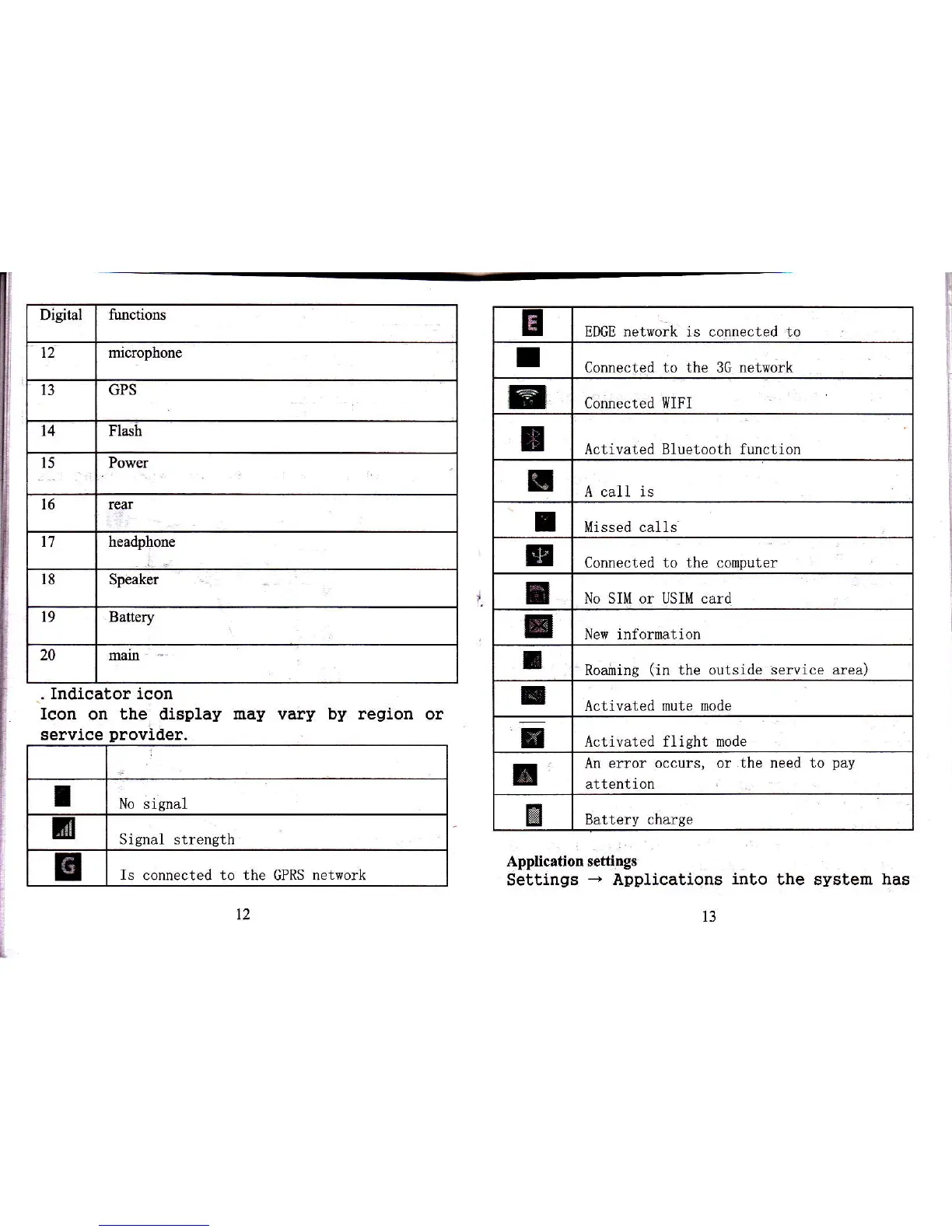
Digrtal
timctrons
12 microphone
l3
GPS
t4 Fl6h
Powq
l6 tru
headphone
IE
Jpeiler
19 Battery
20 l]ro
E
EDGE network is connected to
I
Connected to the 3G network
t
Connected I{IFI
I
Activated Bluetooth function
I
A call is
I Missed call
B
Connected
to the
computer
f
No SIM or USIM card
r
New information
I
Roainine
(in
the outside
service aea)
I
Activated mute
mode
-
Activated flieht mode
I
An ettor
occurs, or the need to
pay
attent
ion
&
Battery charge
.
Indicator icon
Icon
on the display
may vary
by
region
or
Application settings
Seltings
-
Applications
into
the system has
servlce
I
No sisnal
3
Signal strength
I
Is connected to the GPRS network
t3

Related product manuals