| NOTE |
\
If the remote does not operate properly:
- Check the polarity +/– of the batteries.
- Check if the batteries are drained.
- Check if the remote sensor is blocked by obstacles.
- Check if there is any fluorescent lighting nearby.
| CAUTION |
\
Dispose of batteries according to local environmental
regulations. Do not put them in the household trash.
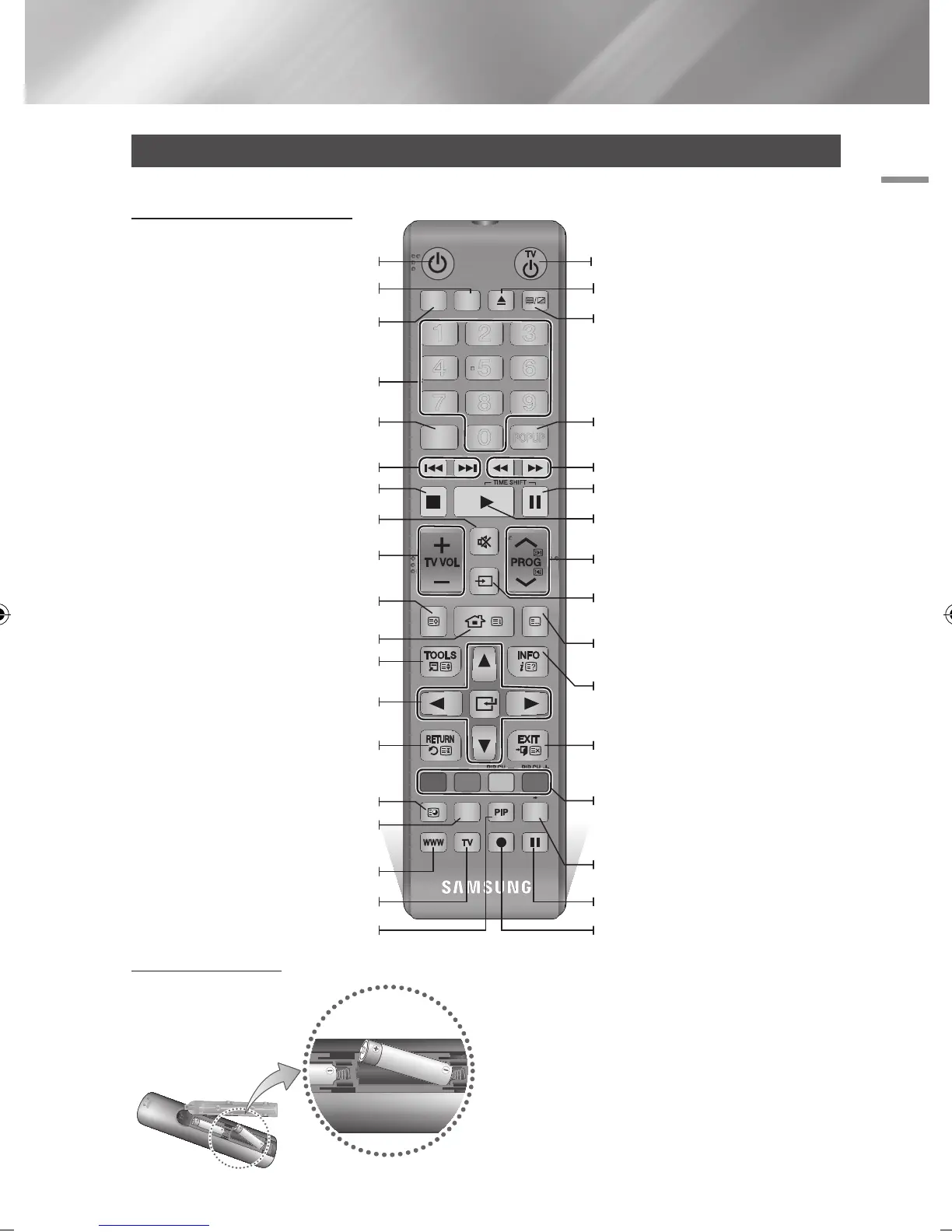
Installing batteries
Remote Control
Tour of the Remote Control
Press this to operate a TV.
Turn the product on and off.
Press to use Tools menu.
Return to the previous menu.
Press numeric buttons to operate options
or to access channels directly.
Use to enter the disc menu.
Press this to operate BD-HDD Combo.
Press to move to the home screen.
Use to select menu items and change
menu value.
Turn the TV on and off.
Press to exit the menu.
Alternately selects Teletext, Double or Mix.
Use to enter the popup menu/title menu.
After setup, allows you to set the input
source on your TV.
Press this to display the playback information
during playing a content in Disc/USB/HDD
or display the information of TV channel.
Press to search backwards or forwards.
Press to skip backwards or forwards.
Stops playback or recording.
TV volume adjustment.
Mutes the speakers of your TV.
Displays channel lists on the screen.
Press this to pause a playback or pause the
Timeshift function.
Press this to play or start the Timeshift
function.
Press this to select a TV channel.
Displays the EPG (Electronic Programme
Guide.)
These buttons are used both for menus on
the product and also several Blu-ray Disc
functions.
FUNCTION
TV SOURCE
POWER
RECEIVER
DIGITAL
SUBTITLE
INPUT
1 2 3
4 5 6
7 8 9
PANDORA SUBTITLE
SUBTITLE
INPUT
DISC MENU TITLE MENU
0
POPUP
A B C D
SMART HUB
SEARCH
BD TV
TV MUTE
TV SOURCE
TTX/MIX
SOCIAL REC REC PAUSE
2D 3D
CH LIST HOME GUIDE
Press to eject a disc.
Press to use Smart Hub.
Press to search contents.
Press this to use web browser function.
Press to use social TV.
Press this to use PIP function.
Press this when you want to use 3D
function.
Press this to pause during recording.
Press this to make a recording.
English 15
|
02230J-BD-E8900-EN-ENG.indd 15 2012-04-13 오후 2:53:11



 To Next Page