English _15
● DESCRIPTION
REAR PANEL
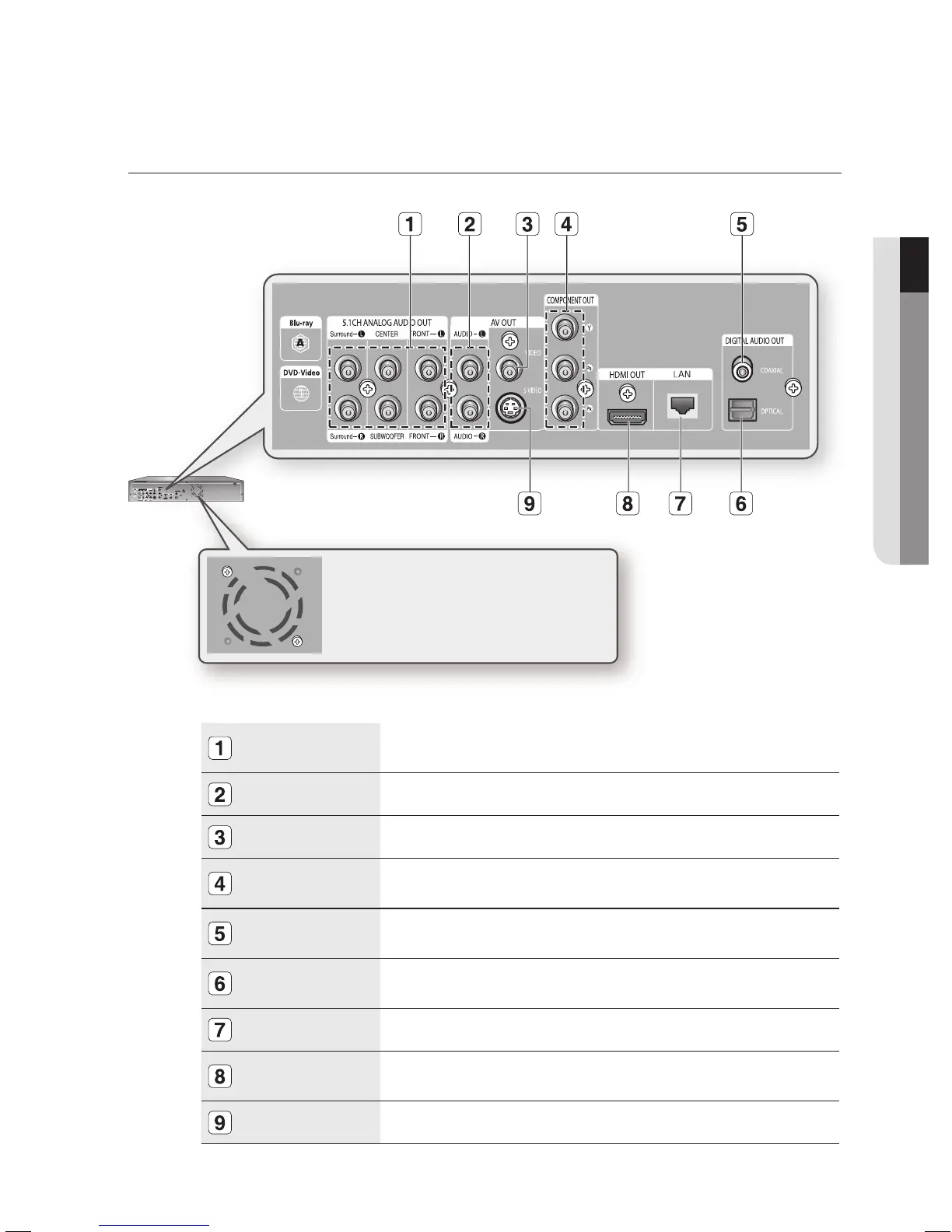
5.1CH ANALOG
AUDIO OUT
Connect to a 5.1CH analog input on an A/V amplifi er
AUDIO OUT
Connects to the audio input of external equipment using audio cables.
VIDEO OUT
Connects the input of external equipment using a video cable.
COMPONENT
VIDEO OUT
Connects to equipment having Component video input.
DIGITAL AUDIO OUT
(COAXIAL)
Connects to an amplifi er having a digital coaxial audio input jack.
DIGITAL AUDIO OUT
(OPTICAL)
Connects to an amplifi er having a digital optical audio input jack.
LAN
Connect this LAN terminal to the LAN terminal on your modem for software upgrades.
HDMI OUT
Use the HDMI cable, connect this HDMI output terminal to the HDMI input terminal on
your TV for the best quality picture.
S-VIDEO OUT
Connects the input of external equipment using an S-Video cable.
Fan
The fan always revolves when the power is on.
Ensure a minimum of 4 inches of clear space on
all sides of the fan when installing the product.





 To Next Page