26_ connections
connections
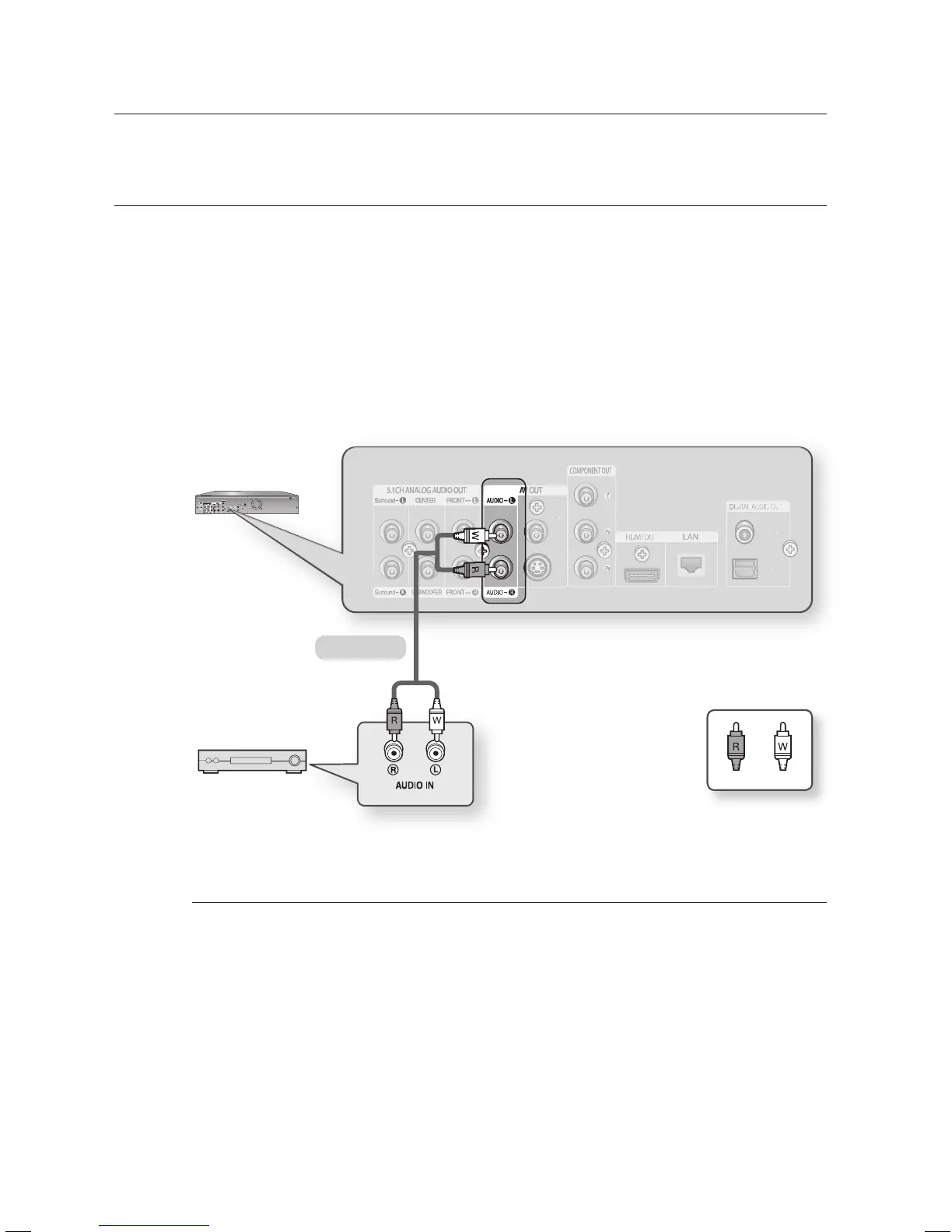
CONNECTING TO AN AUDIO SYSTEM (2 CHANNEL AMPLIFIER)
Using the audio cables, connect the AUDIO (red and white) OUT terminals on the rear of the Blu-ray Disc
Player to the AUDIO (red and white) IN terminals of your Amplifi er.
Using the video signal cable(s), connect the HDMI, COMPONENT, S-VIDEO, or VIDEO OUT terminals on the
rear of the Blu-ray Disc Player to the HDMI, COMPONENT, S-VIDEO, or VIDEO IN terminal of your TV as
described on pages 20 to 25.
Turn on the Blu-ray Disc Player, TV and Amplifi er.
Press the input select button of the Amplifi er to select the external input in order to hear sound from the Blu-ray
Disc Player. Refer to your Amplifi er's user manual to set the Amplifi er's audio input.
Manufactured under license from Dolby Laboratories. “Dolby” and the double-D symbol are trademarks of
Dolby Laboratories.
“DTS” and “DTS Digital Surround” are registered trademarks of DTS, Inc.
1.
2.
3.
4.
M
2-Channel stereo amp
Audio Cable
WhiteRed





 To Next Page