English _17
● REMOTE CONTROL
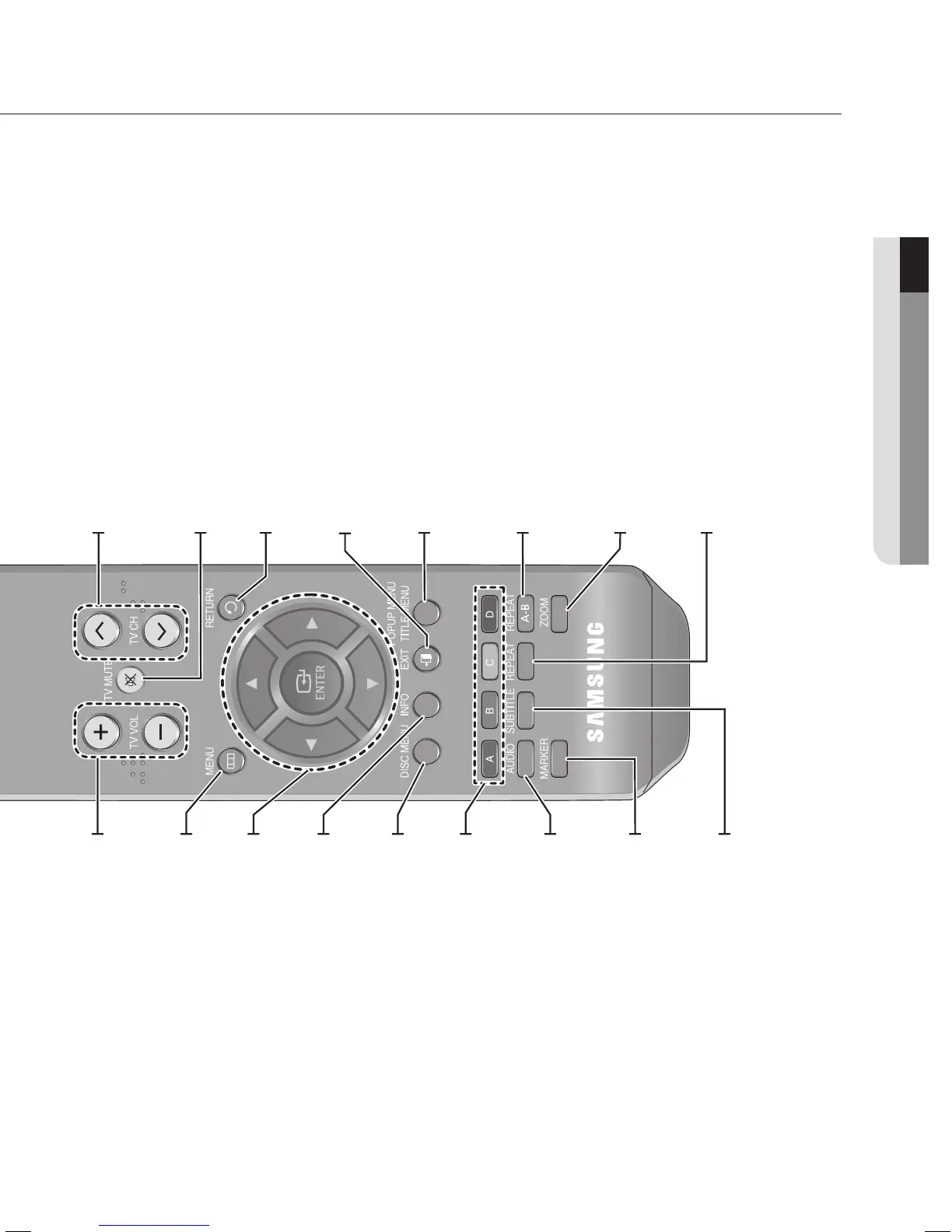
TV VOL Buttons
TV volume adjustment
MENU Button
Brings up the Blu-ray Disc Player’s setup menu.
INFO Button
Displays current setting or disc status.
DISC MENU Button
Use this to enter the disc menu.
COLOR Buttons : RED(A), GREEN (B),
YELLOW(C), BLUE(D)
Allow access to common functions of the Blu-ray Disc
Player such as the Music or Photo List.
AUDIO Button
Use this to access various audio functions on a disc
(BD/DVD).
MARKER Button
Use this to bookmark a position while playing a disc.
SUBTITLE Button
Press this to switch the BD/DVD’s subtitle language.
TV CH Button
Use this to select a TV program.
TV MUTE Button
Mutes the speakers of your TV.
RETURN Button
EXIT Button
POPUP MENU/TITLE MENU Button
Use this to enter the popup menu/title menu.
REPEAT A-B Button
Allows you to repeat playback of a certain section.
ZOOM Button
Enlarges photos on JPEG discs.
REPEAT Button
Allows you to repeat a title, chapter, track or disc.
ENTER/DIRECTION Buttons
(▲▼◄► Buttons)





 To Next Page