ENG ENG
SETUP
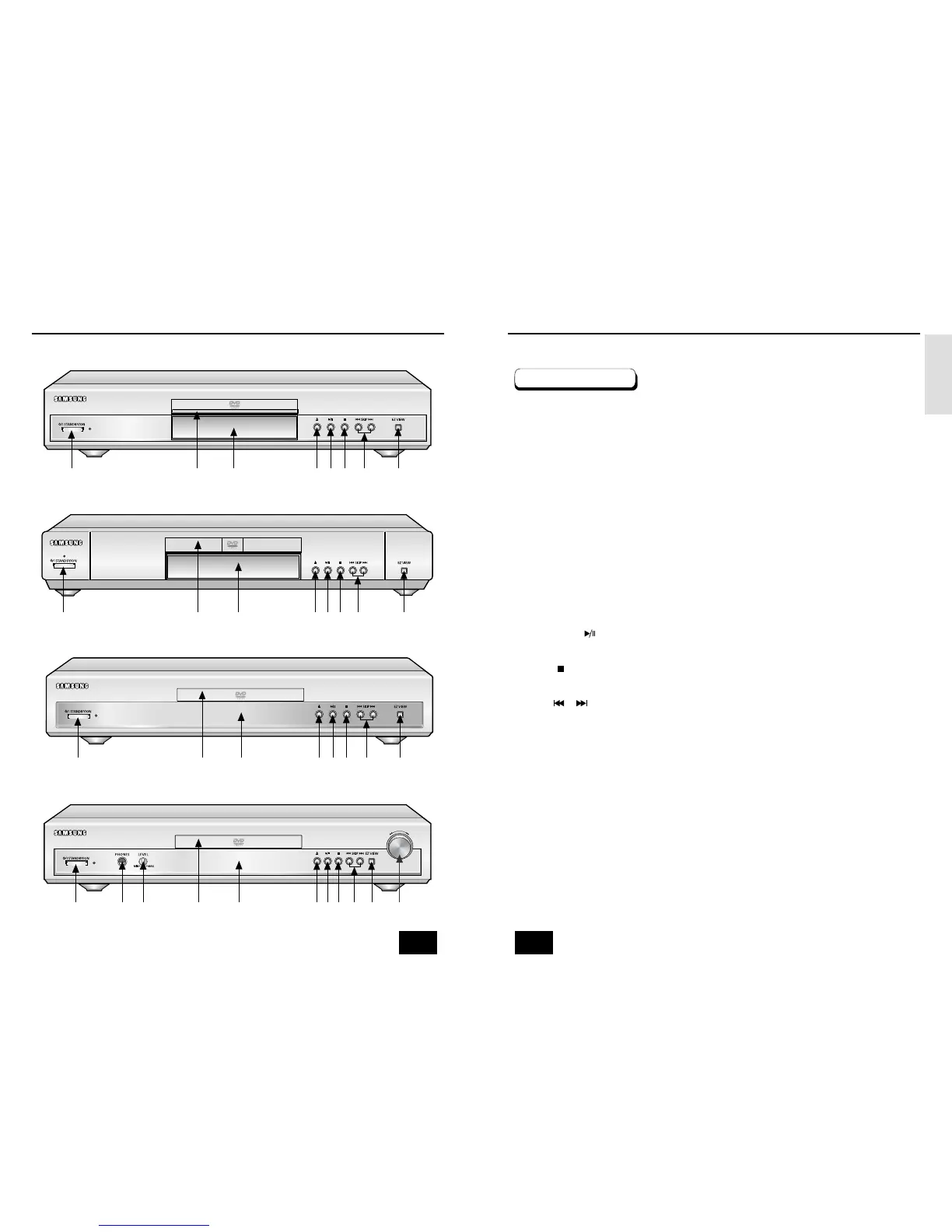
Description-Front Panel
8 9
Description-Front Panel
Front Panel Controls
1. STANDBY/ON
• When the unit is first plugged in, the indicator lights. When STANDBY/ON is pressed on again,
the light goes out and the player is turned on.
2. HEADPHONE JACK
•
You can attach headphones here for private listening.
3. HEADPHONE VOLUME
•
Use to adjust headphones volume level.
4. DISC TRAY
• Load the disc here.
5. DISPLAY
• Operation indicators are displayed here.
6. OPEN/CLOSE
• Press to open and close the disc tray.
7. PLAY/PAUSE ( )
• Begin or pause disc play.
8. STOP ( )
• Stops disc play.
9. SKIP ( / )
• Use to skip a scene or music.
10. EZ VIEW
• Easy View can convert Letter Box images to full screen viewing on your conventional TV.
11. SHUTTLE
• Use during DVD and CD play to fast forward or reverse.
1
4
5678910
DVD-E232
1
4
5
6
7
89 10
DVD-E235
DVD-E234
1
4
5678910
DVD-E335/DVD-E435
1
42
5367891011



 To Next Page