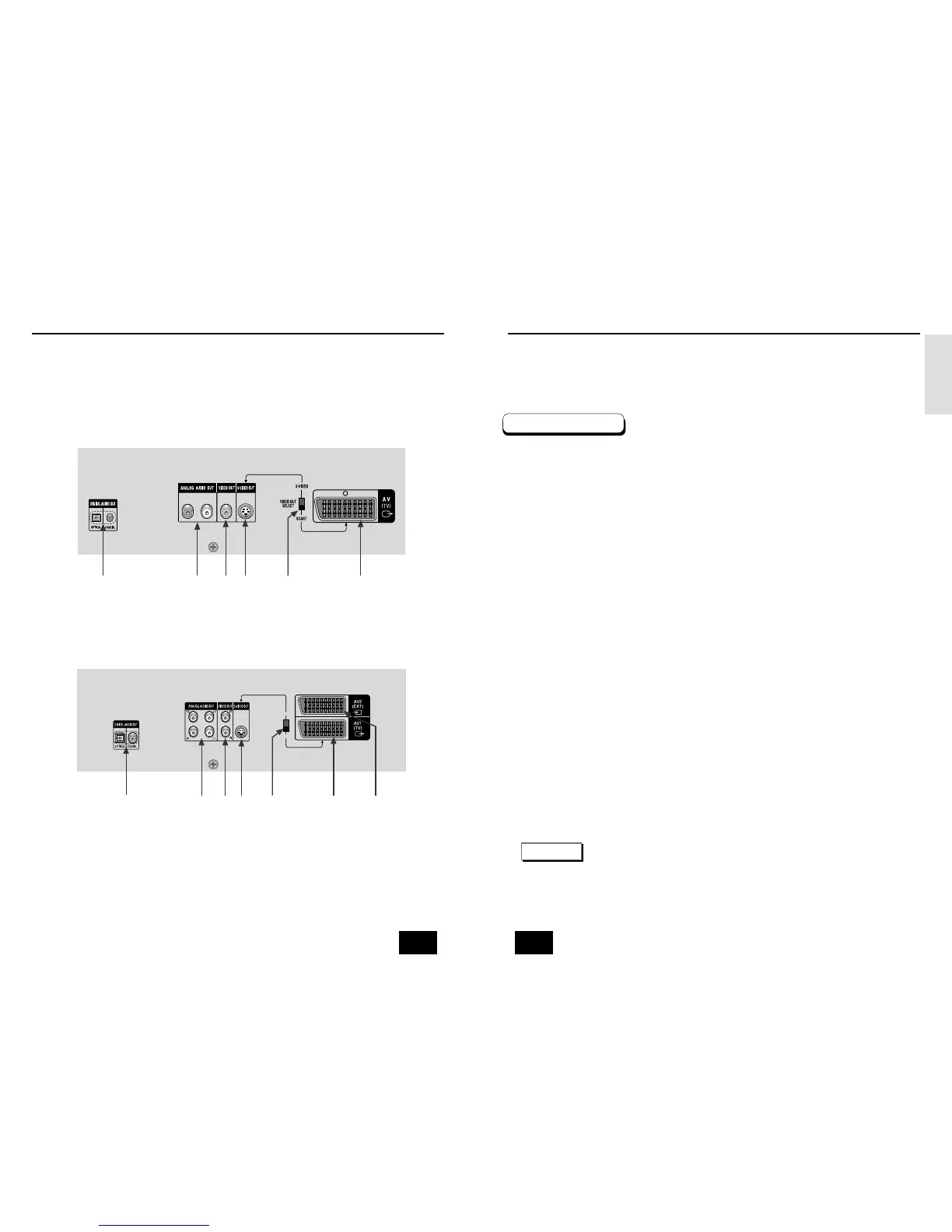
1. DIGITAL AUDIO OUT JACKS
• Use either an optical or coaxial digital cable to connect to a compatible Dolby Digital, receiver.
Use to connect to an A/V Amplifier that contains a Dolby Digital, MPEG-2 or DTS decoder.
2. ANALOG AUDIO OUT JACKS
• Connect to the Audio input jacks of your television, audio/video receiver.
3. VIDEO OUT JACKS
• Use a video cable to connect to the Video input jack on your television.
4. S-VIDEO OUT JACK
• Use the S-Video cable to connect this jack to the S-Video jack on your television for a higher quality
picture. The S-Video must be selected in the VIDEO OUT SELECT.
5. VIDEO OUT SELECT SWITCH
• Use the switch to set video out. If Scart jack is selected, S-Video may not work.
If S-Video is selected, Scart jack may not work.
6. SCART AV1 JACK
• Connect to a TV with scart input jack.
7. SCART AV2 JACK
• Connect to a video recorder or other equipment.
DVD-E232/DVD-E234/DVD-E235
DVD-E335
1
1234567
234 5 6
* Select the VIDEO OUT SELECT switch in the Stop or Power Off mode.
NOTE
Description-Rear Panel Description-Rear Panel
Rear Panel
12 13



 To Next Page