SETUP
16 17
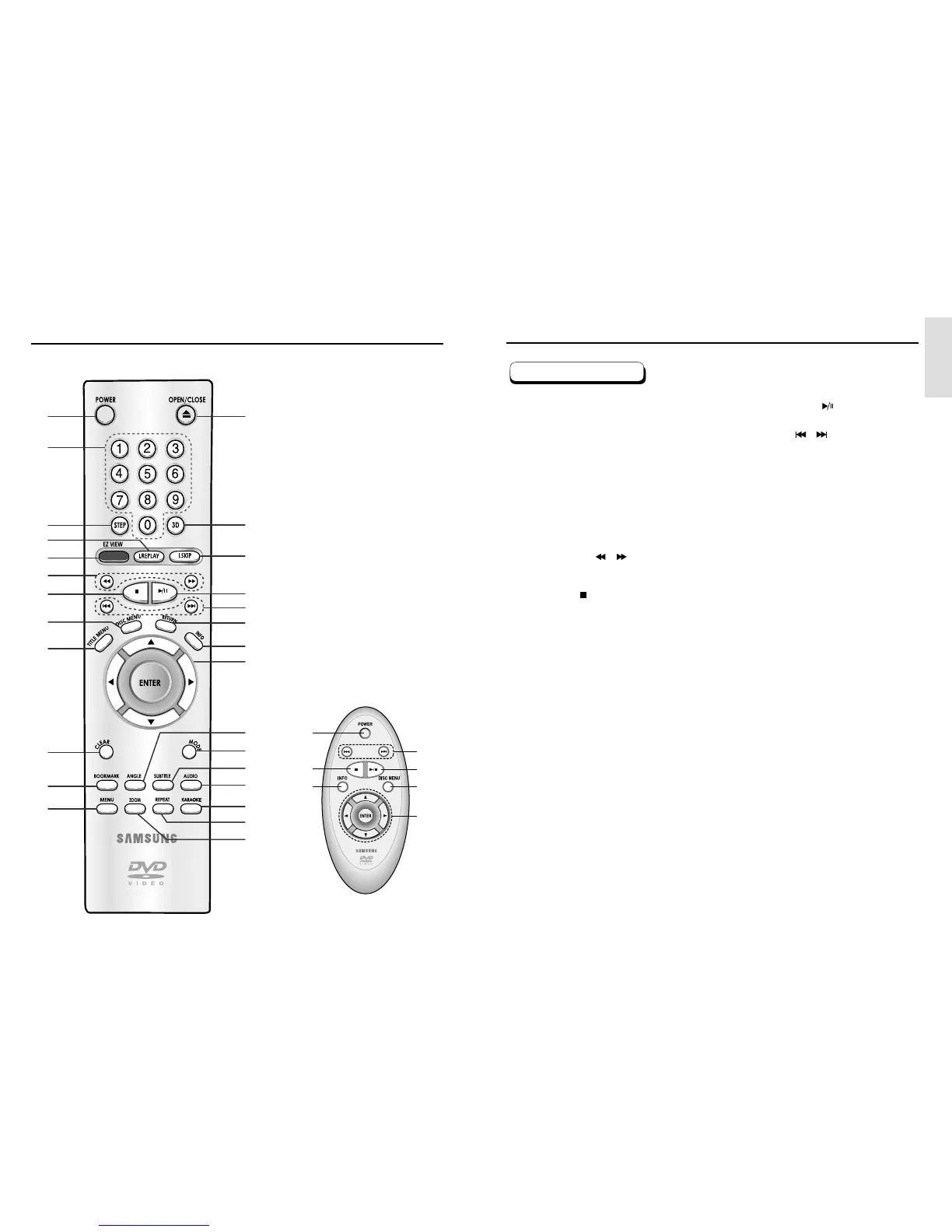
Tour of the Remote Control Tour of the Remote Control
1. DVD POWER Button
• Turns the power on or off.
2. NUMBER Buttons
3. STEP Button
• Advances play one frame at a time.
4. I.REPLAY Button
• This function is used to replay the previous 10
seconds of the movie from the current position.
5. EZ VIEW Button
• Easy View can convert Letter Box images to full
screen viewing on your conventional TV.
6. SEARCH Buttons ( / )
• Allows you to search forward/backward through a
disc.
7. STOP Button ( )
8. DISC MENU Button
• Brings up the Disc menu.
9. TITLE MENU Button
• Brings up the Title menu.
10. CLEAR Button
• Use to remove menus or status displays from the
screen.
11. BOOKMARK Button
12. MENU Button
• Brings up the DVD player’s setup menu.
13. OPEN/CLOSE Button
• To open and close the disc tray.
14. 3D Button
15. I.SKIP Button
• This function skips playback ahead 10 seconds.
16. PLAY/PAUSE Button ( )
• Begin/Pause disc play.
17. SKIP Buttons ( / )
• Use to skip the title, chapter, or track.
18. RETURN Button
• Returns to a previous menu.
19. INFO Button
• Displays the current disc mode.
20. ENTER/DIRECTION Button
(UP/DOWN or LEFT/RIGHT Buttons)
• This button functions as a toggle switch.
21. ANGLE Button
• Use to access various camera angles on a DVD.
22. MODE Button
• Allows you to program a specific order.
23. SUBTITLE Button
24. AUDIO Button
• Use this button to access various audio functions on
a disc.
25. KARAOKE Button
• Use to begin Karaoke functions.
26. REPEAT Button
• Allows you to repeat play a title, chapter, track, or
disc.
27. ZOOM Button
• Enlarges the DVD picture.
DVD Function Buttons
113
14
15
16
17
18
19
20
21
22
23
24
25
26
27
2
3
4
5
6
7
8
9
10
11
12
DVD-E337K/DVD-E437K
1
17
16
8
20
19
7
(Easy Remote Control)



 To Next Page