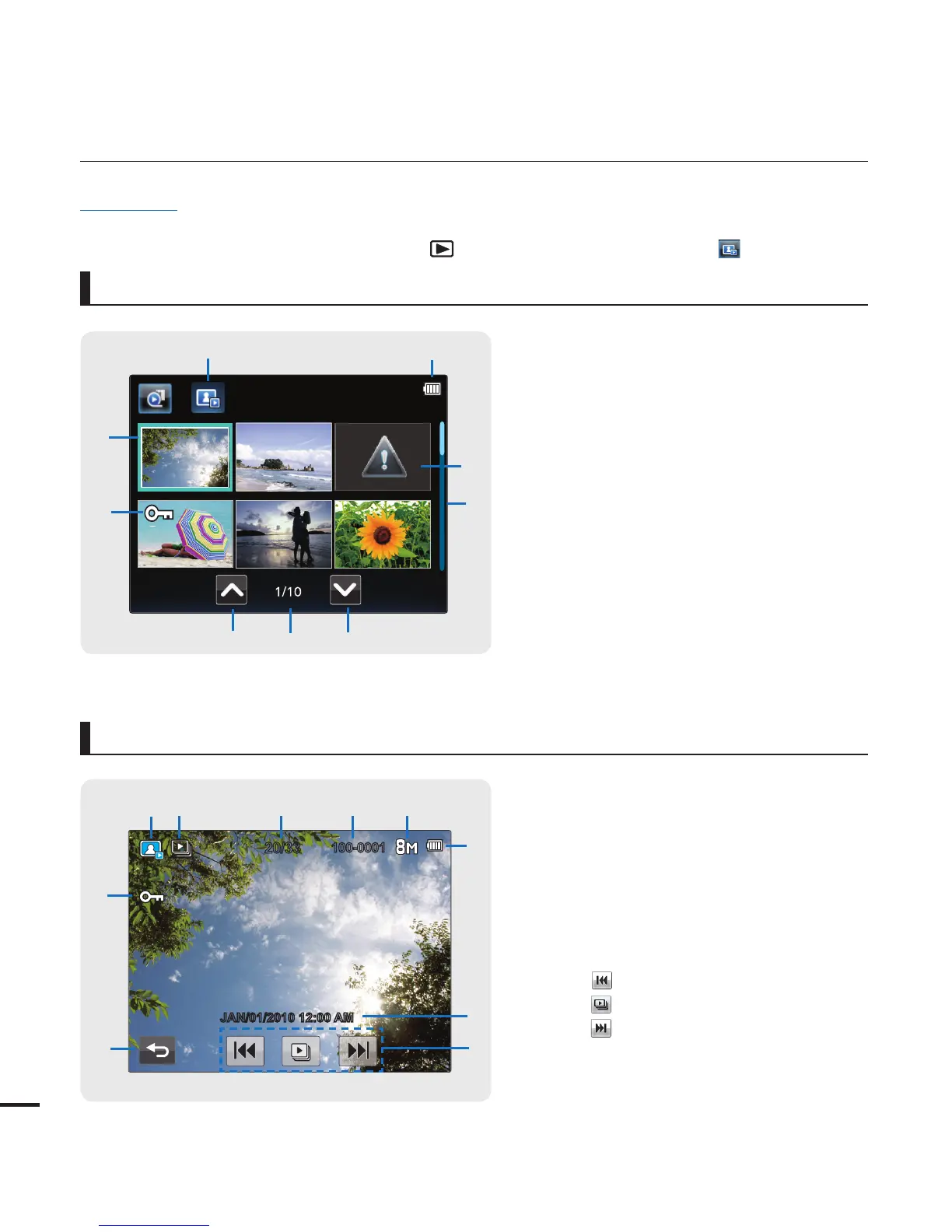
1 Photo play mode
2 Battery info. (remaining charge level)
3 Error File
4 Scroll bar
5 Next page tab
6 Now/ Total page number
7 Previous page tab
8 Erase protection
9 Highlight
Photo play mode : Thumbnail View
Photo play mode : Single View
1 Photo play mode
2 Slide show
3 Photo image counter (current image/
total number of recorded images)
4 File name (fi le number)
5 Photo Resolution
6 Battery info. (remaining charge level)
7 Recorded date/time display
8
ᐓ
: Previous image tab
ᐔ
: Slide show start tab
ᐕ
: Next image tab
9 Return tab
10 Erase protection
getting to know the camcorder
16
PRECHECK!
This On Screen Display (OSD) is shown only when the camcorder is in Photo Play mode.
Select the Play mode by pressing the Mode (
) button, and then touch the Photo ( ) tab.
¬
page 23
•
•
100-0001
20/33
JAN/01/2010 12:00 AM
0
9
1
2 3 4 5
6
7
8
5
7
8
9
1
2
3
4
6








 To Next Page