2-8
Samsung Electronics
Product Specifications
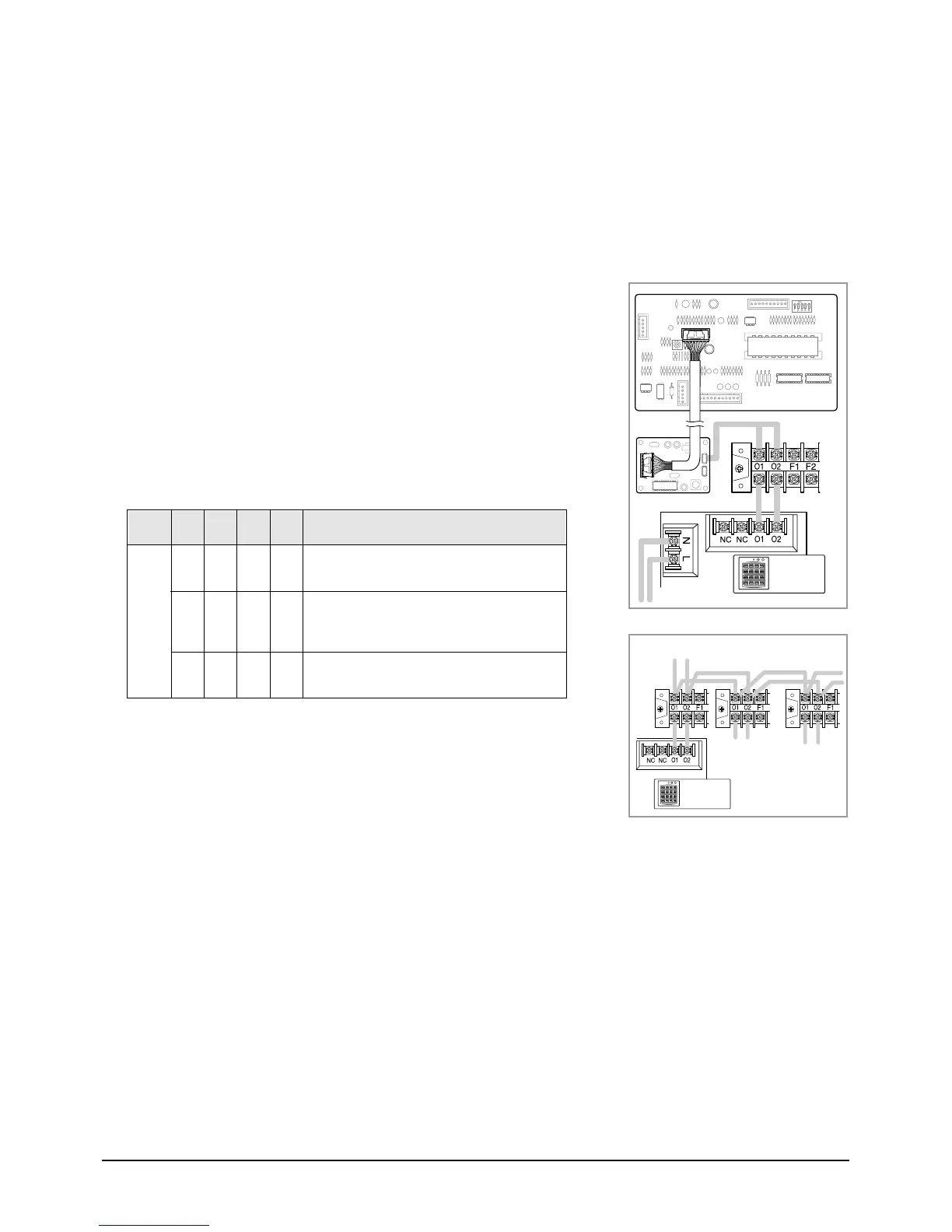
2-7-2. With Centralized Controller
A user can turn on/off up to sixteen air conditioners by using the centralized controller.
In this case, the user can turn on/off all air conditioners or a specific air conditioner connected with the centralized
controller. And each air conditioner can be controlled by its own remote controller(s) depending on the setting.
1. Connect the O1 and O2 terminals in the centralized controller to
the O1 and O2 terminals in the indoor unit “A”.
2. Connect the O1 and O2 terminals in the indoor unit “A” to the
O1 and O2 terminals in another indoor unit “B”.
3. Connect the O1 and O2 terminals of “B” to any indoor unit “C”
and connect the others as the same way.
4. Adjust the DIP switch(DS01) in the centralized controller to the
desired position referring to the table below.
5. Adjust the rotary switch on the transmitter to the desired position
referring to the table on page 2-11.
Note : You cannot install the centralized controller when the wired remote
controller for a group has already been installed.
OFF
Switch
Position
OFF
OFF
OFF
OFF
OFF
OFF
OFF
ON
OFF
ON
OFF
The air conditioner is operated by the controller
adjusted last among the wired remote controller,
wireless remote controller and centralized controller.
A user can use wired/wireless remote controller when
the centralized controller is switched on.
And he/she cannot use the remote controller(s) when
the centralized controller is switched off.
The air conditioner(s) can be controlled by only the
centralized controller. The user cannot use the
wired/wireless remote controller in this case.
Switch
No.
1234 Meaning
Centralized
Controller
Unit A Unit B Unit C
Centralized
Controller
2-00216A(1)-PR 5/19/01 10:05 AM Page 2-8



 To Next Page