7-1
Samsung Electronics
7. Schematic Diagrams
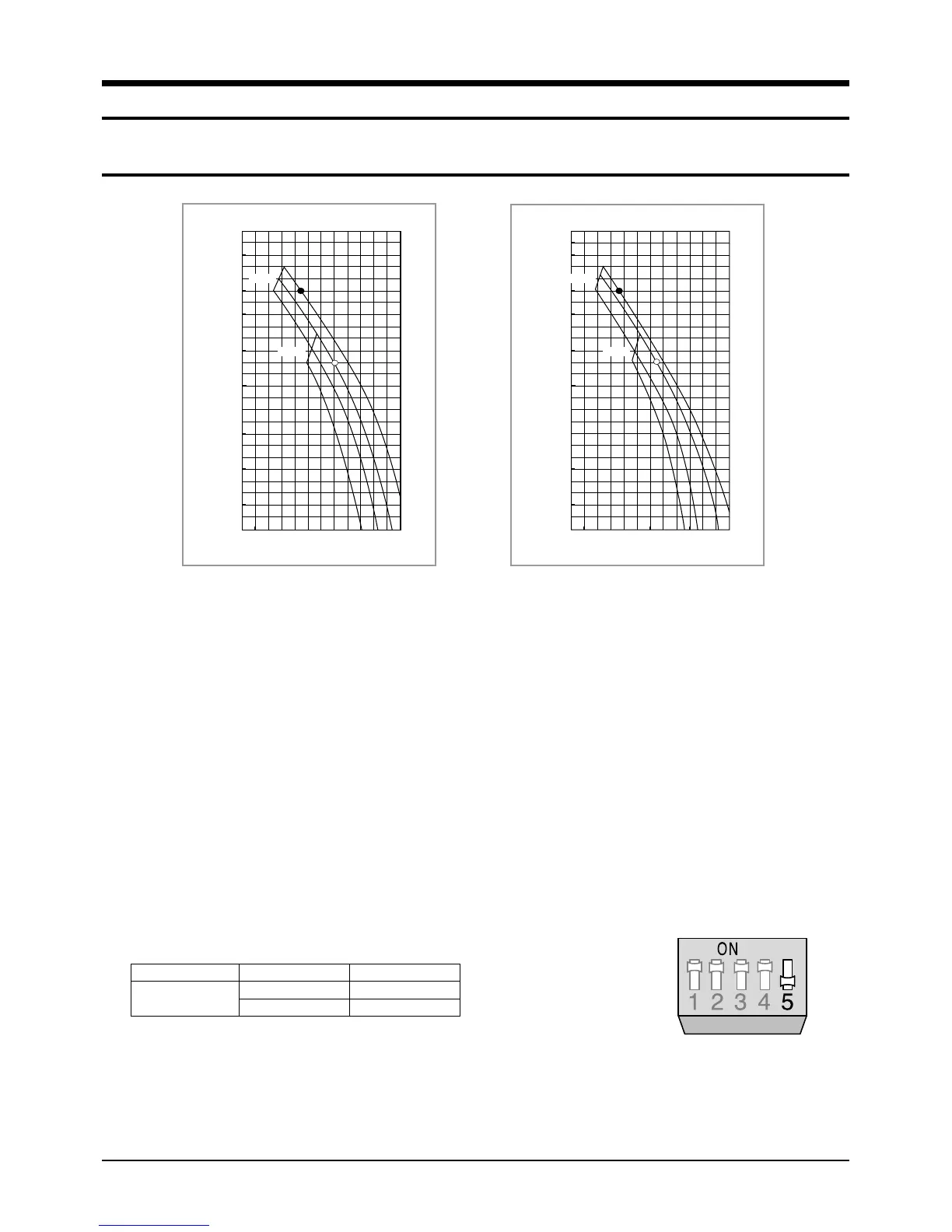
7-1 Graph of air flow rate vs external static pressure
How to Read Diagram
1. The vertical axis is the external static pressure(mmAq) while the horizontal axis represents the AIR
FLOW(m
3
/min).
2. The characteristic curves for ‘HH’, ‘H’, ‘Med’, and ‘Low’ fan speed controller are shown.
3. The nameplate values are shown based on the ‘H’ air flow.
4. If external static pressure is too great, the air flow volume may drop too low as explained above.
HH : DIP Switch OFF position(High speed) H : At shipment(Normal speed)
If external static pressure is too great(due to long extension of ducts, for example), the air flow volume may drop too
low at each air outlet. This problem can be solved by increasing the fan speed using the following procedure.
1. Remove the screw on the electrical component box and remove the cover plate.
2. Adjust the DIP switch(SW2) on the main PCB to the “OFF” position.
Note:
◆ This air conditioner is tested under 14mmAq external static pressure.
Note:
◆ If you increase the fan speed, you can use the air conditioner under the external static pressure of 20mmAq maximally.
3. Re-install the cover plate and join the removed screw.
(Without air filter)
Air Flow (m
3
/min)
25
20
10
15
5
0
20 25 30 35 40 44
L
M
H
HH
Static pressure (mmAq)
Switch No.
5
Switch Position
ON
OFF
Function
Normal speed
High speed
Limit line
Limit line
(With air filter)
Air Flow (m
3
/min)
25
20
10
15
5
0
20 25 30 35 40 44
L
M
H
HH
Static pressure (mmAq)
Limit line
Limit line
5-00216A(1)-EV 5/19/01 10:07 AM Page 7-1



 To Next Page