3. Operating Instructions
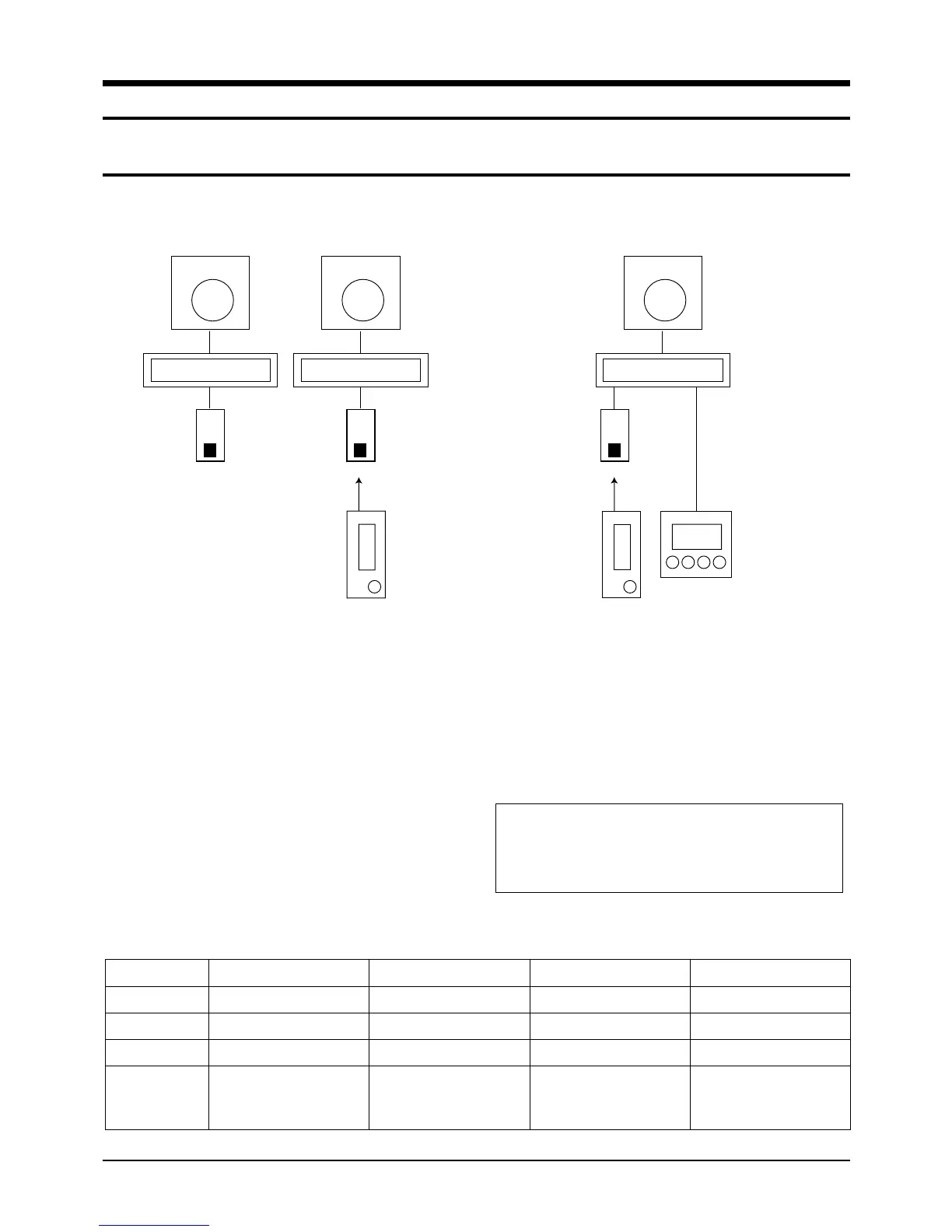
3-1 Example of Single unit Operation
Samsung Electronics
3-1
1 chamber wired, wireless remote controller single operation and 1 chamber wireless remote controller +
wired remote controller combination control
Wired Remote Controller Option Switch
Indoor unit
Receiver
& display
unit
Wireless
remote
controller
Outdoor unit
Indoor unit
Wired
remote
controller
Outdoor unit
Indoor unit
Receiver
& display
unit
Wireless
remote
controller
Wired remote
controller
Outdoor unit
Example of 1 chamber single operation
(wired or wireless remote controller)
Example of 1 chamber single operation
(wireless + wired remote controller)
1. Put off the power.
2. For the combined use of wireless remote
controller and wireless remote controller, put on
the option switch 4 of wired remote controller.
3. Putting off the option switch 4 of wired remote
controller disables the control by wireless remote
controller.
4. Put on the power.
* In case of 1 chamber single operation (wireless remote controller+wired remote controller), both setting of wired remote controller
to MASTER/SLAVE is available.
<To use wired & wireless remote controller simultaneously >
DIP SWITCH NO
1
2
3
4
OPTION ITEM
Type of unit
Indoor unit control
Basic specification
Combined use of
wireless remote
controller
SW ON
Cooling only
Group control
-
Able to operate of wired
remote controller
(SLAVE MODE)
SW OFF
Heat pump
Indoor unit 1 chamber control
-
Disable to operate the
wireless remote controller
(MASTER MODE)
DEFAULT
OFF
OFF
Fixed to OFF
OFF
Caution :
• After resetting the option in the wired remote controller, be
sure to put the power on again so that the set option can
be applied.
2-00216A(1)-PR 5/19/01 10:05 AM Page 3-1



 To Next Page