2-4
Samsung Electronics
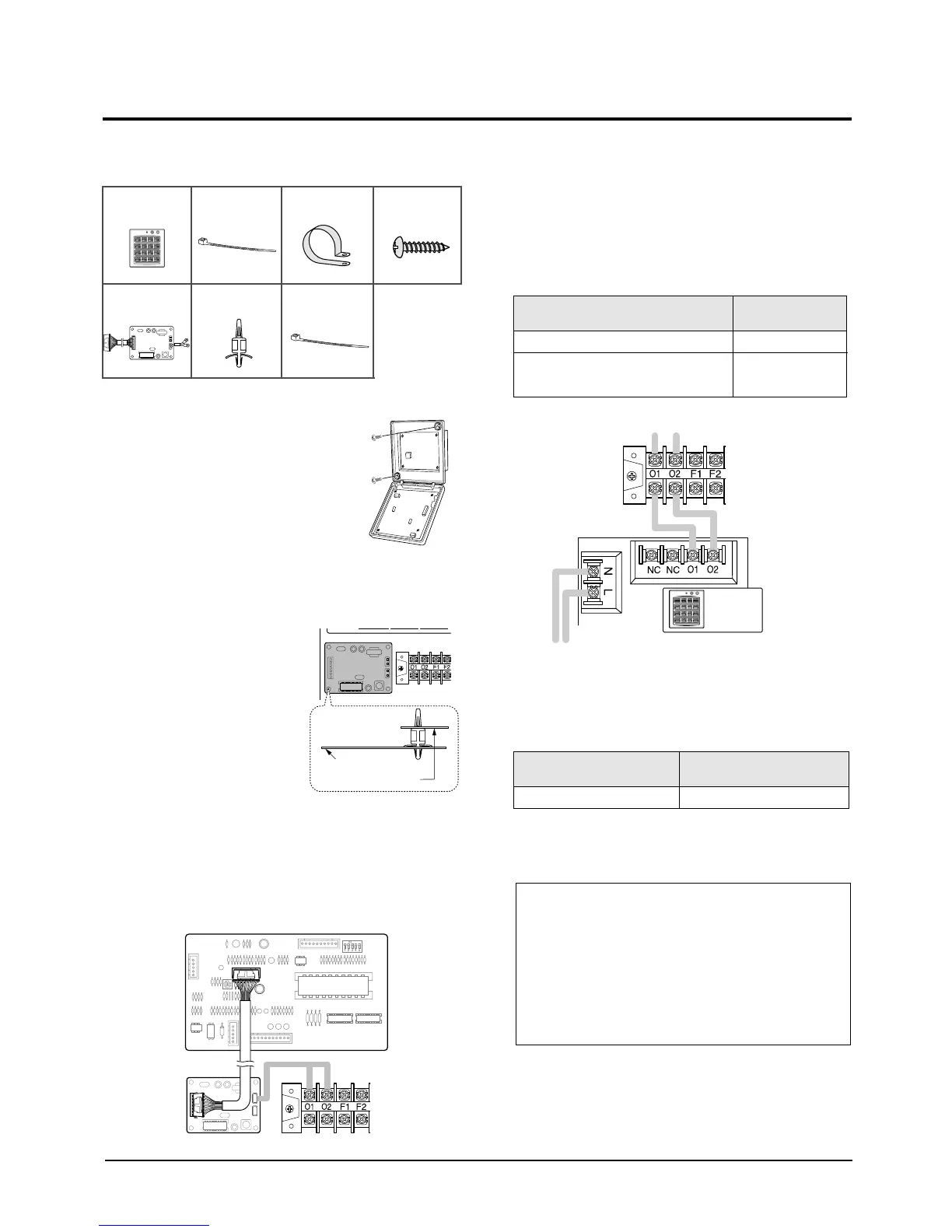
Accessories
1. Open the centralized controller
cover by using two grooves on
the top of it.
2. Secure the rear cover of the centralized
controller on the wall with two screws.
3. Secure the transmitter
with four spacer supports
into the electrical
component box.
4. Connect the cable from the PCB and to the
transmitter.
And connect another cable from the O1, O2
terminals and to the transmitter as shown in
figure.
5. Connect the O1 and O2 terminals of the
centralized controller to the O1 and O2
terminals on the electrical component box as
shown in figure.
Note : Cable Specifications
6. Connect the power cables.
Note : Cable Specifications
7. Reassemble the centralized controller.
2-4 Centralized Controller Installation
Size of cables 0.75mm
2
~1.25mm
2
Cable type
Double-insulation, 2G
Centralized
Controller(1)
Cable-Tie(2) Cable Clamp(5) M4 X 16 Tapped
Screw(7)
Transmitter(1) Spacer Support(4) Cable-Tie(2) M4 X 16 Tapped
Screw(7)
Electrical component box
Transmitter
Size of cables
Max. length of electric wires from the
indoor unit to the centralized controller
0.75mm
2
~1.25mm
2
1km
Cable type
Double-insulation,
2G(Shield Cable)
Centralized
Controller
Caution :
•The optional kits must be installed by an installation
specialist.
•Before installing the optional kits, ensure that you have
turned off the main power.
•All optional kits cables should be installed according to
the national wiring rules and you must install them in the
wall not to be touched by users.
2-00216A(1)-PR 5/19/01 10:05 AM Page 2-4



 To Next Page