EasyManua.ls Logo

Samsung MAX-445 - Cassette Deck

Samsung MAX-445
67 pages
Print Icon
To Next Page IconTo Next Page
To Previous Page IconTo Previous Page
Loading...
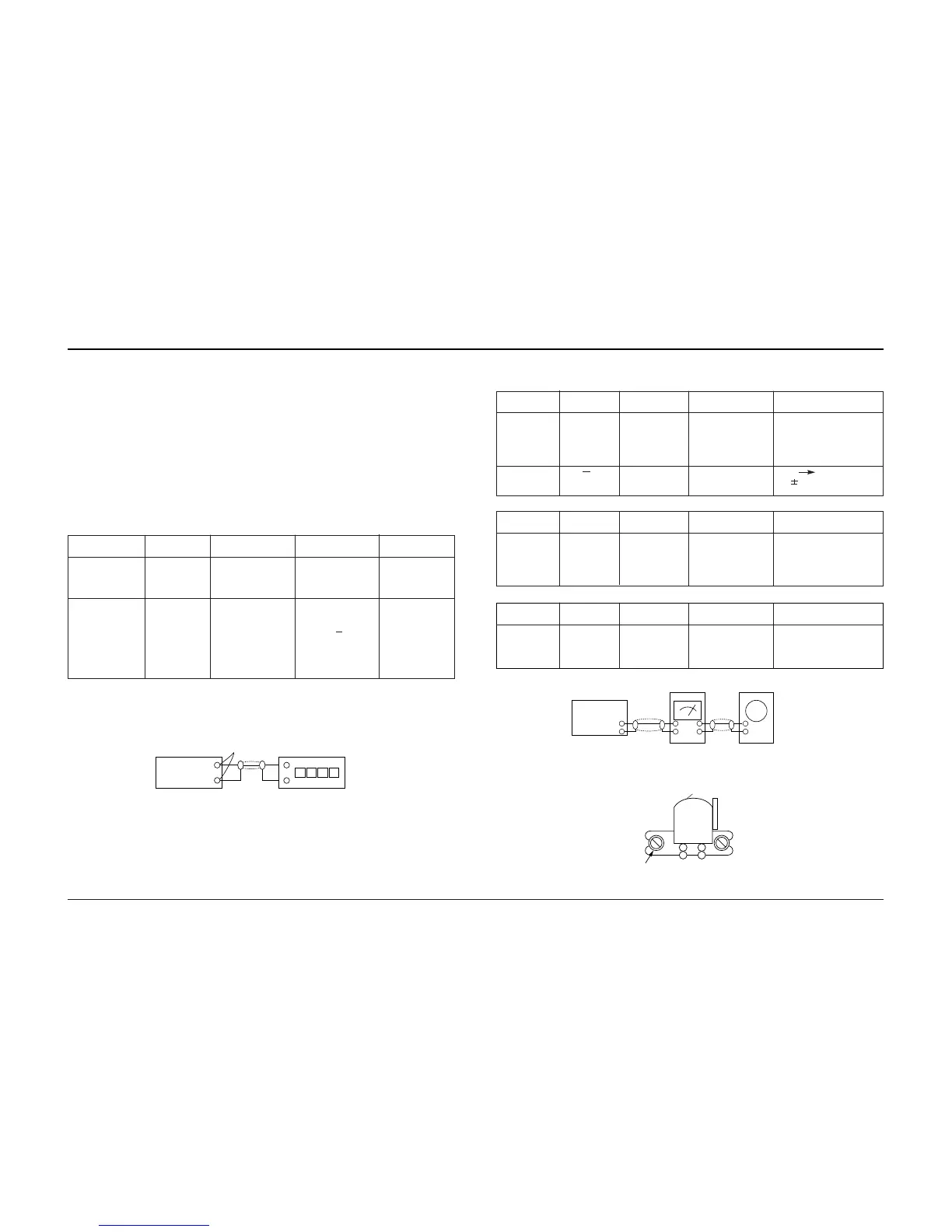
Figure 4-4
Figure 4-6
4-2 Cassette Deck
4-2-1 Test Equipment
1. Oscilloscope
2. VTVM
4-2-1(a) TAPE
1. MTT-111 (or equivalent) : Test tape on which 3KHz signal is recorded (Tape speed adjustmant)
2. MTT-5512 (or equivalent)
3. MTT-113CN (or equivalent) : Test tape on which 8KHz signal is recorded (Azimuth)
4. MTT-112B (or equivalent) : Test tape on which 1KHz signal is recorded (L.R. channel unbalance)
AZIMUTH Adjustment
Screw
REC PB Head
INSET
Frequency
Counter
Speaker
Terminal
Figure 4-5
Oscilloscope
IN
OUT
OUTPUT
Item
Connection
Preparation
Tape speed
(normal speed)
adjustment
Figure 4-4
Figure 4-4
3 KHz
5200Hz ~ 6600Hz
CVR1
JPT1
Tape speed
(high speed)
1) Insert MTT-111 to
Deck 2.
2)Press PLAY button.
1) Insert MTT-111 to
Deck 2.
2) Insert MTT-5512
to Deck1.
3) Press Hi-SPEED
button.
4) Press RECORD
button.
Remark
Adjustment Point
Samsung Electronics4-2
4-2-2 Location of Adjustment Points (Refer to page 4-1)
4-2-3 Adjustment Procedure
4-2-3(a) TAPE SPEED
4-2-3(b) AZIMUTH
1. DECK 1
2. DECK 2
Maximum output and
identical phase of L,R
channel.
Set the screw after
adjustment.
Maximum output and
identical phase of L,R
channel.
Set the screw after
adjustment.
Item
Connection
Preparation
AZIMUTH
Figure 4-5
L-CH R-CH
0.5dB
Figure 4-6
JSVR15L
L,R unbalance
Play MTT113N
in the DECK1.
Play MTT112B
in the DECK1.
Remark
Adjustment Point
Item
Connection
Preparation
AZIMUTH
Figure 4-5
Figure 4-6
Play MTT113N
in the DECK2.
Remark
Adjustment Point
3. Recording Frequency
85KHz
Item
Connection
Preparation
Bias oscillation
frequency
LL1
Record
MTT5512
in the DECK1.
Remark
Adjustment Point
Alignment and Adjustments

Related product manuals