EasyManua.ls Logo

Samsung MAX-670 - Troubleshooting; The Amp Section

Samsung MAX-670
75 pages
Print Icon
To Next Page IconTo Next Page
To Previous Page IconTo Previous Page
Loading...
Samsung Electronics 6-1
6-1 The Amp Section
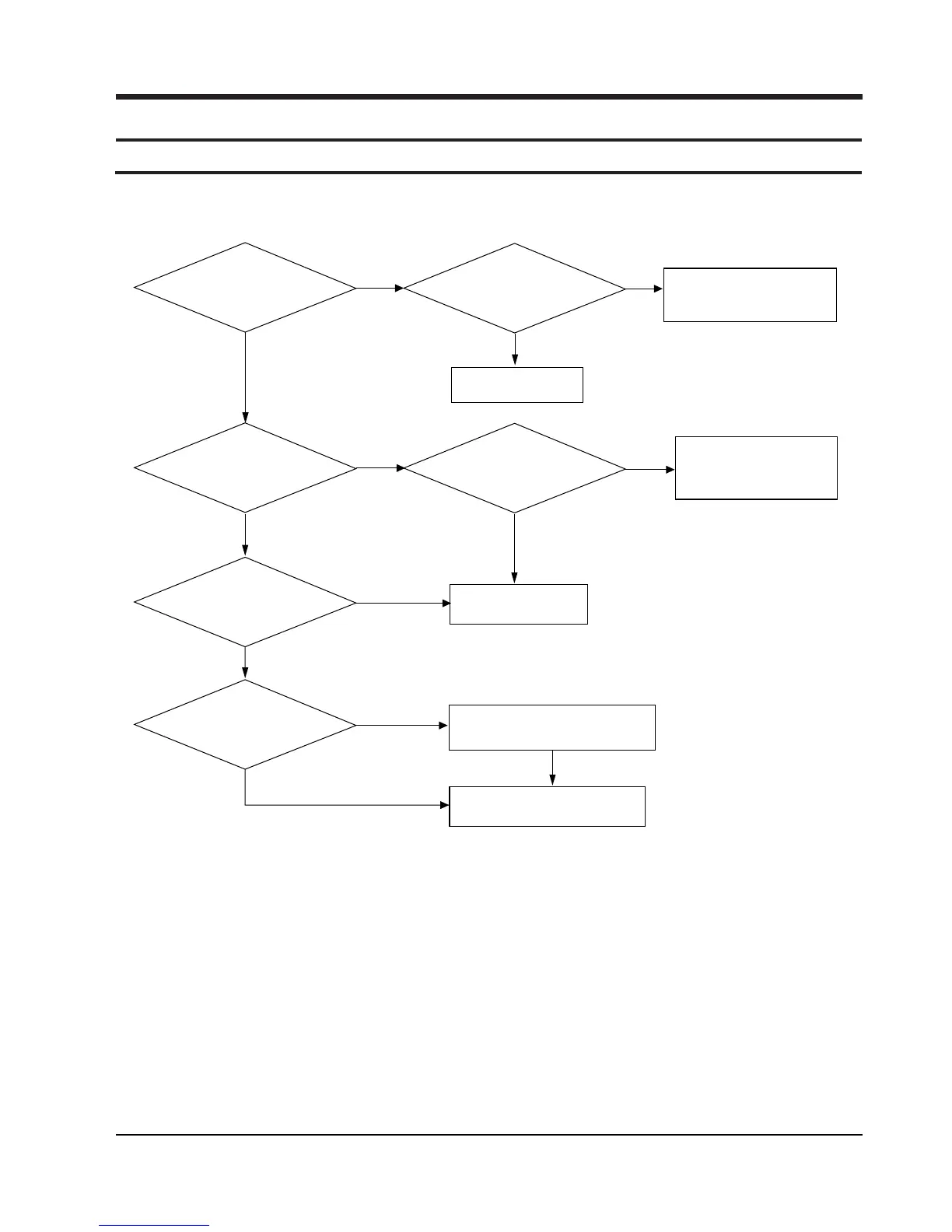
6-1-1 Power Malfunction
6. Troubleshooting
Main PCB µ-com VDD(5V)
normal?
UIC1 pin no. 18,47,90
O
Front PCB
X
Main PCB POSNS
voltage normal ?
(pin no. 28 ; 4.5V)
X
Check the Front PCB ; UQ1
Check the Main PCB ;
RD3,RZD4,PC11,PR33
PR9,PR10,PC12
Check the Power PCB ;
PIC2,PR4,3
X
RF3,4(T2A 250V)
Main PCB UIC5(78L05) IN : 8V
Input voltage normal ?
O
X
Replace UIC5
Does UX2(12MHz)
oscillate ?
O
O
At the base of
Main PCB ; PQ3
Base High Display ?
Replace µ-com
X
X
O
Front PCB,
When the power is
ON 'H', displays
at pin no.84 ? (5V)
Connect Front PCB and Main PCB &
Check the connector Main PCB
Wafer CCW2,CMW2
O
Replace µ-com
O