22
1 Preparations
1
Preparations
1.1 Checking the Contents
1.1.1 Removing the Packaging
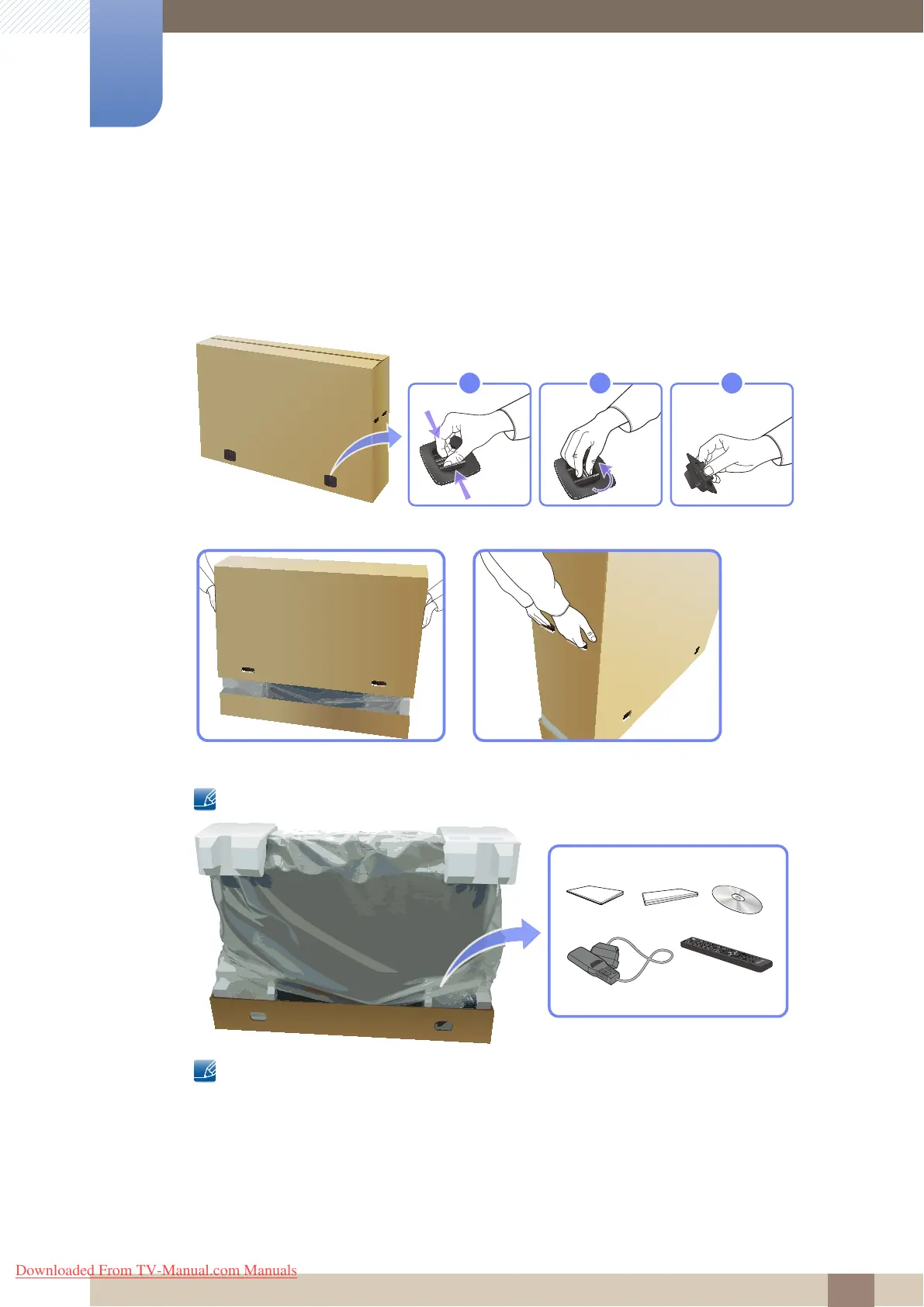
1 Remove the black locking device at the bottom of the box.
2 Using the grooves in the box, lift and remove the top of the box.
3 Check the components and remove the styrofoam and plastic bag.
The appearance of actual components may differ from the image shown.
This image is for reference only.
4 Store the box in a dry area so that it can be used when moving the product in the future.
POWER
OFF
SOURCE
GUIDE
INFO
EXIT
RETURN
T
OOLS
MENU
TTX/MIX
MagicInfo
AA59-00539A
MTS/DUAL
1
2
3
4
5
6
7
8
9
-
0
PRE-CH
.QZ
ABC
DEF
GHI
JKL
MNO
PRS
TUV
WXY
SYMBOL
ENTER
DEL -/--
MUTE
VOL
CH/P
MagicInfo
AUTO
LOCK
MDC
I-II
PC
DP
DVI
HDMI
A
B
C
D
Lite
CH LIST
Downloaded From TV-Manual.com Manuals



 To Next Page