EasyManua.ls Logo

Samsung NB28 - The BIOS Setup Screen

Samsung NB28
84 pages
Print Icon
To Next Page IconTo Next Page
To Previous Page IconTo Previous Page
Loading...
66
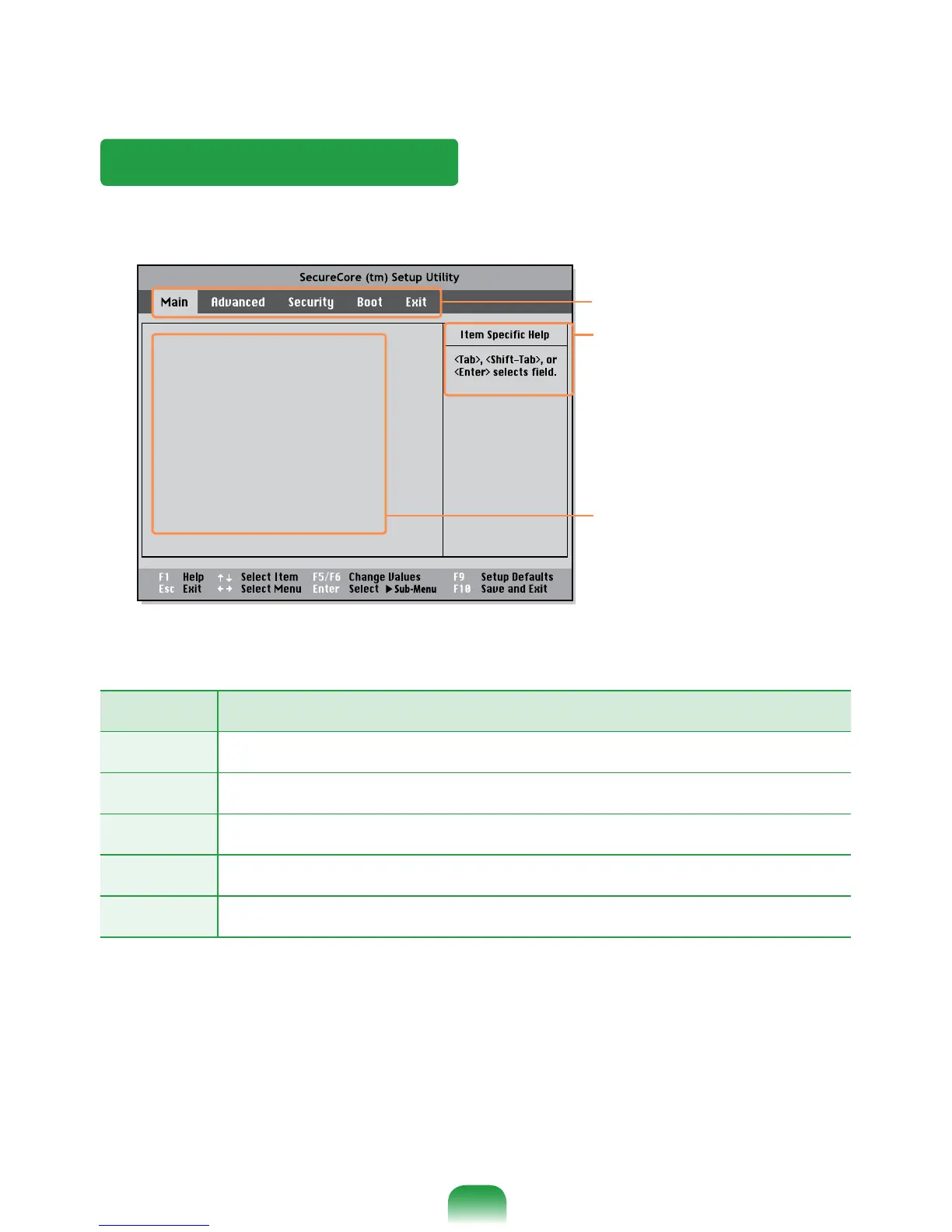
The BIOS Setup Screen
Setup Menu Description
Main
Used to change the basic system and environment settings.
Advanced
Used to congure advanced functions on your computer for devices and chipsets.
Security
Used to congure security functions, including passwords.
Boot
Used to set the boot priority and other boot options.
Exit
Used to exit the Setup either saving the changes or not.
System Time [10:21:53]
System Date [07/30/200X]
SATA Port 1 XXXXXXXX
CPU Vendor
CPU Type XXXXXXXX
CPU Speed X.XX GHz
Total Memory XXX MB
BIOS Version XXXXXXXX
MICOM Version XXXXXXXX
XXXXXXXX
Setup Menu
Setup Items
Help
Help for the selected item
appears automatically.