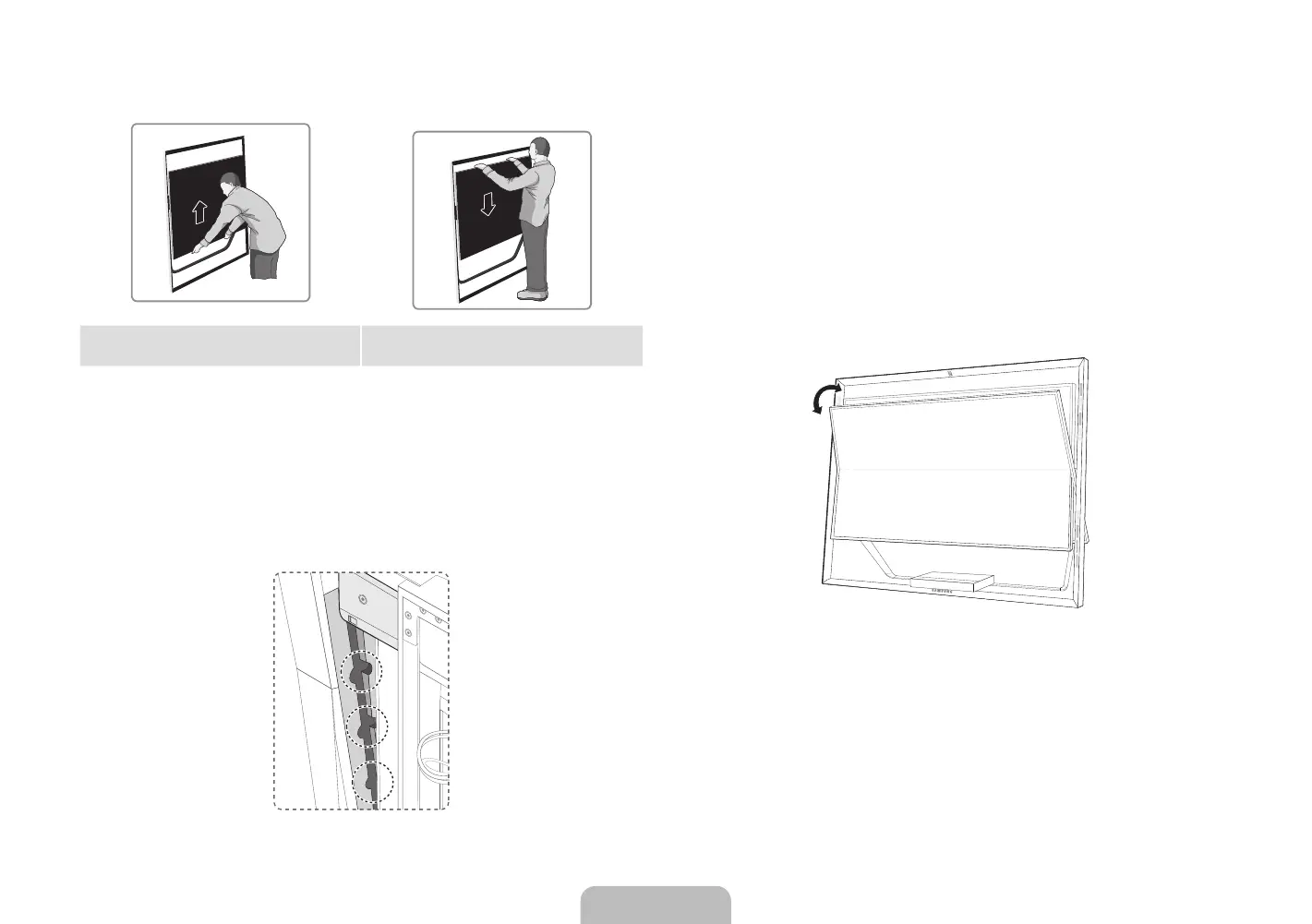
2. Refer to the diagram and adjust the height of the TV.
<Diagram 1> Pull the product up slowly while holding it
at the bottom center.
<Diagram 2> Push the product down slowly while
holding it at the top center.
[
When moving the product, make sure there are no small children
nearby. In addition, the improper handling of the product may result in
injury.
3. When adjusting the height of the TV, make sure the frame ends up in the
designated position.
4. Use the DELPHINUS (included) to tighten the locking devices attached to
the frame on both sides and secure the TV in place.
5. Grab the middle part of the top or bottom edge of the product and push or
pull to adjust the TV angle.
✎
Adjustable angles
Front angle:
• When installing the TV, the maximum height is: 2.7 ± 1.0°
• When installing the TV to the minimum height: 7.7 ± 1.0°
Rear angle: 9.5 ± 1.0°
[
When adjusting the TV angle, make sure there are no small children
nearby. In addition, the improper handling of the product may result in
injury.
English - 10 English - 11
[UN85S9AF-ZC]BN68-05182C-04L02.indb 11 2013-10-30 �� 9:56:11


 To Next Page