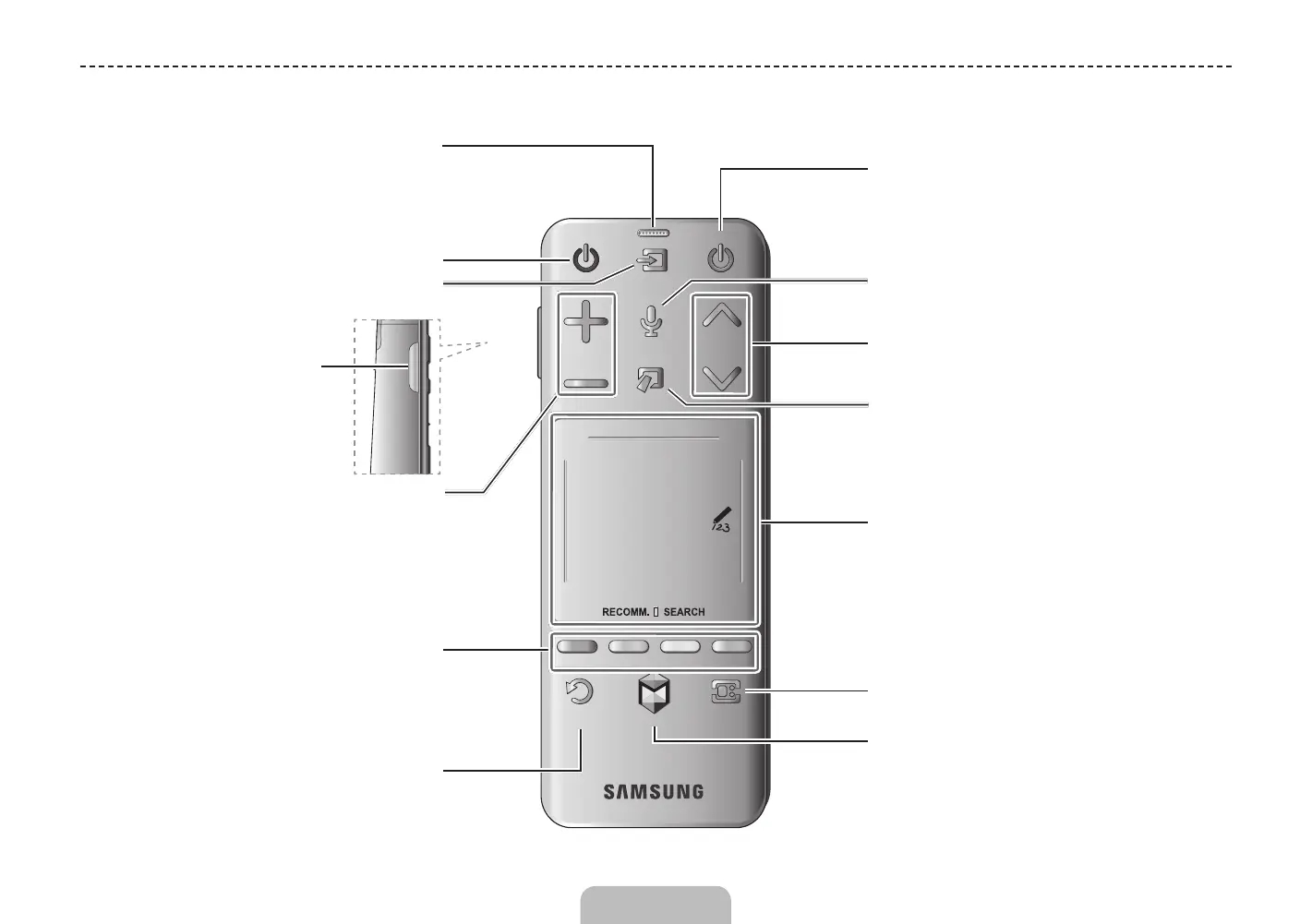
Using the Smart Touch Control
TV
MIC
STB
SOURCE
VOICE
MORE
VOL
CH
LIGHT DVR MENU 3D
SMART HUB
GUIDERETURN
EXIT
Touch Pad
• Drag on the touch pad to move the focus on
the screen.
• Press the touch pad to run, activate, or select
the highlighted item.
• Press and hold the touch pad to display the
Channel List.
VOICE: Take your voice command and enter a text
using your voice.
Displays a virtual remote panel on the screen. See
the e-Manual chapter, Controlling the TV > Using
the Virtual Remote Control.
Changes channels.
Displays the EPG
(Electronic Program Guide).
Brings up Smart Hub applications.
See the e-Manual chapter, SMART TV Features
> Smart Hub.
✎
To exit an application that is running easily,
press the
™
button.
Turn on and off the satellite or cable set-top box
connected to the TV.
For this, the Smart Touch Control must be
configured as a universal remote control. See the
e-Manual chapter, Controlling the TV > Universal
Remote Setup.
Turns the TV on and off.
Displays and selects the available video sources.
Returns to the previous menu.
LIGHT: Turn on the backlight for the buttons.
The backlight lasts for only a few seconds. Turns
the remote control light on or off. When on, the
buttons become illuminated for a moment when
pressed. (Using the remote control with this button
set to On will reduce the battery usage time.)
DVR: This button is only available when the Smart
Touch Control is configured to function as a
universal remote control to control a set-top box.
Run DVR (Digital Video Recording) in set-top box.
MENU: Opens the OSD.
3D: Turns the 3D function on or off.
See e-Manual chapter,
TV Viewing > 3D TV.
TV
MIC
STB
SOURCE
VOICE
MORE
VOL
CH
LIGHT DVR MENU 3D
SMART HUB
GUIDERETURN
EXIT
MUTE
MUTE: Cuts off the
sound temporarily.
Adjusts the volume.
Use Voice Recognition function with the
microphone embedded in remote control.
✎
The Voice Recognition function can be
affected by unclear pronunciation, voice
level, or surrounding noise.
Basic Features
English - 4 English - 5
[UN85S9AF-ZC]BN68-05182C-04L02.indb 5 2013-10-30 �� 9:56:07


 To Next Page