Samsung Electronics 5-21
Alignment and Adjustment
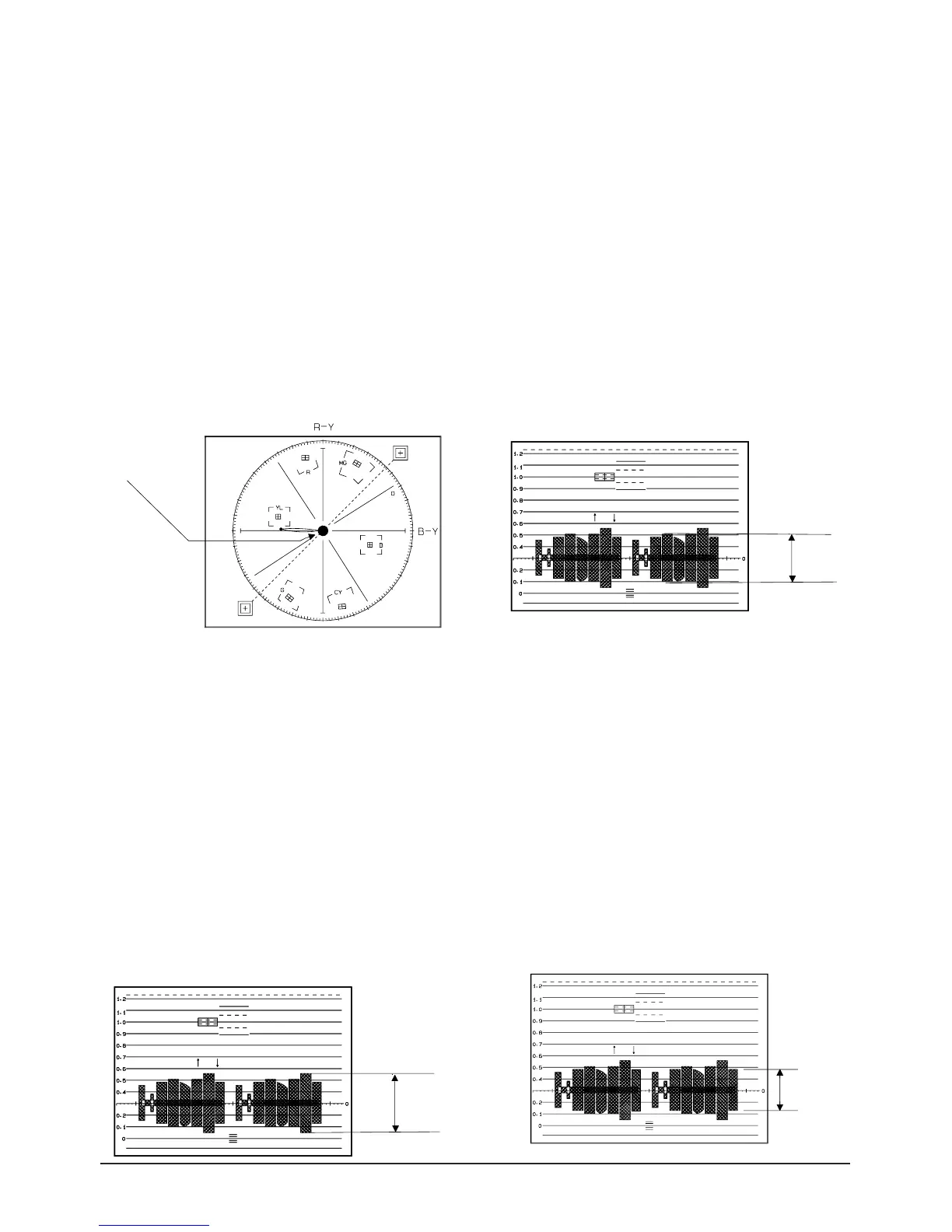
8. Pre white balance (II)
1) Camera “E-E”, 3100°K gray-scale chart.
2) Video(output) jack and AF MICOM.
4) Connect vectorscope input jack to video(out-
put) jack.
3) Press the “DATE/TIME (MODE UP)/TITLE
(MODE DOWN)” button so that the OSD state
is “138. XX XX”.
5) Aim the camera at a 3100°K gray-scale chart
illuminated at 1500 to 2000 lx.
6) Adjust the “C/RESET(DATA UP)/Z/RTN
(DATA DOWN)” button so that the white vec-
tor moves to the B-Y axial on screen of the vec-
torscope.
Note : Bright dot shifts after the confirm button is
pressed.
9 R-Y Positive Gain
1) Camera “E-E”, 3100°K color bar chart.
2) Video(output) jack and register of EEPROM.
3) Connect video(output) jack to waveform moni-
tor input jack and monitor TV jack respectively.
4) Press the “DATE/TIME(MODE UP)/TITLE
(MODE DOWN)” button so that the
OSD state is “147. XX XX”.
5) Aim the camera at a color bar chart illuminated
at 1500 to 2000 lx.
6) Adjust the “C/RESET(DATA UP)/Z/RTN
(DATA DOWN)” button so that the red level is
70IRE.
7) Be sure to press the “MENU/ENTER(CON-
FIRM)” button to memorize setting.
Note : Bright dot shifts after the confirm button is
pressed.
10. R-Y Negative Gain
1) Camera “E-E”, 3100°K color bar chart.
2) Video(output) jack and register of EEPROM.
3) Connect video(output) jack to waveform moni-
tor input jack and monitor TV jack respectively.
4) Press the “DATE/TIME(MODE UP)/TITLE
(MODE DOWN)” button so that the
OSD state is “148. XX XX”.
5) Aim the camera at a color bar chart illuminated
at 1500 to 2000 lx.
6) Adjust the “C/RESET(DATA UP)/Z/RTN
(DATA DOWN)” button so that the cyan level
is 65IRE.
7) Be sure to press the “MENU/ENTER/CON-
FIRM)” button to memorize setting.
Note : Bright dot shifts after the confirm button is
pressed.
11. B-Y Positive Gain
1) Camera “E-E”, 3100°K color bar chart.
2) Video(output) jack and register of EEPROM.
3) Connect video(output) jack to waveform moni-
tor input jack and monitor TV jack respectively.
4) Press the “DATE/TIME(MODE UP)/TITLE
(MODE DOWN)” button so that the
OSD state is “14B XX XX”.
5) Aim the camera at a color bar chart illuminated
at 1500 to 2000 lx.
6) Adjust the “C/RESET(DATA UP)/Z/RTN
(DATA DOWN)” button so that the blue level is
50IRE.
7) Be sure to press the “MENU/ENTER(CON-
FIRM)” button to memorize setting.
Note : Bright dot shifts after the confirm button is
pressed.



 To Next Page