COLOR CCD CAMERA User’s Manual
23
COLOR CCD CAMERA User’s Manual
22
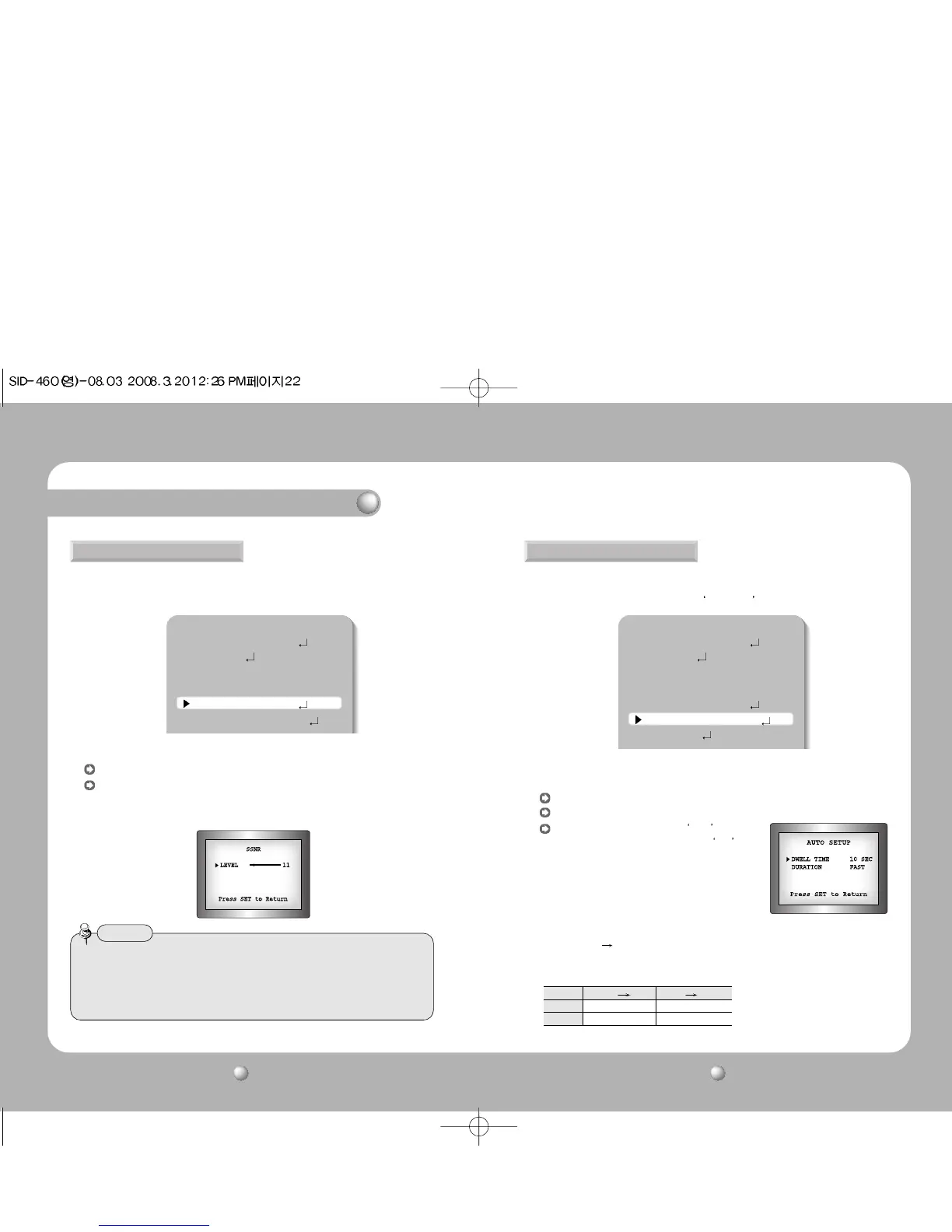
This function reduces the background noise in a low luminance environment.
1. When the SETUP menu screen is displayed, select ’SSNR’ by using the Up and Down
buttons so that the arrow indicates ’SSNR’ .
2. Select a desired mode using the Function Setup switch.
OFF : Deactivates SSNR. Noise is not reduced.
ON : Activates SSNR so that noise is reduced.
3. Set the SSNR mode to ‘ON’ and press the Function Setup switch. Then you can adjust
the noise reduction level.
• You cannot set the SSNR to ‘ON’ or ‘OFF’ when the AGC mode of the EXPOSURE menu
is ‘OFF’.
• When adjusting the noise reduction level of the SSNR mode, remember that the higher
the level set, the more the noise level will be reduced but that after image may also
occur.
Notes
You can display pictures in color or black and white.
1. When the SETUP menu screen is displayed, select ‘DAY/NIGHT’ by using the Function
Setup switch so that the arrow indicates
DAY/NIGHT .
2. Select a desired mode using the Function Setup switch according to the picture display
you want.
COLOR : The picture is always displayed in color.
B/W : The picture is always displayed in black and white.
AUTO : The mode is switched to Color in a normal
environment, but switches to
B/W mode
when ambient illumination is low. To set up
the switching time or speed for AUTO mode,
press the Function Setup switch.
SSNR DAY/NIGHT
MAIN SETUP
1.LENS DC
2.EXPOSURE
3.WHITE BAL ATW
4.BACKLIGHT OFF
5.SSNR ON
6.DAY/NIGHT AUTO
MAIN SETUP
1.LENS DC
2.EXPOSURE
3.WHITE BAL ATW
4.BACKLIGHT OFF
5.SSNR ON
6.DAY/NIGHT AUTO
7.IMAGE ADJ
Operating Your Camera
Color B/W B/W Color
Fast 2.5 lux 4 lux
Slow 0.8 lux 6 lux
* The brightness of illumination is changeable
by installed environment.
- DWELL TIME : You can select the duration time about changing the day/night mode.
5s, 7s, 10s, 15s, 20s, 30s, 40s, 50s, 60s
- DURATION : You can select brightness of illumination about changing the
day/night mode.



 To Next Page