
 Need help?
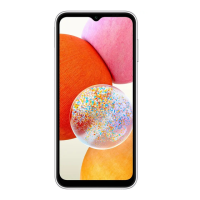
Do you have a question about the Samsung SM-A145F and is the answer not in the manual?
Identifies physical components like buttons, ports, and screen elements.
Explains wired and quick charging methods, plus battery saving tips.
Instructions for inserting and managing SIM and microSD cards.
Guide on turning the device on/off and initial configuration steps.
Signing in, creating, and managing your Samsung account for services.
Methods for transferring data from previous devices using Smart Switch.
Explains basic touch interactions like tapping, dragging, and swiping.
How to navigate and customize Home and Apps screens for app access.
Setting up screen lock methods and understanding basic security features.
How to take screenshots and manage device notifications and quick settings.
Keyboard layout, input languages, and text input methods for typing.
Downloading, installing, and uninstalling applications from stores.
Making, receiving, blocking calls, and managing call options during conversations.
Adding, searching, sharing, and organizing contacts for communication.
Sending, viewing, and managing text and voice messages for communication.
Taking photos, recording videos, and exploring various camera modes and settings.
Browsing, editing, and organizing photos and videos in the Gallery.
Utilizing AR features, creating AR emojis, and Deco Pic for fun content.
Running multiple apps simultaneously in split or pop-up views for productivity.
Using Samsung Internet for web access and Samsung Health for wellness.
Using Samsung Notes, Calendar, Reminder, Voice Recorder, Clock, Calculator.
Managing smart devices and sharing files via Quick Share.
Introduction to essential Google applications pre-installed on the device.
Managing Samsung account and network connection options like Wi-Fi.
Connecting to wireless networks and pairing Bluetooth devices.
Managing mobile data, sharing connection, and other network settings.
Managing external devices and setting up custom modes and routines.
Customizing audio feedback, vibration patterns, and alert settings.
Adjusting screen brightness, theme, font, and Home screen layout.
Setting up screen locks, fingerprint, and face recognition for security.
Enabling special device features and improving accessibility options.
Monitoring usage, optimizing performance, and managing battery health.
Managing apps, languages, and general system configurations.
Updating device software and obtaining remote assistance for issues.
Viewing device status, legal information, and software details.
General safety guidelines and important notices for proper device operation.
Causes and remedies for device overheating during use or charging.
Solutions for device problems, error messages, and connectivity issues.
Addressing battery charging, depletion, and network quality problems.
Tips on storage, battery removal, and data safety.
 General
| Category | Cell Phone |
|---|---|
| Processor | Octa-core |
| RAM | 4GB |
| Internal Storage | 64GB |
| Operating System | Android 13, One UI Core 5 |
| Network | GSM / HSPA / LTE |
| USB | USB Type-C 2.0 |
| Model | Samsung SM-A145F |
| GPU | Mali-G52 |
| Expandable Storage | microSDXC |
| Battery | 5000 mAh |
| SIM | Dual SIM (Nano-SIM, dual stand-by) |
| Bluetooth | 5.0, A2DP, LE |
| Main Camera | 50 MP, f/1.8, (wide), PDAF 2 MP, f/2.4, (macro) |


 To Next Page