
 Need help?
Do you have a question about the Samsung SM-A146U1/DS and is the answer not in the manual?
Important introductory information and precautions for safe and proper device use.
Discusses causes and solutions for the device overheating during charging and use.
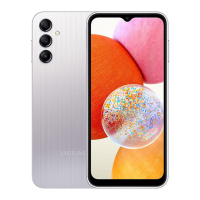
Details the physical components and basic operational functions of the device.
Explains the function and usage of the device's physical buttons.
Describes the on-screen navigation buttons and their functions.
Provides instructions and safety precautions for charging the device's battery.
Offers tips and features to conserve battery power on the device.
Guide on inserting and managing SIM or USIM cards in the device.
Details settings for managing multiple SIM cards in dual SIM devices.
Instructions for installing and managing microSD memory cards.
Procedure for safely unmounting, removing, and formatting the memory card.
Instructions on how to power the device on, turn it off, and perform a restart.
Explains how to activate and use emergency mode for battery conservation.
Guidance on the initial setup process when turning on the device for the first time.
Instructions for signing in and managing your Samsung account.
Steps to recover forgotten Samsung account ID or password.
Procedure for signing out of the Samsung account and its implications.
Guide to using Smart Switch for transferring data from an old device.
Explains touchscreen gestures for interacting with the device.
Details the function of the on-screen navigation buttons (Recents, Home, Back).
Describes the Home screen and Apps screen, and how to switch between them.
Instructions for customizing the Home screen with wallpapers, widgets, and panels.
Guide to configuring the device to show all apps directly on the Home screen.
How to use the Finder feature to search for content on the device.
Instructions for rearranging apps and shortcuts on the Home and Apps screens.
Steps to organize apps into folders for easier access.
How to use and customize the Edge panels for quick access to apps and features.
Information about locking and unlocking the device screen.
Explanation of common icons displayed on the status bar.
How to take screenshots and use the toolbar options.
How to access and use the notification panel and quick setting buttons.
Using the Media feature to control music and video playback.
Managing connected devices and SmartThings scenes from the notification panel.
Guide to keyboard layout, changing input language, and keyboard types.
Explains various functions available on the keyboard, like emojis and voice input.
Instructions on how to copy and paste text on the device.
Steps to download, install, and remove apps from the Galaxy Store and Play Store.
How to manage app permissions for device security and functionality.
Introduction to making and receiving voice and video calls.
How to initiate calls using call logs and the contacts list.
Instructions for setting up and using speed dial numbers.
Guide to making calls to international numbers.
How to answer or reject incoming calls.
Steps to block unwanted calls from specific numbers or unknown callers.
Details on features like adding calls, recording, muting, and using speakerphone.
Guide to creating, importing, and managing contacts on the device.
How to find contacts using search criteria and initiate calls or messages.
Steps to remove individual or multiple contacts from the device.
How to share contact information with others.
Guide to organizing contacts into groups.
How to streamline the contacts list by merging duplicate entries.
Instructions for sending, viewing, and sorting text messages.
Procedure for removing individual messages from the device.
How to customize message notification and blocking settings.
Guide to browsing the web, bookmarking, and managing tabs.
How to activate and use secret mode for private browsing and data.
Introduction to taking pictures and recording videos.
Steps for capturing photos, adjusting focus, and brightness.
How to use zoom functionality with the camera for different shots.
Procedure to lock focus and exposure for consistent camera shots.
How to use the physical camera button for shooting photos and videos.
Details on flash, timer, aspect ratio, and frame rate settings.
Using automatic settings for capturing pictures in various environments.
How to use the Scene optimizer for enhanced photo quality.
Instructions for taking self-portraits using the front camera.
How to enhance photos with filters and beauty adjustments.
Guide to recording videos with automatic adjustments for different scenes.
How to take photos with a blurred background and sharp subject.
Manual camera controls for exposure, ISO, white balance, and focus.
How to lock focus and exposure separately on the camera preview.
Instructions for capturing wide-angle scenes using panorama mode.
How to enhance food photos with vibrant colours and background blur.
Tips for taking clear photos in low-light conditions.
Guide to recording and editing videos in slow motion.
How to record fast-motion videos of moving scenes.
Using stickers to capture pictures or videos.
Overview of intelligent features, picture settings, and video options.
Details on Auto HDR, grid lines, location tags, shooting methods, and watermarks.
Introduction to viewing and managing images and videos.
How to view, modify, and share images in the Gallery app.
Steps to crop and save specific areas of images.
How to play videos, control playback, and configure caption settings.
Guide to creating and organizing albums for images and videos.
How to create stories from captured images and videos.
Procedure for removing images, videos, or stories from the device.
How to manage deleted files in the recycle bin.
Introduction to running multiple apps simultaneously in split or pop-up view.
Instructions for launching apps in split screen mode.
How to launch apps in split screen view from the Edge panel.
Creating pairs of apps for quick launch in split screen view.
How to resize split screen windows.
Instructions for launching apps in pop-up view.
How to launch apps in pop-up view from the Edge panel.
How to reposition pop-up windows on the screen.
Guide to creating, editing, and deleting notes.
Details on support services, community features, and tips.
Accessing product information and the Samsung website.
How to manage schedules, create events, and sync with accounts.
Instructions for setting, completing, and restoring reminders.
How to record, pause, bookmark, and save voice recordings.
Managing files and storage on the device.
Setting alarms, checking time, timing events, and durations.
Performing calculations, viewing history, and using unit conversion.
Gathering and managing games for easy access and game mode.
How to share content using various methods, including Quick Share.
Information about the Samsung Global Goals initiative.
Overview of Google apps like Chrome, Gmail, Maps, YouTube, etc.
Overview of customizing device settings and searching for specific settings.
Settings for Wi-Fi, Bluetooth, NFC, mobile networks, and more.
How to connect to Wi-Fi networks, share passwords, and use Wi-Fi Direct.
Guide to pairing devices, sending/receiving data via Bluetooth.
How to use NFC for reading tags and making contactless payments.
How to reduce mobile data usage by limiting background app activity.
Configure apps to use mobile data even when connected to Wi-Fi.
How to share the device's mobile data connection with other devices.
Settings for nearby device scanning, printing, VPN, private DNS, and Ethernet.
How to configure printer plug-ins and print content from the device.
Customize sound modes, ringtones, notification sounds, and vibration settings.
Adjusting sound quality with Dolby Atmos for audio and gaming.
Manage notification pop-up styles, recent notifications, and do not disturb settings.
Customize display settings like dark mode, brightness, motion smoothness, and font size.
Adjust screen refresh rate for smoother scrolling or battery saving.
How to change the wallpaper for the Home and lock screens.
Apply themes to change the device's visual elements.
Configure settings for the Home screen layout and appearance.
Information about locking and unlocking the device screen.
Set the device to unlock automatically based on trusted locations or devices.
Options for securing the device with face recognition, fingerprints, and updates.
How to register and use face recognition for unlocking the device.
Steps to activate and use face unlock.
How to remove registered face data.
How to register and use fingerprints for device security and unlocking.
Tips for improving fingerprint recognition performance.
Step-by-step guide to registering fingerprints on the device.
How to activate and use fingerprint unlock.
Procedure to remove registered fingerprint data.
Settings for permission manager, Samsung, and Google privacy configurations.
Manage location permissions, accuracy, and recent requests.
Configure settings for various Google services on the device.
Sync, back up, and restore data using Samsung Cloud, Google Drive, and Smart Switch.
How to back up and restore device data using Samsung Cloud.
Steps to restore backed-up data from Samsung Cloud to the device.
Activate and configure advanced features like Android Auto, Side key, and motions.
How to install and use a second instance of messenger apps.
Configure the device to send help messages via the Side key.
Activate and configure motion-based features like double tap and gestures.
Manage device usage, set screen time goals, and enable parental controls.
Overview of device status and quick optimization features.
How to manually and automatically optimize device performance.
Check battery status, activate power saving, and manage background usage.
Check device storage status and delete files or uninstall apps.
Manage device memory by stopping background apps.
Scan the device for malware and check security status.
Reduce mobile data usage with data compression and background app limits.
Manage app settings, usage, notifications, and permissions.
Customize system settings like language, text-to-speech, and date/time.
How to add and set new languages for the device.
Configure settings to improve device accessibility for all users.
How to check for, download, and install software updates.
How to get technical help through the remote support service.
View device information such as status, legal, software, and battery details.
Solutions for common issues like password prompts, network errors, and device not turning on.
Troubleshooting steps for unresponsive or slow touchscreen performance.
Solutions for device freezes, hangs, or fatal errors.
Troubleshooting steps when calls cannot be made or received.
Troubleshooting steps when the other party cannot hear you during a call.
Troubleshooting for poor network connectivity or audio quality.
Troubleshooting steps if the battery is not charging correctly.
Explanation of why battery life may decrease over time or with usage.
Troubleshooting steps for camera app errors related to memory or battery.
Factors affecting picture quality and how to improve it.
Troubleshooting steps for issues with opening or playing multimedia files.
Troubleshooting steps for Bluetooth connection or performance issues.
How to fix the missing screen brightness control in the notification panel.
Troubleshooting steps for device connection issues with a computer.
Troubleshooting steps for GPS or location finding issues.
Importance of backups and Samsung's disclaimer for data loss.
Explanation of manufacturing gaps and potential part movement.
Tips to free up storage space by deleting data or apps.
How to make the Home button visible if it disappears.
Safety warnings and instructions regarding battery removal.
 General
| Model | SM-A146U1/DS |
|---|---|
| Network Technology | GSM / HSPA / LTE / 5G |
| Build | Glass front, plastic back, plastic frame |
| Resolution | 1080 x 2408 pixels, 20:9 ratio (~400 ppi density) |
| RAM | 4GB, 6GB |
| Internal Storage | 64GB, 128GB |
| Main Camera | 50 MP, f/1.8, (wide), PDAF |
| Macro Camera | 2 MP, f/2.4 |
| Depth Camera | 2 MP, f/2.4 |
| Features | LED flash, panorama, HDR |
| Video | 1080p@30fps |
| Selfie Camera | 13 MP, f/2.0, (wide) |
| Loudspeaker | Yes |
| 3.5mm jack | Yes |
| WLAN | Wi-Fi 802.11 a/b/g/n/ac, dual-band, Wi-Fi Direct |
| USB | USB Type-C 2.0 |
| Sensors | Fingerprint (side-mounted), accelerometer, gyro, proximity, compass |
| Battery | Li-Po 5000 mAh, non-removable |
| SIM | Dual SIM (Nano-SIM, dual stand-by) |
| Type | PLS LCD |
| Size | 6.6 inches, 104.9 cm2 |
| OS | Android 13, One UI Core 5 |
| Bluetooth | A2DP, LE |
| Positioning | GPS, GLONASS, GALILEO, BDS |
| NFC | Yes |
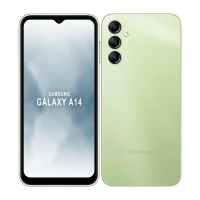
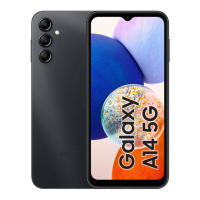
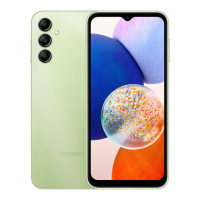
| Colors | Black, Light Green |


 To Next Page