English - 33
OPERATING
CHANGING THE WATER
FILTER
Toreducetheriskwaterdamagetoyour
propertyDONOTusegenericbrandsof
waterltersinyourSAMSUNG
Refrigerator.
USEONLYSAMSUNGBRAND
WATERFILTERS.SAMSUNGisnot
legallyresponsibleforanydamage,
including,butnotlimitedto,property
damagecausedbywaterleakage
fromtheuseofagenericwaterlter.SAMSUNG
RefrigeratorsaredesignedtoworkONLYWITH
SAMSUNGWaterFilters.
TheFilterlightturnsredtoletyouknowwhenitis
timetochangeyourwaterltercartridge.
Togiveyoutimetogetanewlter,theredlight
comesonjustbeforethecapacityofthecurrent
lterrunsout.Changingthelterontimeprovides
youwiththefreshest,cleanestwaterfromyour
refrigerator.
Tochangethewaterlter,followthesesteps:
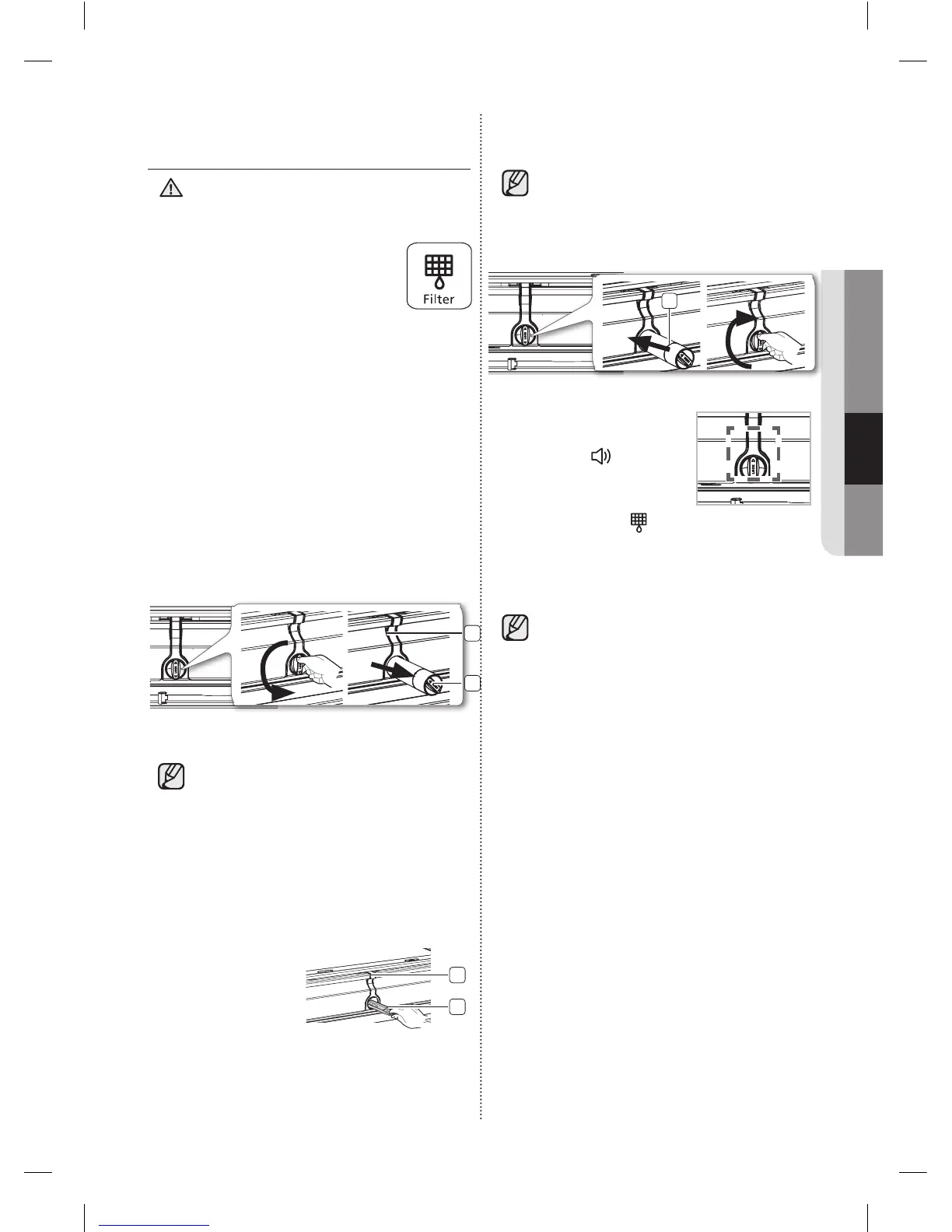
1. Shutoffthewatersupply.Then,turnthewater
lter(1)about1/4turn,counter-clockwise.
2
1
2. Pullthewaterlter(1)fromthecaselter(2).
• Tochangethewaterltermoreeasily,
shutoffthewatersupplyvalve.
• Sometimes,itishardtodisassemblethewater
lterbecauseimpuritiesinthewatercauseit
tostick.Ifyouarehavingdifculties,gripthe
waterlterrmlyandpullithard.
• Whenyoupullthewaterlter,alittlewater
canleakfromtheopening.Thisisnormal.
Tominimizethewaterleaks,keepthelter
cartridgehorizontalwhenyoupullit.
• Toprevent
overow,empty
thewaterlter
tray(3)anddry
aroundthelter
case(2).
3
2
WARNING
(Red)
3. Insertthenewlterintotheltercase(4).
4. Pushthelter,andthenturnitclockwiseuntil
itlocks.
• Ifyouhavetroubleinsertingthewater
lterbecauseofhighwaterpressure,
shutoffthewatersupplyvalve.
• Thelockedsymbolshouldbelinedup
withtheindicatorline.
4
5. Touchthe“Alarm/hold
3 sec for Filter Reset”
button(
(Filter Reset)
)for
about3secondstoreset
thewaterlter.Thecolor
oftheindicator( )
changesfromredtooff.
6. Ifyouturnedoffthewatersupply,turnitback
on.
Forareplacementwaterlter,youcanvisit
yourlocalhomeImprovementcenteror
contacttheSamsungPartsdistributor.
Toordermorewaterltercartridges,
contactyourauthorizedSamsungdealer.
Besurethereplacementwaterlterhas
theSAMSUNGlogoontheboxandonthe
waterlter.
DA68-02915A-11.indd 33 2015. 5. 8. �� 8:52













 To Next Page